Workflow - ordering/arranging tools
Logged
Hi.
Regarding to this topic
https://support.captureone.com/hc/en-us/community/posts/360009899297-To-add-tools-to-empty-layer
We have tools that are used only once like e.g. lens correction, keystoning.
Next we have special layers which don't use any tools like heal and clone stamp layers.
All tools are visible - grayed out, but visible.
IMHO some tools should be visible at some stages of the work so as not to clutter your work order with visibility of this tools
Darek K
-

Hi Darek,
Thank you for your post.
In Capture One, the interface is highly customizable, so it is possible to drag tools between the tool tabs and create new ones as well. You can also create custom tool tabs and place the rarely used tools in there. For local adjustments when working with Layers, add the Local Adjustments tool tab with the tools that can be used on Layers. You can also create separate workspaces with a different arrangement of tools and tool tabs, and then save those (Window -> Save Workspace).
Thanks,
Lily
0 -
That's a bad UX you propose. I am against this request. (and looking at the votes I'm not the only one).
What you ask for means that the layout of the tool tabs would constantly switch e.g. when switching between a heal and an adjustment layer.
Awful stress to the eyes and brain! As the remaining tools (visible) don't stay at their place if others go invisible.
I'd rather have the same tool layout at their usual place all the time and see only the color of the sliders going grey (disabled), as it is now, than always making tools invisible and flipping around the enabled ones.
And btw., what makes you believe the tools you only use once are only used once by others?
1 -
Thanks BeO for Your voice.
0 -
One more time...
Thanks BeO for Your voice, not only + or -.
Look at Paul Reiffer videos.
How many times he uses lens corections and e.g. Keystoning, leveling ? Only one time, at begining of work with photo.
Thank You.
Darek K
0 -
Hi Darek, I think everyone's workflow is slightly or even drastically different (and maybe even differs for different images), that makes it difficult to define a "hard-coded" choice of tools which "should" only be used once during an image edit, without upsetting those users for who it does not fit.
But UX design is definitely not easy especially if an appliation has an existing user base, and at the same time users with other experiences from other apps enter the scence.
Ask 5 users and you get something between 0 and 8 opinions.
cheers
BeO
1 -

Darek,
People can make their own workspaces complete with their own choices of which tabs and tools they expect to use.
Remember that 's videos he is working on other people's files and seeking to show as many steps as he feels are necessary to demonstrate a possible editing sequence. All in a limited period of time.
I like what he does, the way he presents it and the result he achieves with relatively little effort. This last point is what attracted me to C1 a long time ago even when half the features it offers today did not exist.
However, I would be willing to take a bet (and I am not someone who gambles) that in many cases when working with his own regularly used equipment on his own projects, he may well have specific defaults applied to perform a lot of the regular changes - lens correction for example - on import or as a first step afterwards in certain circumstances. Many people do.
And I would also expect that for a final selection image there will often be somewhat more activity and revisiting of tools deployed before he would consider it to be completed.
There is absolutely nothing stopping us as user from creating our own version of tool tabs in whatever groupings we want to use. Different tab sets for different purposes. Even completely different Workspace definitions as Lily had observed.
My feeling is that that is a complicated as it needs to be. Anything more and the application starts to get in the way of doing the work it is intended to do - unless one is extremely careful.
0 -
Sorry.
My english is so bad to understand all Your voices.
But I totally agree - You totally disagree with me.
It was my only imHo.
Thank You very much. Greetings.
Darek K
0 -
Darek,
Let me propose something which might work for you:
Hide the tools, hide the browser, in menu "Window" "Create floaing tool" - "Layers" then save the workspace under a name " "Heal and clone".
You can customize a workspace button here:
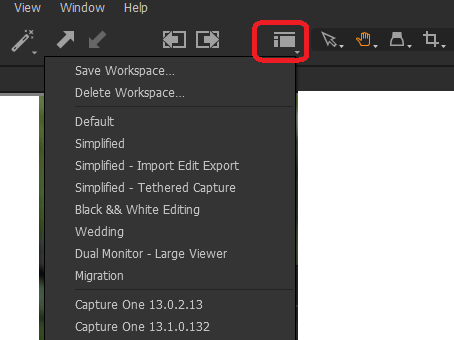
If you switch to this new workspace you only see the Layers tool and can do your healing and cloning without being disturbed by other tools.
Or, you can customize a tool tab with just the layers:
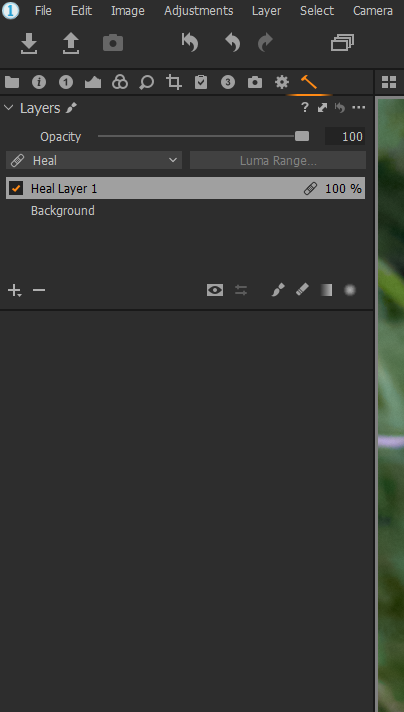
You got the idea I think.
Regards,
BeO0

Post ist für Kommentare geschlossen.
Kommentare
8 Kommentare