Why C1 is not able to see which photos were already imported and not to import them again ?

I wonder why such an elementary function was not added to C1 yet ?? Even the amateurish Apple Photos are able to tell during the import which photos were already imported before and which not. But having C1 catalogue and importing photos several times, you can have the same photos imported again and again and thus have multiply identical photos - which is really a bit annoying and not sophisticated at all ...
Normally there should be at least the option - import only new photos (that were not imported yet)

-

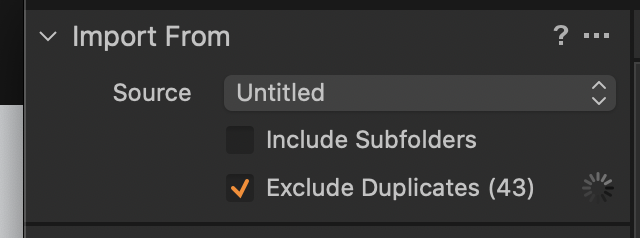
In the window with the settings for import, in the upper left corner, section "import from" did you check "Exclude Duplicates"?
0 -
This seems to work a bit strange. When selected , it goes photo by photo by the speed 1-2 sec per photo. If you have 200-300 photos on the SD card, you can go for a small trip before it analyses all ... Why Photos make it in few moments ?
 0
0 -

@ jj kk
I have never had any problems with this, with the "Exclude Duplicates" option checked. It's fast and effective (unlike my experiencs with LightRoom ...)
0 -

i understand you are working with a catalog and want to add new photos to a folder already referenced in the catalog? Then there is an alternative way to import them: Copy the photos from the memory card into the corresponding folder using the Finder, then go to the library in C1 and right-click on the folder and select Synchronize from the context menu (at least in the Windows version), this will just import the new photos into the folder / catalog and this goes fast.
Finally a basic note: You complain about C1 in several posts, originally it was even completely useless for you. At least a part of the postings seem to come from ignorance about how to use C1. I would recommend you: RTFM (read the fucking manual) and watch the many videos that are offered in the Learning Hub on the website and on the official YouTube channel. I am far from saying C1 is flawless and perfect, but there is more to it than some people think. You just have to learn it, it works differently than e.g. the mass product Lightroom.
0 -
Let me try to summarize my understanding:
- You complain that CO would not be able exclude images which were already imported
- After getting to know that it is possible, you complain about the speed for checking concerning duplicates
What I did not get from your statements so far is:
- Do you use a catalog (with embedded images) or a session?
- Where are the (imported) images stored?
- Why don't you delete the imported images from your memory card?
All in all: I wonder why do you complain in a user forum? A (detailed) feature request to CO might be more effective,
0 -

Normally, if you import a file with the same "Out of camera" name to the same folder you would get a number suffix for it.
Here there is no suffix. So presumably the file has been imported, unchecked for duplicates, to (or at if simply a referenced file.) a different location.
Was that an accident or simply a misunderstanding of the way things work?
0 -
My requirement is just simple - I import photos from the card to one catalogue and make more photos later or the next day and want to import again. And I may not remember which photos were already imported before and which are new. So I would expect that similarly like Apple Photos, C1 would easily say - these photos were already imported in these catalogue. But C1 just imports them again and one has the same photos several times in the catalogue which is just weird.
"Exclude duplicates" works just strange and not doing what is required - it just slowly goes photo by photo and the result are few photos remaining that were actually already imported ...0 -
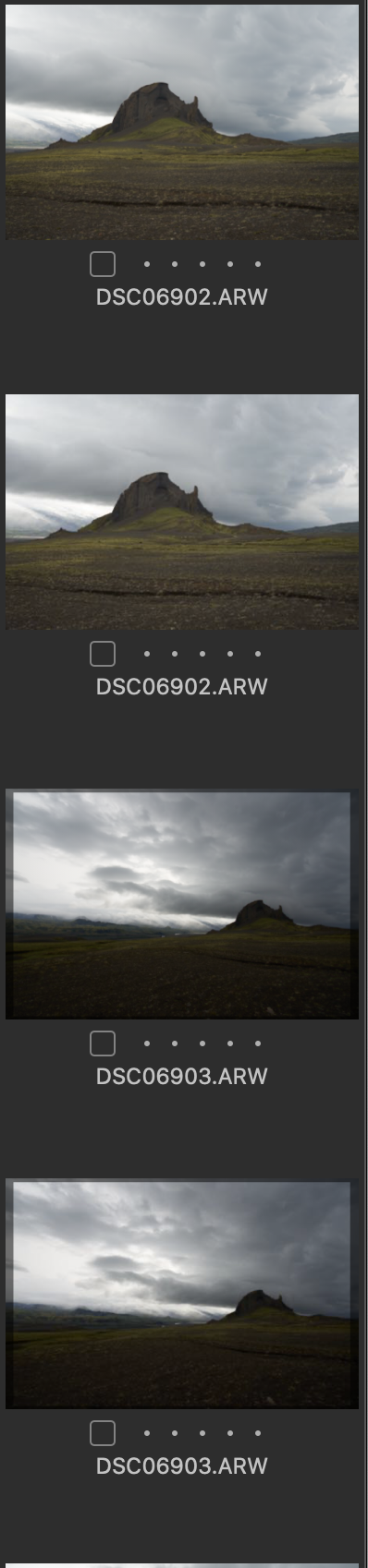
Like just now again - I was not sure which photos were from yesterday and which from today and C1 just duplicated the same photos twice in the same catalogue. This is really a bit non sophisticated ... such a SIMPLE thing.
 0
0 -
It is still not clear to me if there is or is not an option to automatically import only new photos in the catalogue. Checking "Exclude duplicates" option does not work at all - it just slowly reduces the content to few photos and strangely enough to those that were already imported.
What would be just natural - if selecting photos to import, C1 should just tell "out of them, these photos were already imported before", as simply as for example Apple Photos do. So far it results in duplicates.
0 -
The problem may be in the definition of "duplicate". A duplicate is 2 identical files. If you are firing a burst each shot prodices a unique file even if the image captured is the same.
0 -
No "burst" etc. There is a catalogue, we are on the move, importing photos from SD cards now and then, sometimes not sure which ones were already imported the last and C1 makes identical photos to be twice in the list (double imported) instead of telling "these photos are already imported in the catalogue". So I still wonder if it is not capable of this essential behaviour or I am missing something. As I said - checking "exclude duplicates" does not work in this case (it probably means duplicates on the card, not in the catalogue - that is not very helpful).
Lightroom has even more sophisticated behaviour than Photos in this regard: when you want to import photos in the catalogue and open the card/folder etc., you will not see photos already imported into that calatogue at all !0 -
It's maybe not what you want but it's entirely logical - you are importing from a card and what's on the card therefore establishes the reference point for what constitures a duplicate.
Or, as the saying goes, CaptureOne is doing "what it says on the tin". If you don't like it and it matters all that much to you, choose a different tin!
0 -
What does Capture One support say about your issue? What you describe doesn't match Capture One's support article on the subject. See https://support.captureone.com/hc/en-us/articles/360002492617-Importing-images-into-a-Catalog#h_01EC54CNVMX88T5ZN27DW88DV9 especially the section titled "Excluding duplicate files on import". That makes me think this is something support should look at.
0 -

The same thing is happening to me. "Exclude duplicates" will import tons of duplicates, and sometimes excludes new photos. This feature seems broken.
0 -

Hi Adam, make sure you have version 13.1.4 of Capture One 20
https://www.captureone.com/en/account/download/previousAlso, make sure your setup is supported.
Check the table on the link to see which versions of Capture One are compatible with your operating system version. https://support.captureone.com/hc/en-us/articles/360004526177-Which-Capture-One-version-should-I-choose-
0
Post ist für Kommentare geschlossen.
Kommentare
15 Kommentare