RGB Curves / Less blue results in a green cast instead of a yelow cast?

Dear All,
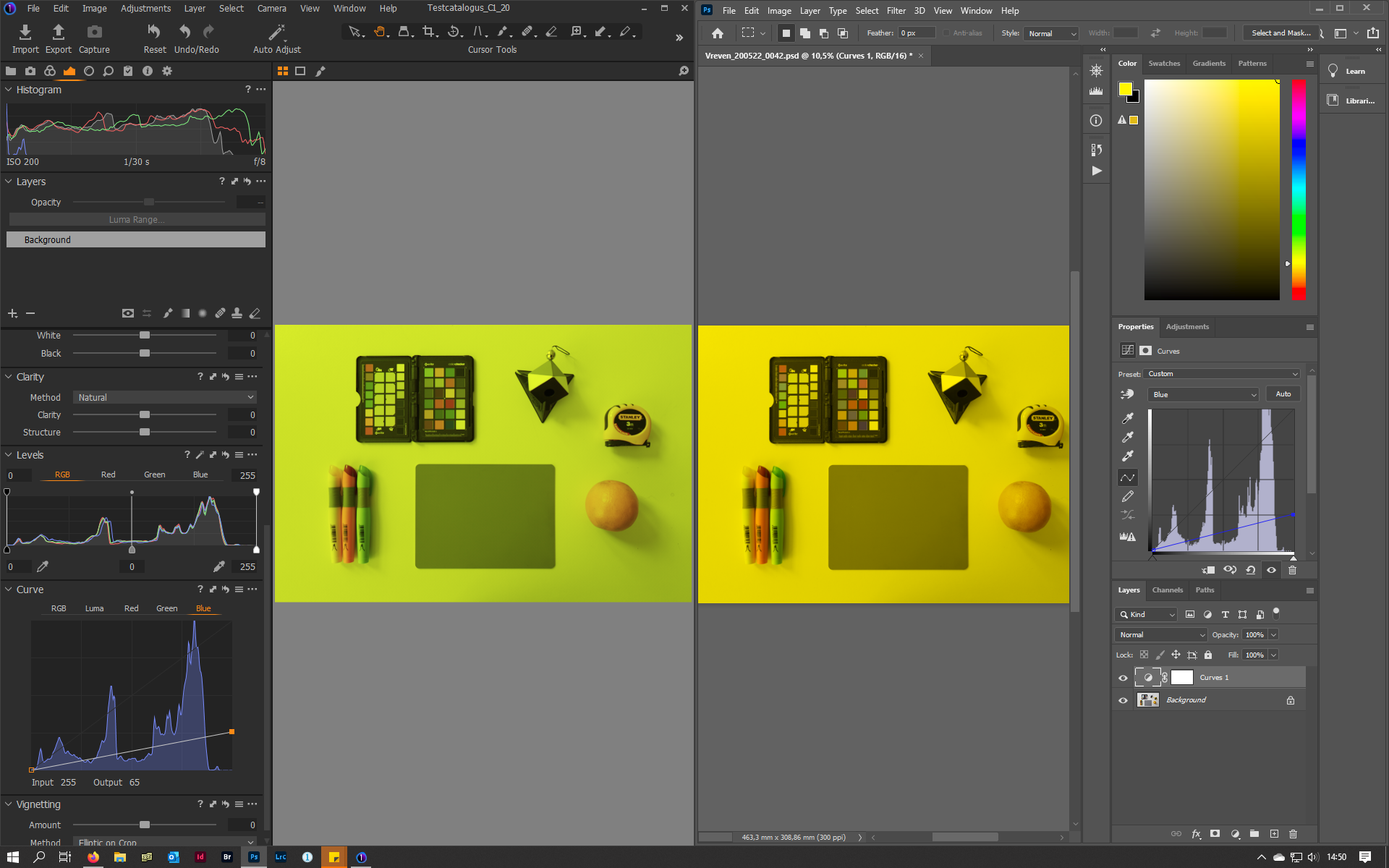
Every time I try to chance color by adjusting the individual color curves, I strugle to get the right results. Now, today I tryed out some extreme settings. I did this in both Capture one, and in Photoshop (using an exported 16bit PSD with ProPhotoRGB color profile). While photoshop behaves as expected, C1 absolutely does not. As an example, reducing the blue in the blue channel should result in a yellow image. In PS, that is exactly what happens, while in C1 I ended up with a weird greenish mess as can be seen in the screenshot. When observing the histogram you can see that in PS only the blue channel changes when you make a change to the blue curve. In C1 however, the histogram shows that both other color channels do change quiet a lot too. This does not make sense to me at all. All color-knowledge is worthless when color-channels work totally different then expected. Now the question is of course am I doing something wrong, or is this weird C1 behaviour?
All the Best,
Bram
-

Yes the RED channel does not seem to be fully independent of the blue in C1.
I see in C1 the RGB readout of a mid grey RAW patch goes from 140, 140, 140 to 131, 139, 56
when lowering the BLUE channel curve 255/65 (In/Out) as in your example.The same exported ProPhoto Tiff in PS goes from 140, 139, 139, to 140, 140, 36.
0 -
Thank you for the confirmation of the observation that the channels are not independent in C1.
This can also be observed when using the levels tool for example. Whenever you touch something
on the R, G or B channel, the other channels are moving too, as can bee seen in the histogram. When
using the same tools (curves, levels) in photoshop this is totally different, and works as expected.
When changing something in either the R, G or B channel, the other channels do not move at all in PS.
Now I am really interested in what is causing this behaviour in C1, and - even more important -
how to deal with this. Warming up an image by adjusting the Blue and Red channel for example
is nearly impossible if the green channel also moves automatically...
Who has some intersting thoughts on this?0 -

I was interested in this problem and first of all checked to see if the opposition exhibited it - it does not. Then I did the same check in Capture One and could not reproduce your problem there either. Hmm I thought I wonder, so I set proof profile on and selected a random paper profile - result your problem reproduced.
I suggest you go to View/Proof Profile and tick no proof profile and see what happens then.
Hope this helps
Dave.
0 -
Dear Dave,
Thank you for diving into this. Unfortunatly the problem persists. I had no proofing on when doing
the tests. I nevertheless changed it`s setting to "No proof profile" to be sure, and then turned proofing
on and off. This makes no difference, which kind of makes sense, as "no profile" should only show the
working space of C1, which is profotoRGB, I guess. My normal setting for the profile is the default
"Selected Recipe".
Interestingly enough, you mentioned that you did not observe the problem when proofing was switched off.
What happens to the histogram if you drag the top right point of the blue channel curve all the way down
to zero? Do the other channels stay rock steady in your case, or do they move? And do you end up with
a plain yellow color cast, or does it appear somewhat greenish (or totally greenish as in my case).
Kind regards,
Bram0 -
Hi Bram
To get zero effect on R and G channels you have to turn recipe proofing off, click on view/disable recipe proofing, it will now read enable recipe proofing. Recipe proofing turned off and proof profile set to none is the only way I have found that ensures that adjusting blue curve has zero effect on G and R channels.
I will try and construct a simple diagram to explain what is going on - watch this space.
Dave
0 -
H again Bram
This absolutely horrible diagram shows the flow through the program and why you only get a clean unaffected result with both recipe proofing or proof profile turned off. If they are turned on the program is always trying to show you what the print would look like, not the unadulterated best representation of which your monitor is capable.
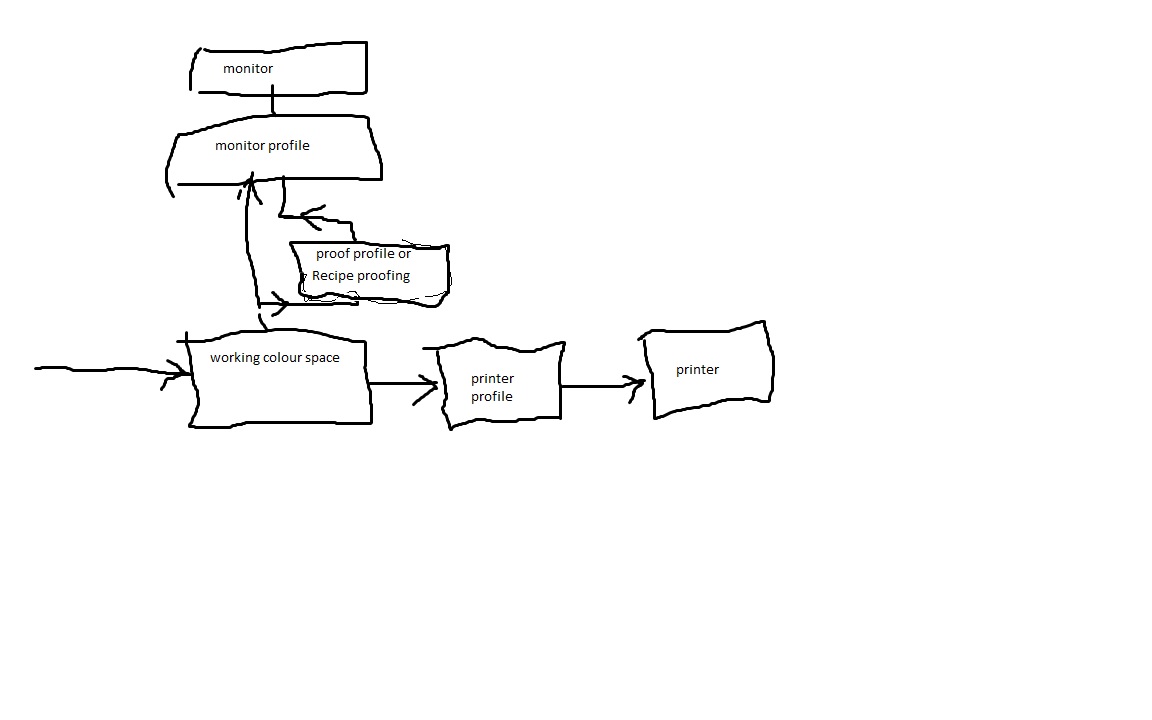
Any one feel free to alter the diagram
Dave
0 -
Dear Dave,
Thank you for the explanation and the diagram. Unfortunatly it does not solve my problem, but I did learn something important about C1. It turns out that there are two kinds of "proofing". The first one is Recipe Proofing. When turned on, the image-preview and the histogram is rendered using the color profile that is selected in the Process Recipe. With this type of proofing, also other settings from the recipe are rendered, like output sharpening en sizing. This is for example usefull when editing images for the web. When enabled, a label with the word "Proofing"is shown above the image viewer.
Secondly, there is the setting which PhaseOne calls Proof Profile (under the View Menu). This actually sets a permanent colorspace for the image previews and the Histogram.Now this (permanent) proof profile has basically three types of possible settings:
- "Selected recipe (default). This can be considered the dynamic option. Whatever colorprofile is selected in the selected process Recipe will be the color profile that is used for rendering the image viewer and the histogram. Unlike "recipe Proofing", this setting will not render other settings from the process recipe, only the color profile that is selected there.
- Every possible color profile that is installed on your computer. This will permenantly render the image viewer and the histogram with this color profile, except when Recipe Proofing is enabled.
- No Profile. It is actually not clear to me how C1 renders the image/histogram with this option. To my knowledge an image can not be rendered when there is no color profile defined. I therefore assume that C1 uses the something like the ProPhotoRGB colourspace as a basis, and that the selected proof profile is calculated from this. This would mean that if "No Profile" is selected, one is actually looking at ProPhotoRGB (or whatever profile is used as the basis).
Now, to come back to my issue, it is true that selecting "no profile" makes the channels independant in the Histogram. Changes made on for example the blue channel, leave the Red and Green channels alone in the histogram. However the image itself still looks totally greenish instead of the yellow that one should expect. The screenshot in my initial post shows this too, as the appeareance of the image dit not change by selecting "No Profile". Only the Histogram (and the color readout vallues) changed. For the sreenshot, the proof profile was set to "selected recipe". In the selected recipe ProhotoRGB was selected as the colorprofile, thus the image was rendered using ProPhotoRGB. The PSD I exported to Photoshop also had ProhotoRGB. So, although both programs rendered the image using the same ProphotoRGB colorspace, Photoshop does make the image Yellow when lowering the blue in the blue curves channel, while C1 renders it greenish. This basically happens to all images.
All in all, I still don`t understand what happens. I tried the same in Lightroom, and there it works as expected, less blue means more yellow; not more green. Also changes to other individual color channels act as expected in LR. So what is happening in C1, is still the question...All the Best,
Bram0 -
I set recipe proofing off and select no proof file in the view menu and I still don't see any channel independence.
Only difference is that with a proof profile selected in the view menu as you drag say the blue 255 input down to zero output the other two channels slowly lower their height and stay low while with no profile selected those two other channels first lower but then bounce back up to near the top of the histogram graph as you reach zero output.0 -
Dear GB,
I also saw this vertical movement. But if you put one or more color readouts in the image viewer, you will see that the R and G stay stable when B is changed as long as Recipe Proofing is not active, and if there is "No Proof Profile" selected in the menu "View / Proof Profile". As soon as one of both are activated, the dependency of the channels is visible in both the color readouts and in the histogram.Now, regardless of what these two usefull and important technical tools (histogram/color readouts) show, and what the settings of the proofing parameters are set to, C1 visually behaves stange. Whatever settings of the proofing parametes I choose, all images just become greenish when lowering the blue in curves or levels. Changes made to the R and G channel also influence the other channels, but in a lesser degree. Comparisons between using curves in C1 and PS show that PS acts as expected, and C1 does not...
So the questions stays why the channels are interconnected, and how to deal with this or (way beter) how to solve this.
All the Best,
Bram0 -
Yes you are right. I put out some color readout points and the channels are independent with No Profile and Recipe Proofing both off. So at the moment the Histogram seems to be meaningless information.
I don't think I'm seeing that huge green cast you show in your first post.
What are the color values of that grey card in Photoshop, both for an original color C1 export set to zero blue in PS and the C1 zero blue channel export, both loaded in PS?
On a neutral grey I'm seeing about -6 Red and +5 Green difference.
That's with No Profile and Recipe Proofing off while setting the blue curve in C1 and exported with AdobeRGB profile.0 -
Dear GB,
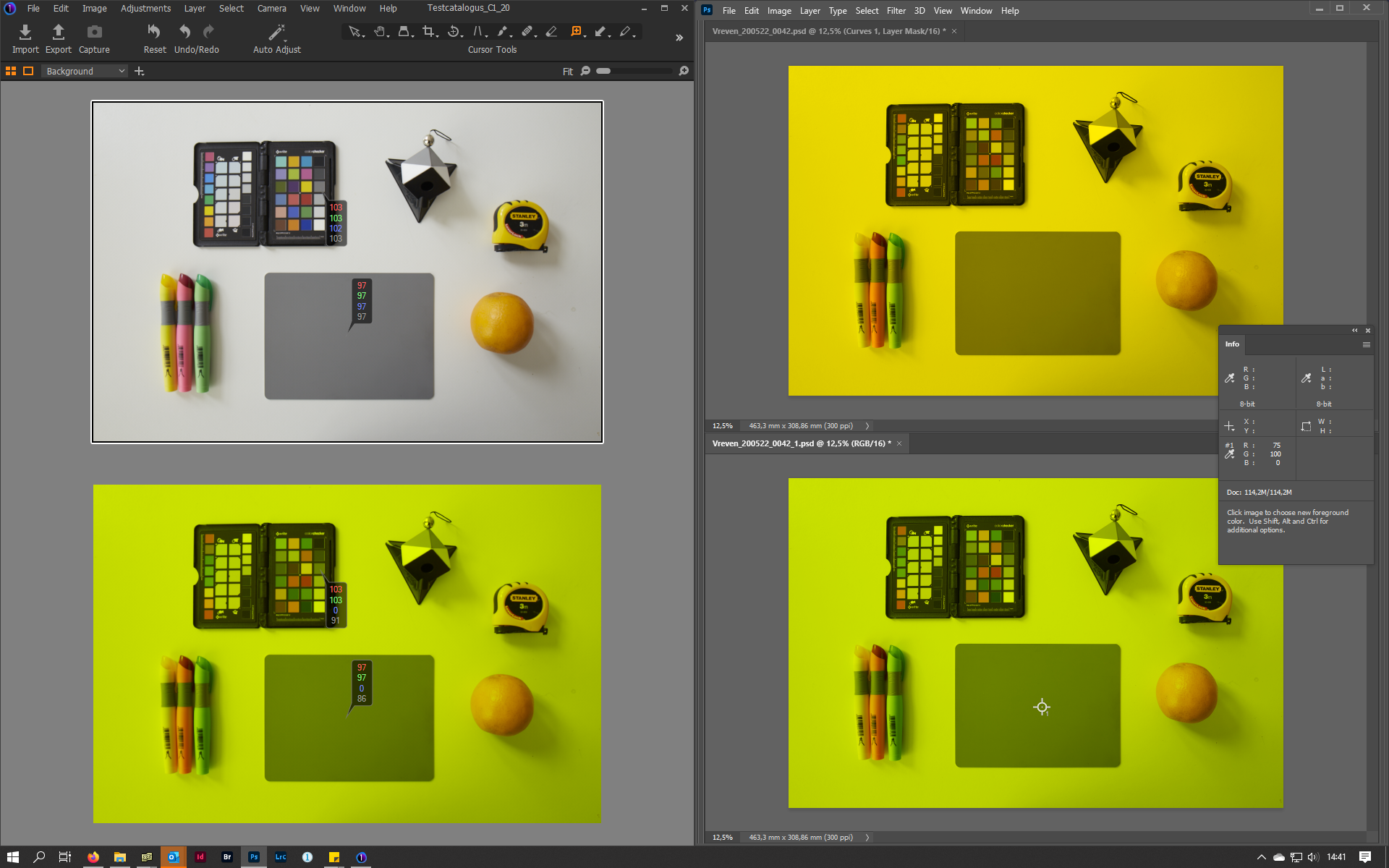
Thanks again. Here are the values, see also the screenshot. In C1, Recipe Proofing is off and No Profile is selected in the Menu View/Proof Proflile. Both exports are PSD`s, 16bit, ProPhotoRGB.
- Upper Picture in C1: White balanced on the grey card : values R97/ G97 / B97
- Lower Picture in C1: Clone variant from upper picture / Blue in curves set to zero : values R97/ G97 / B0
- Upper Picture in PS: Export from upper C1 Picture + Curves Layer with Blue set to zero: values R97/ G97 / B0
- Lower Picture in PS: Export from lower C1 Picture, no further adjustments: values R75 / G100 / B0
Also interesting: When setting the proof profile to ProphotoRGB in C1, the colorvalues on the readout show the same values as PS (on the lower pictures in both programs). Something most be really wring in C1, but what?
 0
0 -
So a 22 difference in the red channel.
Not exactly subtle.You might be better off asking in a forum with higher traffic flow.
I spend some time at Fred Miranda, mainly their Sony Camera section, but they do have a fairly active post processing forum too.
https://www.fredmiranda.com/forum/board/16Don't suppose you saw my post here:
https://support.captureone.com/hc/en-us/community/posts/360013465578-Outputed-Tiff-images-have-adjustment-points-in-red-channel-Are you seeing in C1 any control points on the red channel curve of an exported tiff ?
Thanks.
0 -
Dear GB,
Thank`s again. I`ll check Fredmiranda. I also submited a CaptureOne-support-ticket on this issue, as I find it
very difficult to deal with this channel behaviouir. If this leads to a solution, I`ll post it in this thread too.
About your other post, I`ll send you a reaction there.0
Post ist für Kommentare geschlossen.
Kommentare
13 Kommentare