New user questions about Capture Pro 21

Hi there,
I'm a relatively new user of Capture One Pro, and although I've tried searching there are a couple of questions I can't seem to find the answer to, and I'd be grateful for any help/thoughts that anyone could offer.
I have begun the heroic task of importing and sorting the myriad sources of photos across the digital cameras I have owned over the years, so the questions I have are predominantly with importing and sorting images once in a catalogue.
1) I have a Mac with a 4k Samsung screen. Whilst the display is gorgeous, the text is just too small for comfort and I find I'm leaning close to the desk and getting a crick in my neck/back. Is there any method to increase the size of the text whilst keeping the display resolution?
2) One issue I have is when I have images that have been saved on the card in RAW & JPG format. Capture one seems to treat these as separate images, whereas back in Aperture they were kept as stacks. I've decided that wherever possible, I want to ignore the JPGs and keep the RAW files. However, my image sources have a mixture of files that are RAW+JPG and some that are JPG only.
This means that although I can (and do) sort the different types into separate folders on import, I cannot simply ignore the JPG files as there are many which don't have a corresponding RAW version. Currently I am having to go through the film strip sorted by date and manually selecting and deleting JPG's that have a RAW version. A very long and tedious process when you have thousands of images.
It appears the Capture does not link RAW&JPG files, which I find a bit odd- or have I got this wrong - I'm new to the program after all.
Is there a better way of doing this - getting rid of JPG's that have corresponding RAW files ?
3) Is there anyway on the filmstrip to display both he filename and the date of the image ? This would so help me in organising the files.
I'd be very grateful if anyone has any ideas. It could save me hours and hours.....
Thanks in advance for any help you can give...
Regards,
Michael.
-

"Is there a better way of doing this - getting rid of JPG's that have corresponding RAW files ?" If you just want to delete them from the disk or from the catalog, you can use the filter tool (in the toolbar) to select only JPEGs, then delete them.
I also would like the ability to customize what meta data is displayed but I don't think you can
0 -

1) I have a Mac with a 4k Samsung screen. Whilst the display is gorgeous, the text is just too small for comfort and I find I'm leaning close to the desk and getting a crick in my neck/back. Is there any method to increase the size of the text whilst keeping the display resolution?
This concern, and the "weight" of the lines used on screen for the tools, has been repeatedly asked to C1 development.
Unfortunately for our necks and aging eyes, it doesn't seem to be important enough for them to address it.
0 -
Is there anyway on the filmstrip to display both he filename and the date of the image ? This would so help me in organising the files.
I apply a renaming convention to my files on import. My scheme is date + a counter, so I might have a file shot today renamed to
20-01-19-1234.NEF
You could also have Capture One retain the existing image name and add a date to it so for instance a file called DSC_1234.NEF could be renamed on import to
20-01-19-DSC_1234.NEF
Also, you can rename after import using the batch rename feature so a date could be appended to the file name in the same way after the event.
If that idea appeals, I could point you in the direction of the guidance for file renaming.
Ian
0 -
@Jonathan Lipkin. Thank you for your reply. Unfortunately some of the JPG's do not have corresponding RAW files, so I need some way of selecting only those JPG's. But thank you for your suggestion. This has come about as one of my cameras does not produce RAW files when certain settings are applied. So I'll get say 500 JPG's and 300 RAW files in the same memory card folder. So I only want to kept the JPG's for the 200 files for which I don't have RAW file versions.
But thank you kindle for your help.
@Claude Cause. I feared this might be the case. I have much the same issue with Kontakt (for orchestral sample libraries) and they don't seem to have any urgent desire to fix the same issue. But thank you for confirming that there is no fix as yet. Surely this must be on the cards...
@Ian Wilson. Why on earth didn't I think of that. Brilliant and simple ! I will look into this. I'd want to have the date the image was taken from the EXIF data - I wonder if there is some way of doing that automatically.....
Thank you so much everyone, I really appreciate you guys taking the time to help out.
0 -
@Michaael Antrum
Yes you can automate the date being added. If you want to do it to existing files in the catalog (or session), see this article on batch renaming.
https://support.captureone.com/hc/en-us/articles/360002529997-Rename-multiple-files-Batch-Rename-
The token you would need for date is "Image date". If you want to retain the current file name as well as the date you would use also the "Image name" token like this.
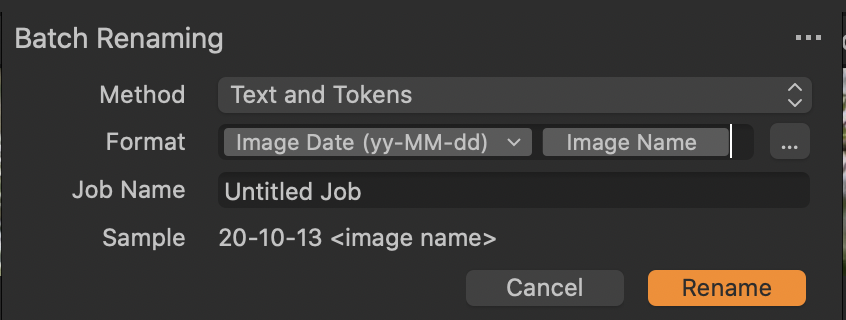
You might want to type a dash between the two tokens.
If you want to rename on import, you can set up a similar naming pattern in the import dialog box. Capture One remembers it from one import to the next, so you only have to set it up once.
Ian
0 -
Once again, many thanks, Ian, that explains it clearly. The main problem with being new to software is that you don't know what it will and won't do, nor the best of the often many ways to achieve the same result.
Much appreciated.
Michael
0

Post ist für Kommentare geschlossen.
Kommentare
6 Kommentare