Keystone and Straighten Tools Improvements - Loupe Mechanism

Keystone Tool:
- After placing Control points, to move the guides parallelly same control points to be used. As control points in 4 way Keystone are linked to both horizontal and vertical guides when ever control point to moved both alignments to be checked. Allowing guide lines similar to "Linear gradient" and "Guides" to reposition will not only make sure control points and other guide lines are locked but also precisely guides can be placed . So control points decides both placement and angle of guide lines and to refine the placement lines can also be done by moving the guide lines directly. Allowing Guide lines to be rotated line Linear gradient center line will be an awesome feature as well.
- As shown in below picture, Loupe Tool can be added to Keystone tool to enable Loupe mechanism for precise control point positioning.
Straighten Tool:
Clicking start and end points with Loupe mechanism will help a lot users to precisely select the desired points especially smooth edges or blurry horizons...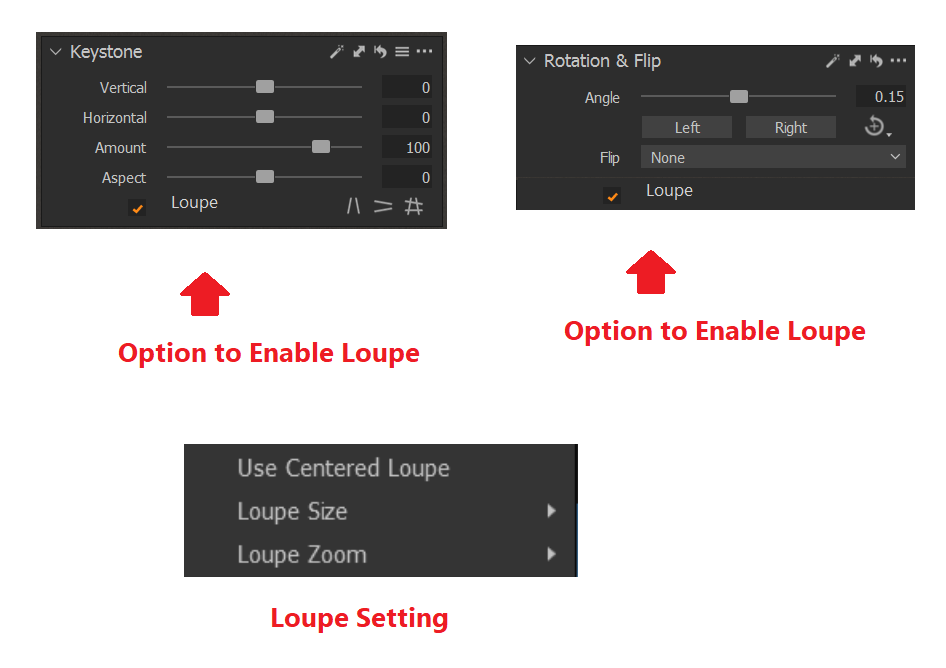
-
Regarding 1., do you mean an option to drag the lines themselves rather than the adjustment points/handles (circles)?
A loupe function for the adjustment points (like in Lightroom) would be very useful. I've made a summary of keystone tool improvement requests here, a loupe function is included (6).
2 -
Thomas Kyhn - I have refined the description. I am suggesting guides also to be selectable and moved to desired location by locking control points.
0 -

it would only take them some time to study dxo viewpoint and adobe to learn what needs to be improved but as we know they have their own priorities like goofy online challenges or to f..k up essential functions. this tool is unusable if you do serious work even more since they enhanced it, also when you apply corrections with vertical guides it adds unasked a horizontal shift too.
0

Post ist für Kommentare geschlossen.
Kommentare
3 Kommentare