Ricoh GR3 X
Logged
Dear Team, when can we expect support for the new Ricoh GR3X? In the latest current version I discover a heavy green cast in the shadows and almost no chance to correct this with whitebalace. Even more there are hard transitions between the darker tones and a very poor performance when browsing reshly imported files….
thx much for a reply
-
Offizieller Kommentar

Hi Thomas,
Thank you for your post.
I have sent your request to support Ricoh GR III X to our Product Management team as something to consider in a future release. Hopefully, your feedback contributes toward a future version of Capture One.
Whilst we cannot comment on future releases, we take all suggestions on board. -

I agree. The DNGs look horrible in Capute One. I am also hoping you integrate the camera asap since its absolutely gorgeous.
0 -
The link in the "official comment" is dead ?
3 -
+1 please!!
1 -
After downloading the latest version 15.1.0 I still miss the integration of the Ricoh GR3X. I am using capture one since the first releases easily 15 years ago when shooting with Hasselblad H1 and P45.. Now I'm shooting with XF IQ4 , Nikon D850, Sony r4 and for ALL of the digital work I use C1. With this brilliant little guy GR3X I added one special tool into my toolbox and why in the world do I need to go to Lightroom, ACDC or Affinity just for that camera.. ? Since you DID integrate the Ricoh GR3 into supported cameras, it must me an easy fix to spent an hour and adapt this camera with a longer lens into your spectrum. Please do not disappoint us here !! much appreciated..
0 -
I am trying lightroom and everything works flawless with the gr3x
0 -
i tried lightroom too. It can pick up the lens profile. But seems the color profile is not there ?
hopefully capture one can sort it out soon.
0 -
https://support.captureone.com/hc/en-us/articles/360002718118?page=3#comment_4405885030941
please subscribe my request
0 -

I know this an old thread - but I wanted to callout that modifying the GRIIIx DNG files to make them appear to have been taken on a GRIII works flawlessly for me.
It is unfortunate that I need to take the additional steps to make this work and I really hope official support is added soon. @Capture One team - I love C1, and have no idea how these things work but it seems like this would be a simple fix allow the software to process the GRIIIx files as those from the existing GRIII.
0 -
Thx Andrew,
May I ask what steps you take to make the GR3X files look like the GR3 files?.. what settings do you make, what settings do you change?
I also found out that if I change the color settings of the noise reduction, at least the heavy green tone is influenceable.
By changing the brightness and detail in the noise reduction, I can further improve the result at least minimally.
However, it is not yet perfect0 -
I use exiftool which is an open source command line utility to edit exif data. I just drag the dng files into a working folder, then open up a terminal window, navigate to the folder, and then run the following command:
exiftool -Model="RICOH GR III" -UniqueCameraModel="RICOH GR III" -T -ext dng .(make sure to use include the period at the end of the string!!!)
Basically it is modifying the exif data of every DNG file in the directory to show that the pictures were taken with a GRIII as opposed to a GRIIIx. Aside from the fact that the exif data doesn't match, everything works perfectly.
EDIT:
I made a really quick youtube video that walks through the process:
0 -
very elegant.. however, the Terminal tool is a kind of a holy grail for me..
Never used it before.. how can I navigate to a folder from a terminal window..I just downloaded exif tool.. but I'm not familiar with the terminal..
0 -
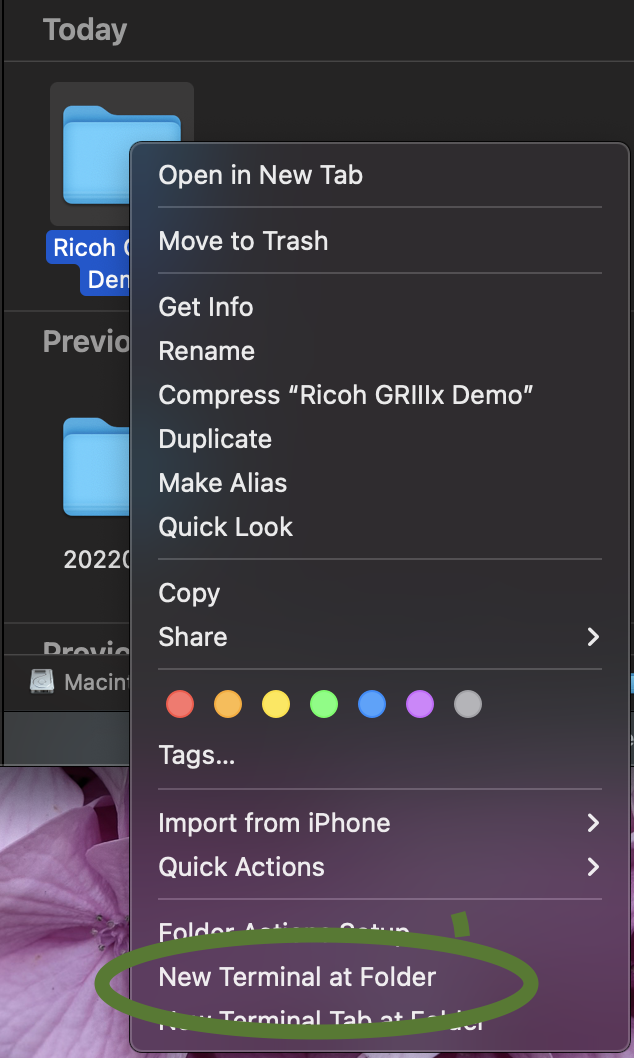
If you are on a mac, you can two-finger click on the folder (ie. right click) then select 'New Terminal at Folder'
 1
1 -
I am impressed Andrew!!!! it works just fine! I figured I could get rid of the blur by changing the noise reduction a lot, but my tints were not as good as with the exif tool, and the hue was too far from acceptable. A brilliant workaround!!! Thanks for that!
I'm still hoping for a quick update and support for this little camera, of course.0 -

Awsome, this works pretty good and the difference is like night and day.
But still, it's about time that Capture One starts supporting this camera.
1 -
Absolutely!!! I really don't understand why they still don't support this camera.
0 -
Let them know and make it happen, send a request if you haven't done it yet. Let's go!
https://captureone.co/featurerequest > other > Camera and Lens Requests
0 -
Hey Gabriel, I did many times.. always the same answer:
"Hi Mirko,
Currently, that Ricoh model is not supported by Capture One although the Camera Team of our R&D department is always working to support new cameras as soon as possible.
Every camera profile is carefully done In-house by our engineers which is why support for some cameras might take a bit of time, but rest assured that all is done with the interest of making the best software we can.
I will forward your request to our Camera Team, they consider every request and then prioritise the most requested cameras to speed up support.
Best regards,
Victor
Capture One Support"0 -

Hi
I am looking for a raw file from the Ricoh griiix but I can't find it on the internet. Could someone please send me one? I would like to try the method described by Andrew Brown-Pearn on Windows. This will be desicive to buy the camera.
I would be very grateful!0
Post ist für Kommentare geschlossen.
Kommentare
19 Kommentare