Auto Advance after applying Rating/Color

-
If you use the filter tool to show you only images that have no rating, then as soon as you add a rating to an image, it disappears and you are on the next image.
Ian
1 -

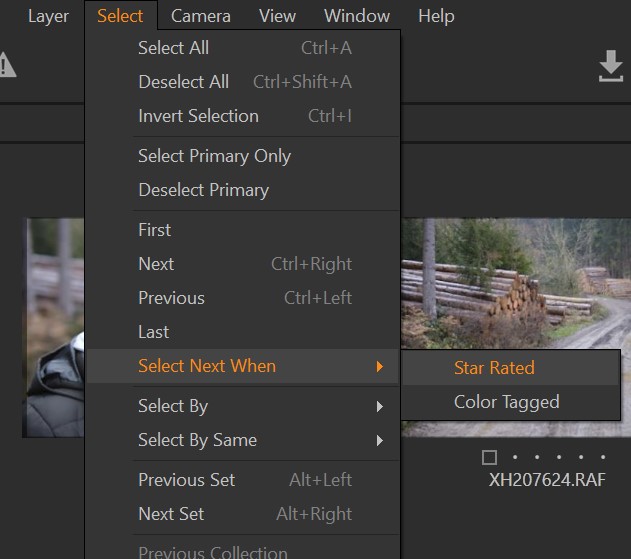
I think the feature is already there. In the menu under Select you will find "Select next when". There you can activate automatic forwarding to the next photo when you color tag or star rate.
 1
1 -

Or even without those, simply use both hands with shortcuts and arrow keys. Eg.
- 5, {right} or {down}, 3, {right}, etc.; or
- +(green), {right}, ......0 -
Jürgen Hügle This is exactly what I was looking for, thank you!
0 -

Below request, I submitted 2 years ago to add this feature to import images and CO acknowledged it. Don't know what is the difficulty to implement.
0 -
I agree. A "go to next when selected/deselected" could be usefull in the import dialogue. Furthermore the regular "select next when" function does not work when using the new culling mode on import or even when using the new culling mode from the library. The culling mode simply ignores the setting for "select next when". This is very inconsistent.
0

Post ist für Kommentare geschlossen.
Kommentare
6 Kommentare