Edit with/Open With Question

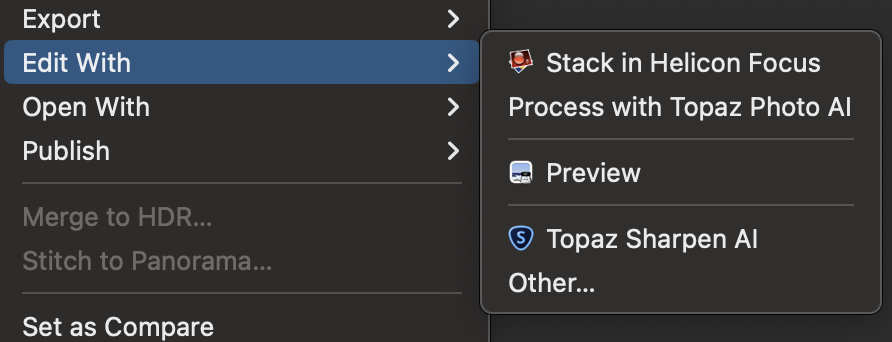
I've installed Topaz and Helicon apps on both my Macs. When I select Edit or Open my laptop shows all the Topaz and Helicon apps I have used.
On my Mac I only see the most recent app used. I suspect this is a setting somewhere but I cannot find it. If this the case could someone point out where this setting is?
Thanks.
-

From within Capture One select Preferences > Plug-Ins and uncheck the plug in programs/versions you don't want Capture One to show when selecting Edit or Open with. HTH
0 -
Thanks Robert. I am actually trying to add these products to the Edit or Open, not remove them. They do not appear in the plug in section of either of my computers. I am trying to figure out why one computer shows all the available applications to Open/Edit and the other does not. I'm sure it is something simple, I just cannot find it.
Michael
0 -
Actually I found it, right in front of my face as expected. I had to edit the Open With "plugin" to select which apps should appear in the menu.
0 -
Apologies, sometimes I need to slow down! I have had similar problems on my Intel iMac running Big Sur 11.7.2 with Capture One Pro 23 (16.1.0.126) where I had to restart the Mac in order for the Plug-In list to populate properly. It also wouldn't hurt to check that Capture One has full disc access. Mac preferences > Security & Privacy > Privacy. After unlocking select Full Disk Access from the left pane and scroll the right pane to see if Capture One is selected. If not, grant the access and restart.
For me the Topaz apps have proven to be finicky in this regard.
Beyond this I would be in uncharted waters.
0 -

I have the exact same problem on my new Mac mini 2024:
I added "DxO PureRAW 4" to the "Edit With" menu via the "Other…" menu option, but it crashes Capture One on selecting the option.I cannot find a way to remove it, even though Capture One has full disk access. DxO PureRAW 4 is in the Applications folder as it should be, but does not show in the Settings > "Open With Menu" list.
I went through all the steps described above, restarted the Mac AND Capture One, but DxO does not appear in the list.
That begs the question – why can an application be selected in the Finder, but not removed???
And why does it crash Capture One?0
Post is closed for comments.
Comments
5 comments