Variant not copying from Capture to Selects

What problem do you see this solving?
After making a New Variant of an image and editing it, moving the original and variant from Capture to Selects folder removes both from the source folder, but only the original image shows up in the Selects folder. However, if I then make a New Variant of the original, the variant shows up, along with a second variant.
When was the last time you were affected by this lack of functionality, or specific tool?
I don't use variants very often, so I can't pinpoint when it worked last. Certainly in C1.22, and probably in an earlier build of C1.23
Are you using any workarounds or other solutions to achieve your goals in Capture One?
(See problem description)
Are you happy to be contacted further about this suggestion or request?
Yes
-
Are you sure that the variants in the Selects folder aren't just collapsed?
Variants collapsed:
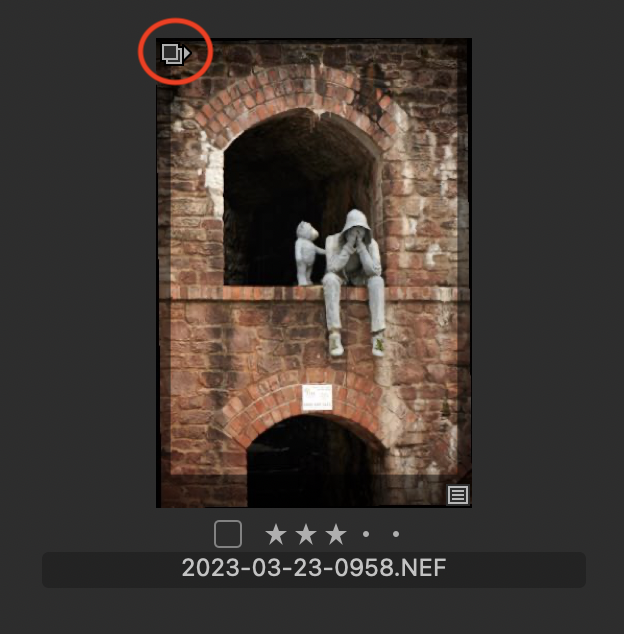
Variants expanded.
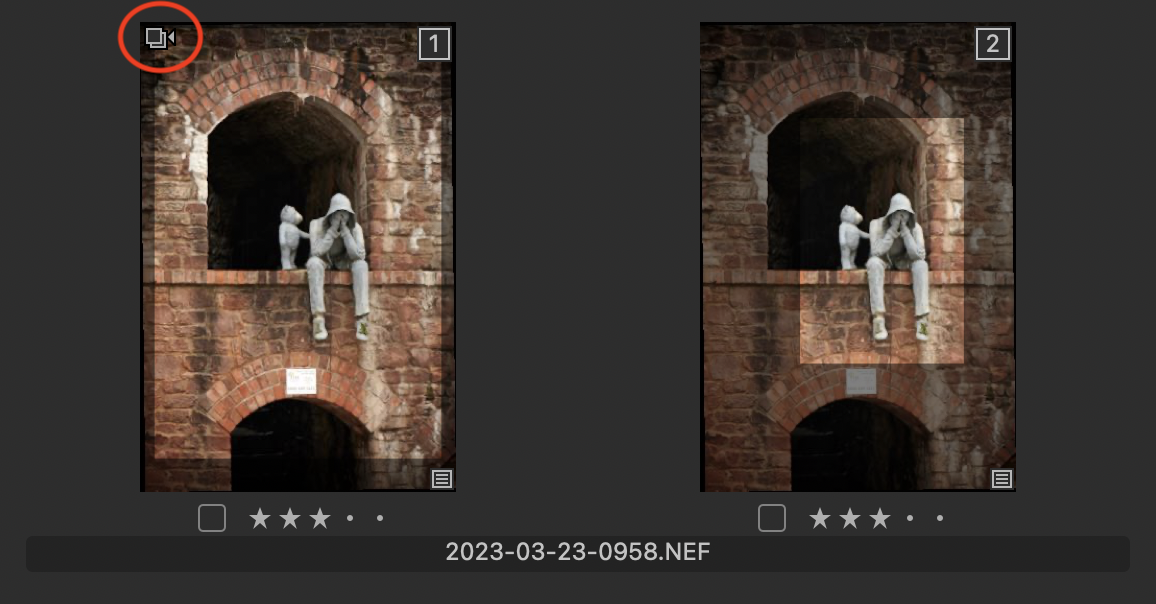
Notice the slight difference in the icon highlighted - which way the triangle points. You can toggle between expanded and collapsed by clicking on that icon.
Or maybe that's not the issue...
Ian
1 -
Maybe! I'll replicate the experiment today and check your theory.
0 -
Thanks, Ian. Collapsed variants was indeed the root of my confusion! Greatly appreciated!
0

Post is closed for comments.
Comments
3 comments