How to stop Capture One from regenerating previews and thumbnails

Recently, Capture One and my iMac Pro had a conflict and Capture One and the entire computer froze when I attempted to add a keyword to an image. No actual changes were made before the freeze up. This required a reboot. When I tried to reopen the catalog, I got a message that it could not recognize the database. I have multiple backups, and repaired the database from the backup copy, which was identical to the corrupted backup. It then started regenerating all of the previews and thumbnails. I tried replacing the database in the repaired catalog with the one from the most recent backup and it still insisted on regenerating all of the previews and thumbnails. Of note, it also changed the default preview resolution, but was undeterred when I changed it back to what it has been. In theory, this background activity is not a big problem, except that in a 64,000 image catalog, this can take 6 to 10 hours (as the drives churn -- sounds like a name for a soap opera) .
I make copies of my catalog each month and rotate them among 3 drives. The latest copy was made a few days ago. When I opened it, it did not need to regenerate preview and thumbnails. I was able to export the images as an album from the repaired catalog and import them into the copy. Problem solved.
My question: Why does Capture One need to regenerate all of the previews and thumbnails after repairing/replacing the corrupted database with one that is identical to it before it was corrupted? It seems unable to just use the existing preview and thumbnails even though the repaired catalog is unchanged. It acts as if you asked it to change the preview size globally. All it accomplishes is to exercise the drives. Is there any way to correct this.
-
If you right click the catalog file in Finder, and choose Show Package Contents you will see that it contains several elements in the package. See screenshot:
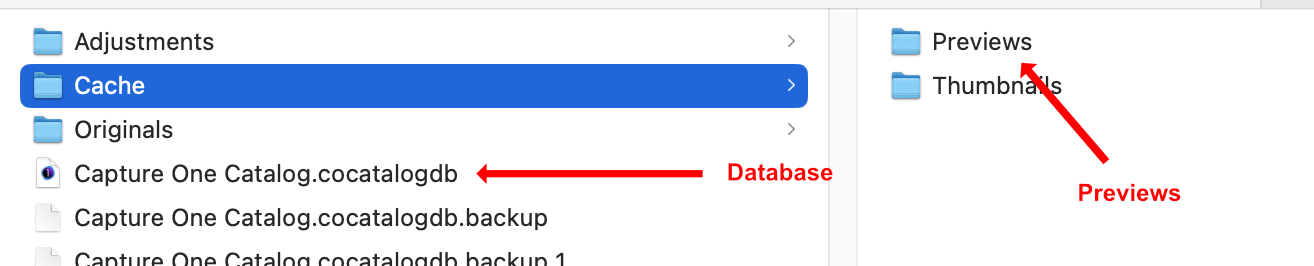
The database contains the adjustments you have made to the images, but not the previews. They are separately stored in a subfolder as shown. If you replaced the database, it would make no difference to the previews, if there was a problem with them. Probably best to let it regenerate them and put up with it.
Ian
0 -
Ian, I am familiar with the contents of the package. Years ago, I found that you could replace just the database with a backup of the database in the catalog package if the database had been corrupted. It did not need to regenerate the previews and thumbnails. I wrote about this, a few years ago.
If you open the database directly from a backup, it will reconstruct the cache and import its adjustments from the backup. The database point to these, but the full resolution previews and thumbnails are not, which is why it regenerates the previews and thumbnails. It looks like Capture One does this when you ask it to recover a catalog rather than just replacing the corrupted database in the package with a backup. Perhaps the folks writing the software presume that if the database was corrupted, the cache might also have been corrupted. However, the only thing that is prone to corruption is the database file. The cache contains individual files and the corruption of one of these would only corrupt one preview or thumbnail. This is what makes Capture One so much more stable than an application that stores all of its data in a monolithic database.
What Capture One does to recover from a corrupted database (regenerating previews and thumbnails) exceeds what is needed almost all of the time. What I am suggesting is that you should not have to regenerate things that do not need regeneration.
Nevertheless, you are right. Just letting Capture One do its thing to recover a catalog, is pretty easy and largely foolproof.The disk churning for hours while preview and thumbnails are regenerated does slow Capture One down somewhat, but it is largely in the background and if you leave it on overnight, it will be done, unless your computer freezes up partway through.
0

Post is closed for comments.
Comments
2 comments