Can't export images from catalog, now I can't even open a fresh install of Capture one.

I use Capture One everyday on my Mac Studio. For some reason my account on my mac prevents me from exporting images from the catalog using any recipe.
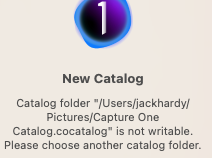
Now after reinstalling my MacOS, uninstalling my capture one using cleanmymac X, and reinstalling it I receive this message:
Catalog folder "/Users/jackhardy/Pictures/Capture One Catalog.cocatalog" is not writable. Please choose another catalog folder.
I can't open any of my catalogs.
What is going on? How do I fix this?? Please help.
-
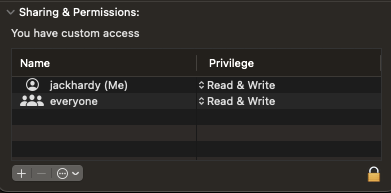
You probably need to check the permissions on the folder using MacOS, and you may need to check that Capture One has got full access to the files and folders it needs to, which is controlled by the Privacy and Security section in System Settings.
Ian
0 -
I've given Privacy and Security Full Disk Control to Capture One.
/Users/jackhardy/Pictures/Capture One Catalog.cocatalog doesn't even exist.
I can't start the software full stop. I can't open any of my albums. The software seems totally broken on my Mac and even if I delete and reinstall capture one it still has the same problem. It's so weird and frustrating.
0 -
 0
0 -
Even after a fresh install I can't get past this!!!!! I can't create a new catalog or open an existing one.
0 -
 0
0 -
The fact is my user on my system (My mac studio M1 Max) is not functioning properly with Capture One anymore despite a permissions reset, software reset etc... A fresh install will still give the notice of the capture catalog not being writable even though it doesn't exist. I can't install it like I can install it fresh if I create a new user. So that begs the question, what do I need to delete in order for my user to completely forget that Capture One was ever installed. Because something is clearly clashing and it's not any obvious settings.
0 -

Hallo Jack.
Did you solve the Problem ?
KindRegards Pascal
0

Post is closed for comments.
Comments
7 comments