folders ordering question

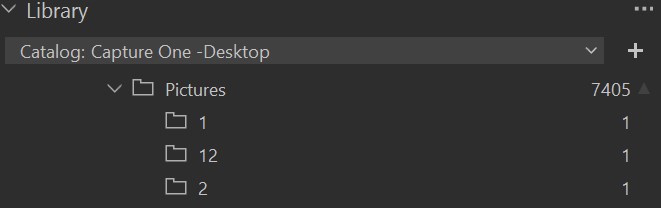
It seems that folders are not displayed in the same order as Windows explorer. For example, on my C: drive folders titled "1" , "2", "3"...."9", "10", "11", "12" display in line with the number (when sorted by name) however when imported into Capture One, those same folders will display in different order in the library: "1", "10", "11", "12"..."2", "3", "4", ... "9". It's basically a difference in sorting by the first digit, 2nd digit, etc. rather than by the entire number.
I suppose a solution for this particular example is to rename my folders "0001", "0002", etc., but is there any way to change the order of how folders are displayed within the Capture One library tab?
-
I wonder if this is a problem specific to the Windows version of Capture One.
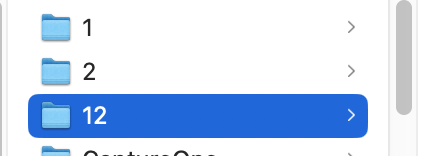
I'm on a Mac, but I was curious about it. I created three subfolders in Finder (the Mac equivalent of Windows Explorer) named 1, 2, and 12.
In Finder they display like this.
and in Capture One they display like this.
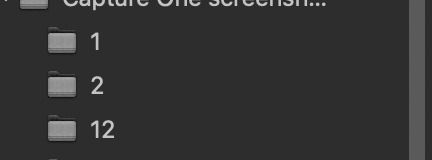
and not as 1, 12, 2, which if I understand you correctly is what you see.
It may be worth submitting a support case. It certainly seems rather odd.
Ian
0 -
Thank you Ian. It appears there's a difference in Mac vs PC on this. At this point I already went ahead and renamed all my picture folders to include 3 digit numbers (001, 002, etc.) and that solved the issue for me. It took a couple hours of work and thankfully it didn't break any links to my other photo apps, which was a concern.
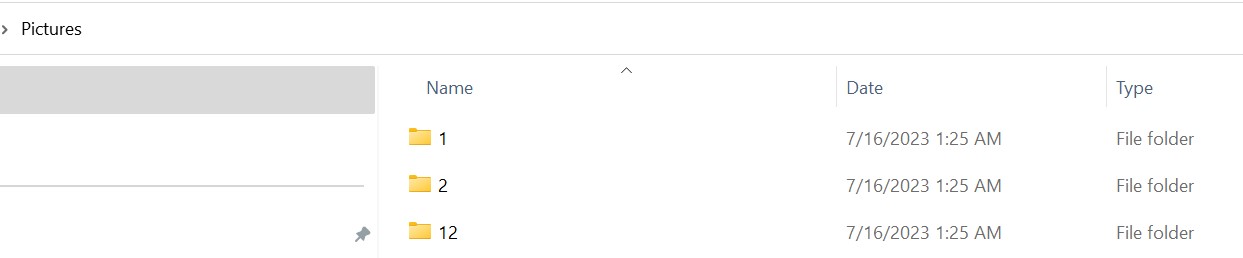
Thus, at this point I doubt I'll be submitting a support ticket to C1, but for future reference here are screenshots from my PC.
In Windows 11 file explorer:
In Capture One 23 Pro (16.2.2.1406) windows version:
 0
0

Post is closed for comments.
Comments
2 comments