Metadata

What problem do you see this solving?
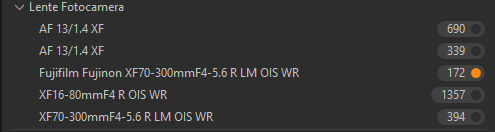
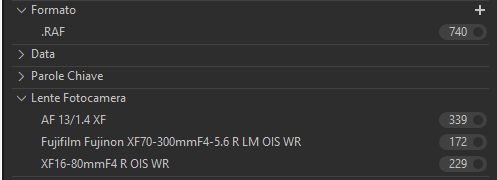
When importing RAF files Capture 1 doesn't seem to read the lens metadata consistently. For example the fujifilm 16-80mm is shown as XF16-80mmF4 R OIS WR while the 70-300 as Fujifilm Fujinon XF70-300mmF4-5.6 R LM OIS WR.
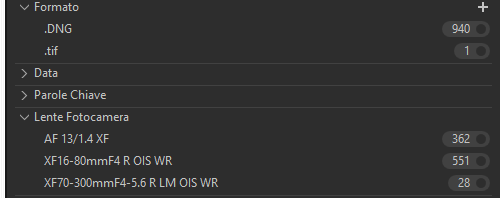
I also have a lot of old photos in DNG, converted with Lightroom, with this files the lenses metadata are read as the 16-80mm example (XF16-80mmF4 R OIS WR' and XF70-300mmF4-5.6 R LM OIS WR etc...).
This issueis evident in the filters tool, the lenses with different names are doubled, there is the option for Fujifilm Fujinon XF70-300mmF4-5.6 R LM OIS WR, which selects the RAFs, and for XF70-300mmF4-5.6 R LM OIS WR, that selects the DNGs. But the16-80mm shows as only one option, including both RAFs and DNGs shot with that lens. Furthermnore, for the Viltrox AF 13mm, even though the metadata are the same for the two file types, the options are two.
The issue with the metadata and the filters tool
When selecting a folder with only DNGs
When selecting one with only RAFs
Are you using any workarounds or other solutions to achieve your goals in Capture One?
At this moment the only work around is to select the lens multiple times. It's not a big deal but it's pretty annoying.
Are you happy to be contacted further about this suggestion or request?
Yes
Post is closed for comments.
Comments
0 comments