Prevent Resizing while Cropping in CaptureOne 23 Express (16.2.2.10)

Hi, I’m failry new to CaptureOne and use Capture One Express for Fujifilm to organize and edit my RAW files. One thing that bugs me and that I can’t seem to find a workaround is the Resize/Crop feature in the right hand “Shape” Section. Whatever I do, CaptureOne always puts the size of a crop at a maximum of 1200x800px, which I simply do not want. I might not want to resize it, but just crop the image, whether it be in the original ratio or an unconstrained ratio, but prevent it from resizing (most of the times, downsizing). Is there a way to solve this, am I missing something completely? Thankful for any insights!
-

Mine does the same thing, it used to be that the preview image could be set to whatever the selected Export recipe was but it doesn't seem to matter whether I turn this off or on (View/Recipe Proofing).
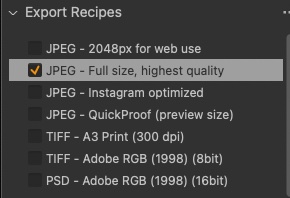
If you change your export recipe to have a different pixel size it should change the pixels. For example set the Format & Size to Scale: Fixed 100% and see if this resolves the problem.
0 -
THANK YOU! This solved it, and was exactly what I was looking for :)
0 -

I just struggled with exactly same odd behaviour, the original size didn't show up in crop tool, only a maximum of 2048px. As I realised, nothing else should be marked, only Full size. Very strange behaviour.
 0
0
Post is closed for comments.
Comments
3 comments