Black & White Tool Tab Missing

When I was using Capture One on my Windows PC I could view the Black & White tool tab; now I've moved over to Mac the tool tab isn't available... or is it?
I can't find it anywhere, any advice would be very helpful.
-
Right-click on any other tab and add it?
0 -
It's not one of the tabs in the default workspace these days, though the tools are all available. There isn't now a ready-made dedicated B & W tool tab you can add, but you can create your own and add whatever tools you like to it.
Ian
0 -
It's not one of the tabs in the default workspace these days
means it was deleted from v23?
0 -
Thank you all for your help, it's appreciated
0 -
BeO - yes apparently so. I think they reorganised things in v23 so that the tabs look more like the iPad version - but you can certainly set up a black and white tab of your own if you want to. To be honest, the only specifically black and white thing on the tab was the black and white tool itself. I've just added that to my colour tool tab.
Ian
0 -
I think I'll try that, thanks.
0 -
Just for information, these were the tools in the B&W tool tab in v22 (I think I did not use hence did not modify it).
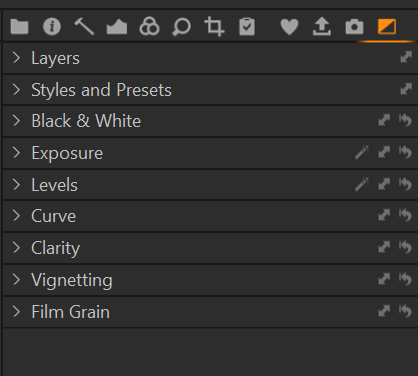
For me, the Color Editor is missing (unless images are shot with a monochrome camera).
0


Post is closed for comments.
Comments
7 comments