Catalog import folder issue

I'm attempting to import images into a catalog. I have selected a folder in the import section, the sample path lists the correct folder path. After importing the images have appeared in the folder in Finder however in Capture One in the "Folder" section of the Catalog the images are in the "In Catalog" folder and the folder the images were imported to isn't listed.
-

Do you have a global filter set? View menu, I think. I’m not at my computer so hope that’s right.
0 -
My guess @...: You selected in the import dialog "add to catalog" (or something along this term, I cannot give you the translation back to English as it's sometimes a bit adventurous...)
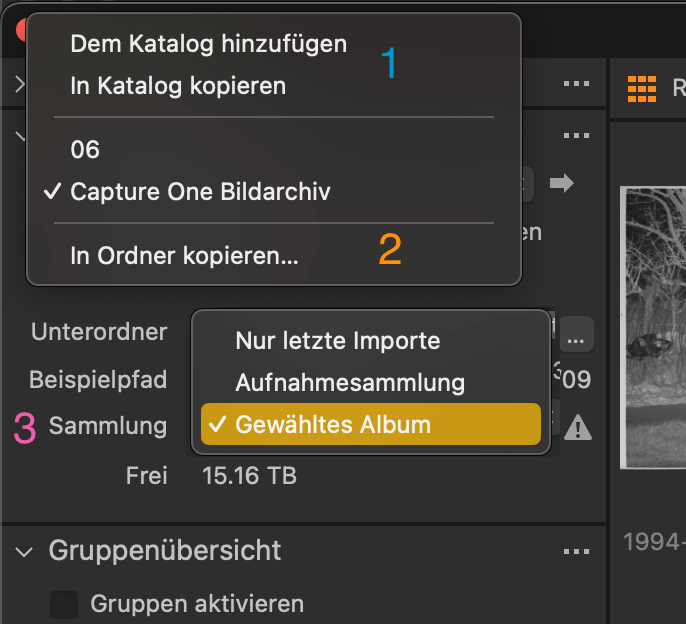 I think, you selected "add to catalog" or "copy to catalog" (1)?
Or, if you choose "Copy to folder" (2), you did not check for the collection (3) the images will be added to?
Especially the "capture collection (???)" can be an album hidden in a project or folder. Difficult for me to guess your way as I'm not certain what you mean with "folder"? the ones in the file system or the ones in C1' s catalog?
0 -
@Brian Jordan Im not in front of the computer but I do not think it's a filter issue as they appear, it's just not showing up as in folders inside capture one, but as in the Catalog. In Finder they are in the correct folder and my catalog file isn't big enough for them to not be referenced.
0 -
Can you open the catalog package and verify whether or not they are in the package ("In catalog")? Can you paste a screenshot of your import dialog, I also assume a wrong setting as JoJu does. Otherwise it could be another regression defect which is a little bit hard to believe -even for me- that they messed up again, especially the import.
0 -
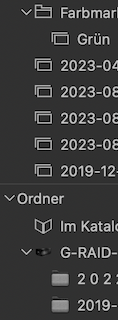
@... I am in front of a computer and I think we really need to clarify the wordings. C1's icon designers have a rather strange idea to symbolize the term "group" with a folder icon (in the user collection part) and the folders with a rectangle and a very hard to see folder tab. Dark gray on slightly darker gray just sucks! That rant was not meant for you, Adam.
 0
0 -
Sorry on a camping trip so can show screen shots from my computer.
I checked the importer about 5 times because I couldn't understand why it was happen. I was definitely importing to a folder titled "media".
After importing in Mac Os Finder the images have been imported to the "media" folder, using the correct sub folders.
In the folder section of capture one, this section https://ibb.co/12pfxWY
The images are in the "In Catalog" section and my new sub folders do not appear.
I have checked the size of my catalog file, it's 33mb. Which isn't big enough to hold a single 42 megapixel image, let alone the 8 I was testing with.
I will have to screen record the process when I get back from my trip, as I feel it's a bug.
0 -
You can paste small images (up to 2MB) here directly.
0 -
BeO that's also what I would have said few days ago.
Yesterday I wrote a comment about very strange behaviour during importing/drag&dropping screenshots. Wanted to find it – it's on the censor's desk, no longer visible as new post: "pending approval"
In short, cursor reacts extremely weird if I type a sentence, then want to drop a screenshot, then want to edit something in the sentence before the screenshot: space bar no longer working, mouse cursor no longer visible. I need to navigate with keyboard only, typ the sentence without spaceswhichdoesn'tmakemuchsensenoriseasytodo and after that go back with left cursor key and use the space bar which was not working while typing but is now while "cursoring" backwards.
@... C1 needs to know about the new folders. It doesn't monitor your media folder and then adds it automatically. This needs to be done by using either the + symbol in the folder section or by right click on your "Media" folder and choosing "synchronize". Just be careful: If you have other images or movie clips in your "Media" folder, C1 wants to add them, too.
The border between function and bug sometimes is not easy to detect. Once set up, the import usually works fine, but the stepping stones during this process of setting up can be slippery.
When I'm importing, I'm using a certain C1 ImageArchive folder and as subfolder the token of [Current year (YYYY)]/[Current month (MM)] to direct the images towards a folder structure created in finder before - maybe the finder was not necessary and C1 also could create a folder these days.
And then I still need to make sure to select an album before I start the import dialog, as I can't do it within the massive option selection field of the import dialog. On one side a cool feature like the tokens (very handy), on the other side too much things needed to become prepared before. If I don't select an album before, I need to abort the import dialog and lose all changed settings. I made a feature request to get the option of creating an album out of the import dialog. Which I again had to search manually as the requests shown in my profile are limited to 10.
0 -
I'll make a screen recording in a few days when I return, apologies for not having it on the initial post. I'm also on my phone so it doesn't have the upload or quote feature here.
@JoJu I'm doing exactly the same steps that David does here https://youtu.be/5IrqW-ht8XE?t=4m40s
I already have my media folder visible from inside capture one from previous imports I have made on my PC. However I have recently gotten a MacBook Pro and now the new folder isn't appearing like the Wedding folder does in this example https://youtu.be/5IrqW-ht8XE?t=7m46s
0 -
Edit-- thought it was strange that a new catalog imported correctly and my old one didn't. Decided to create a new catalog, import my old catalog into it and try an import. Now it's working perfectly. Perhaps something was corrupt in my old one.
0

Post is closed for comments.
Comments
10 comments