Smart album

I want to create a smart album but this option is greyed out.
Windows 11, Capture One 1 16.2.5
-
Are you using a catalog or a session? What steps are you following to try to create the smart album?
Ian
0 -
A catalog. File>New Collection>New Smart Album, except that New Smart Album is grayed out
0 -

Hello Walter,
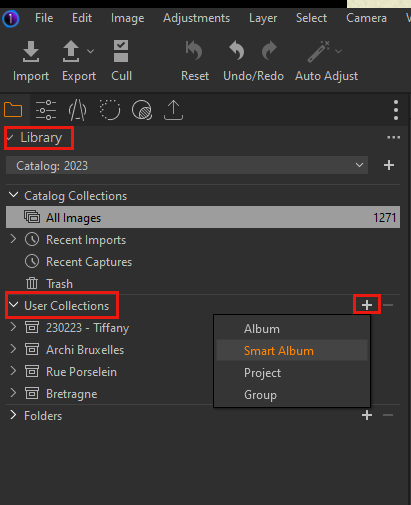
From the navigation pane, under Library, go to User Collections section and click on the + sign, then choose Smart Album
 0
0 -
Although that should be the same as doing it from the menu...
However, worth trying.
The other thing I would suggest trying is to start a new catalog, and see whether the problem persists. I tried this quickly, and I find that I can create a smart album (in that the option is not greyed out) even if I don't add any images to the catalog. It would take only a month to try that, and it might help to see whether the issue wis with your particular catalog, or whether it's something more than that.
Ian
0 -

This could be a bug, it's the same for me: The Album and Smart Album menu selections are grayed out, but they are available via the Library tab and + sign. Didn't note that before as I always used the latter way.
Maybe it's just another difference between the Windows and the MAC version?0 -
I'd have thought that was an odd thing to be different between the Mac and Windows versions. As you say, more likely a bug, and worth reporting. If it works using the Library and + sign, at least that is a workaround until they fix it.
Ian
0 -
As suggested by Ian, I've tested on a new catalog and indeed the options are available from the main menu
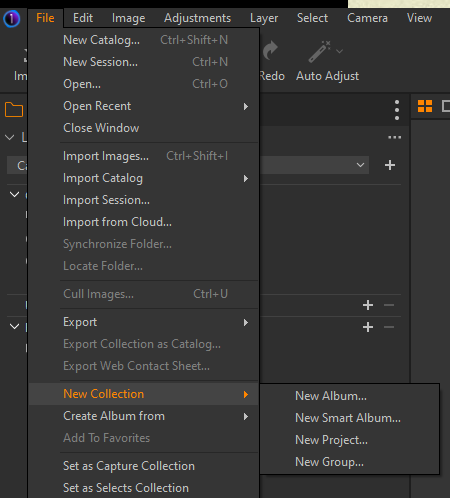
But if you select an option in the Library (like All images in Catalog Collections for example)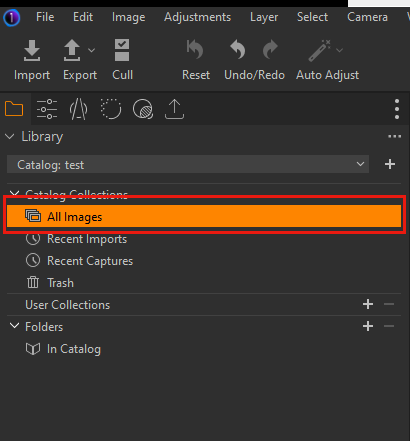
Then the options are grayed out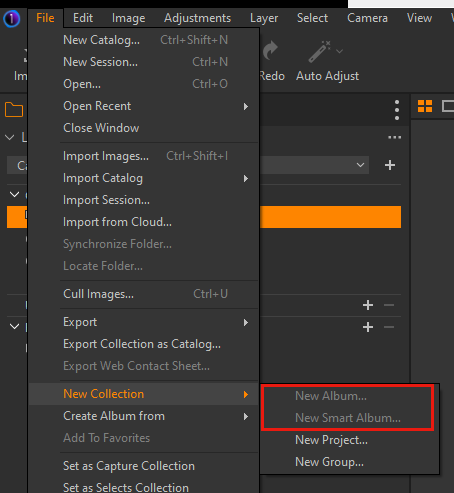
If you collapse the Library, then both options are available again0

Post is closed for comments.
Comments
7 comments