Referenced HEIC images do not show up unless disk with referenced files is attached.

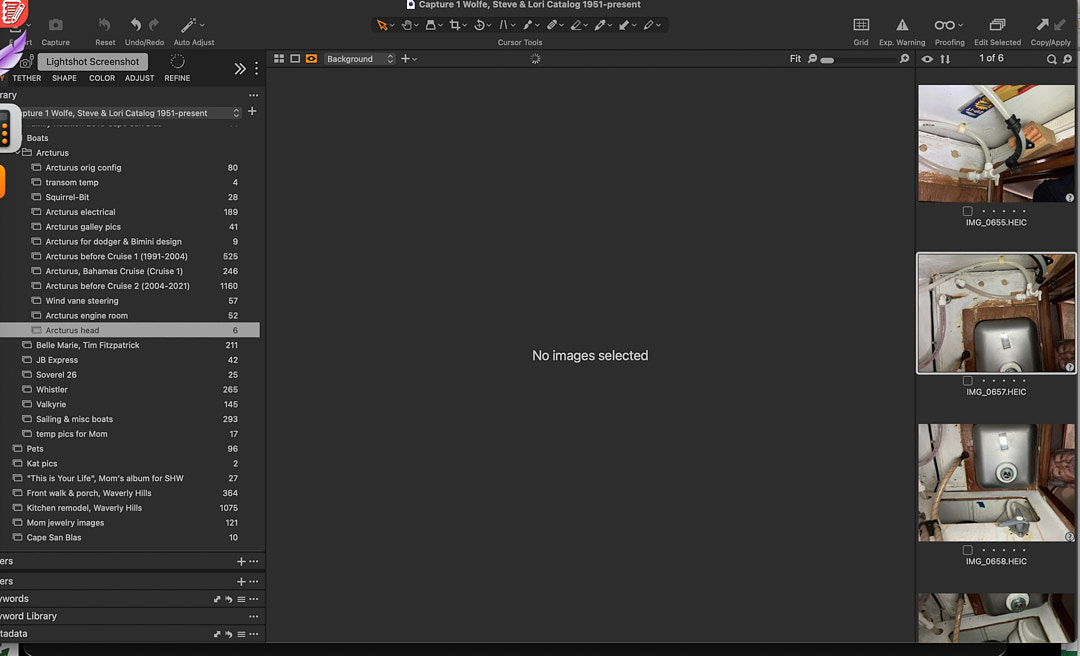
I keep my master images on a separate hard drive. I've done this for years with few problems. However, at some point in Capture One 22 Pro and continuing with 23 Pro, I noticed that when the hard drive of referenced images is not attached, when an HEIC thumbnail is selected C1 will not display the image, giving instead the message "No images selected". This doesn't happen for the files of any other format, All those formats display the image properly. Once the drive is attached, they start working correctly.
What's going on? Is there a fix?
-
Does anyone else have this occurring to them?
0 -

i imported 3 heic images to my capture one catalog. all my images are referenced and reside on a dedicated ssd. i closed capture one, disconnected the drive, then reopened capture one. i got both the previews with the "? offline" and the thumbnails in the browser as i would expect. one of the heic images was from an iphone 7 plus and the other 2 from iphone 13 mini. i have capture one 16.3.0.76.
not sure if that helps, but it's not happening for me at this time.
0 -
Just to clarify, the thumbnails show on my screen, but if I select one of them, it won't show a full-size thumbnail in the working window if the drive isn't connected. I have Capture One set to make all thumbnails higher resolution than my computer screen (so I can zoom in on parts of the image without connecting the external drive), but it will show me only the small thumbnail in in the catalog list along the side of the screen, not in the larger center screen.
Are you seeing a "working" image when you select your thumbnail?
0 -
i get the full size preview in the image viewer. i can zoom all the way in and out and i could select any of the 3 and they would all come up in the image viewer. i attached a screen shot so you could see.
i even deleted all the files, emptied the trash, and then re-imported. still worked fine on my end.
 0
0 -
Drat. Mine looks like this (note the highlighted thumbnail which is selected). All the non-HEIC images work like your screenshot.
Weird.
 0
0 -
i sometimes encounter weird capture one anomalies. they come and go. we won't get into those so we keep this on topic.
some things i would try to possibly rectify this:
1) attach the drive with the images and then rebuild previews for some of the heic files. (image>regenerate preview or right click on the image and select regenerate preview). close capture one, disconnect the drive, and the open capture one. check to see if the images appear in the viewer.
2) verify/repair your catalog. file>verify catalog/session. if verification fails, the dialog will present the option to repair.
3) move the offending images to the capture one catalog trash. empty the trash (don't delete from disk if you don't have backups!! just remove from catalog.) reimport the offending images and allow the previews to build. then close capture one, disconnect the drive, and reopen capture one.
if none of that worked, i'm not sure what else i'd try. maybe create a new catalog and import a few heic files to see if it was catalog related.
0 -
Belatedly wanted to let you know that rebuilding the previews worked. Unfortunately, hunting down all the HEICs sprinkled throughout my date-based storage was still a pain.
Thanks for the help!0 -
Can you search for extension heic?
0

Post is closed for comments.
Comments
8 comments