Greyed out folders on Mac Sonoma

Why do some of my folders that I store my Capture One sessions in appear 'greyed out' when I go to open new session?
Although they are greyed out I can still access them and open the sessions.
I just find it annoying that they are greyed out.
Any help would be greatly appreciated?
Hudson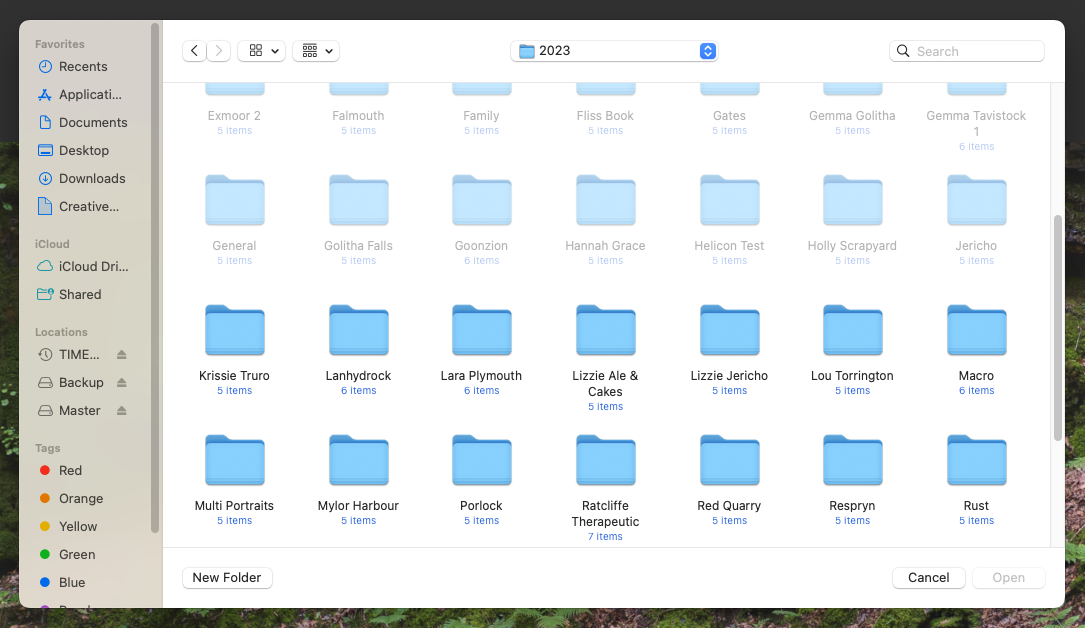
-
I would guess that these are hidden folders and you have marked them manually at some point. This is a forum feedback section, I don't think you will get any better help before moving the thread 😜
0 -

This topic is for Help Center and forum feedback. Moving to the correct topic.
I believe these folders are either hidden, or you do not have permission to edit them. It's a macOS question though, really, so I'll leave it to the Mac experts. :)
1

Post is closed for comments.
Comments
2 comments