Images automatically imported with adjustments?

Hi all, I switched from Lightroom to C1 recently and I'm having trouble importing images. For some reason, all the images are imported with automatic adjustments of Exposure -1.56 and Contrast -34, even if I have not selected any styles in the import window. I tried importing from another camera and the same thing happens. Not sure if this is something that can be changed in the program or if it's a default setting coming from the cameras? Any help would be appreciated!
-
When you import, do you unintentionally have some kind of style applied on import? In the import window, what does it show in this section?
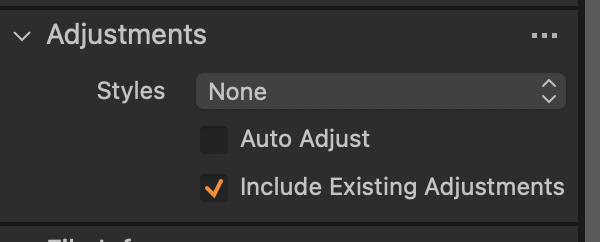
Ian
0 -
Hi Ian, no, I made sure they're both unchecked and no styles are applied, which makes it so strange. It happened with Capture One 23 and now with the newer Capture One Pro.
0 -
SFA, when I click on Reset on a newly imported file, the Exposure and Contrast remain at -1.56 and -34 respectively. When I click Reset on a file that I adjusted to have 0 Exposure and Contrast, it goes back to -1.56 and -34. Is there a chance this is predetermined by the camera?
0 -
What camera are these images from?
Ian
0 -
You said these images were previously edited in Lightroom. Lightroom probably write adjustments into the metadata and Capture One is importing and converting them best it can.
0 -
Ian, the files are from a Leica M11. I tried importing files from another Leica camera I tried in the store with my SD card and they had the same issue.
Walter, sorry for the confusion, I haven’t edited these in lightroom. I just mentioned lightroom to highlight the fact that I’m new to C1.
0


Post is closed for comments.
Comments
6 comments