Finding images by keyword across sessions

Two possibilities suggest themselves, a grand Capture One catalog, including the images in all my sessions, or Media Pro. I already have the previous version of Media Pro, though I have not progressed very far with using it, so Media Pro SE would be an affordable upgrade, not a less affordable first-time purchase.
Is Media Pro the way to go?
I'm on a Mac system, by the way. Some of my sessions are in the Pictures folder on my main HDD. Older ones are on an external (but permanently connected) HDD.
Ian
-

Hi Ian,
I have no experience with Media Pro, but once you get used to a single management+editor program it's hard I to go back to a system that uses 2 different applications. Also, in my very brief playing with MP, I found it to be very 90s, even 80s in appearance and UI. Those 2 reasons made MP not an option for me. Of course, other may and will disagree.
That leaves C1 with catalogs as the only alternative. If you have scanned the forums here, you will find many posts complaining about performance problems. It is indeed a bit of a PITA, but if you keep the catalogs smallish it works quite well. And 'smallish' depends a bit on the speed of the computer, RAM, your patience, etc.
Others may keep the sessions and then catalog the processed output in some other program (c1, LR, Photos, a specialised DAM, etc.). This may work well if you have a structured workflow where you ingest, process and deliver your images, and then 'never' edit them again. That doesn't work from me... (yet).
I hope others with MP-mileage will chime in.
Cheers,
Peter.0 -
Thanks, Peter.
But if I used "smallish" catalogs would I be able to search them all at once anyway, or would I be having to search multiple catalogs to find all my photos of herons? Or is there a way round that?
Also I don't mind whether it has an 80s or 90s look and feel.
Ian0 -
Ian, you can not search across multiple catalogs or sessions using C1. The trick to make it work would be to have catalogs that have nothing in common so you don't require a across-catalog search. Very unlikely, I know.
You can download a trial of MP to see if you can make it work. Also scan the MP fora and check the experience of the people that use it.
You could also try importing all your existing catalogs into a new one and see if that works for you. You may find it acceptable.
Cheers,
Peter.0 -
I don't have existing catalogs - I only have sessions.
Ian0 -

Hi Ian,
You prompted me to do something I have been meaning to try for a while.
As I'm on windows I decided to check out how my windows search systems is set up. I turned out that I was not searching everything so I bit the bullet and set it off indexing the world ...
Why?
Well I have been sort of using keywords for a while and exporting them with jpgs into the output folders. I typical, for events, produce some small instantly shareable jpgs and a larger size plus, perhaps, an A4 print size image on disk.
With all of the meta data embedded, including KWs, windows can search for me quite quickly once it has an index to work with.
It's OK for keywords and stuff. Not so good with numbers or anything that may not be unique to a particular value - like numerics for example and separating between ISO and lens length.
So usefulness rather depends on need and, potentially, system resources. The index files seem to be getting quite large.
I assume Mac offers something much the same?
Grant0 -
Ian3 wrote:
I don't have existing catalogs - I only have sessions.
Ian
OK then, try importing your existing sessions into your very first catalog! 😊
Peter.0 -
peter.f wrote:
Ian3 wrote:
I don't have existing catalogs - I only have sessions.
Ian
OK then, try importing your existing sessions into your very first catalog! 😊
Peter.
Does that leave my sessions still usable as sessions?
Ian0 -
Yes, it should. Try with a few ones (maybe duplicate a few smaller session and try with those). I'm not at my computer now, but I guess that there is an option to leave the images in place. Make sure you select that option, otherwise the import will move your images and the session will not be able to find them anymore (not a problem if you try this with test sessions). Also select the option to import the edits.
I don't think it's wise to keep the session after importing it into a catalog. The catalog and the sessions might share the same images, but they are otherwise 2 separate and independent 'things'. Edits you make in one are not seen by the other, and so that is something you shouldn't do. Also, when you delete an image in one, the other won't find it anymore. So, you must consider this as a 'transfer of ownership': once you're done with the session and import it into a catalog, the session should no longer be used.
There is a good article on that topic by David Grover on the image professor's blog: . It will probably give you more insight than I can.
HTH,
Peter.0 -
Ian,
As Peter says although the catalogue and the session can co-exist using the same image files (as indeed could multiple sessions) there is no expected degree of understanding and adaptation between the two after the import.
Now whether that is a bad thing or a good thing could be debated but it certainly makes managing the relationship somewhat interesting!
That's one of the reasons I favour cataloguing just the output and then mainly do that so that images can be found quickly and their location identified rapidly with further editing of additional output needs processed within the session (a few hundred or thousand images) rather than the catalogue ( some tend of thousands of images). But then my expectation of need of historic image processing as not high.
If I was running an commercial image library with daily demands a different strategy would be needed. Probably.
As import from a session retains the existing session folder structure it would seem like a fairly simple idea to be able to navigate to the image folder and re-import complete with adjustments from the session. Likewise to export from the catalogue to the session although actually managing such processes would be up to the user. I cannot see any obvious "sync" process and I doubt such a think would be much in demand. There are some obvious points if potential conflict if attempting to edit the same image at the same location in different sessions or catalogues with a view to "synchronising" at some point.
As Peter said, best avoided unless really needed for some reason.
Grant0 -

Hi Ian,
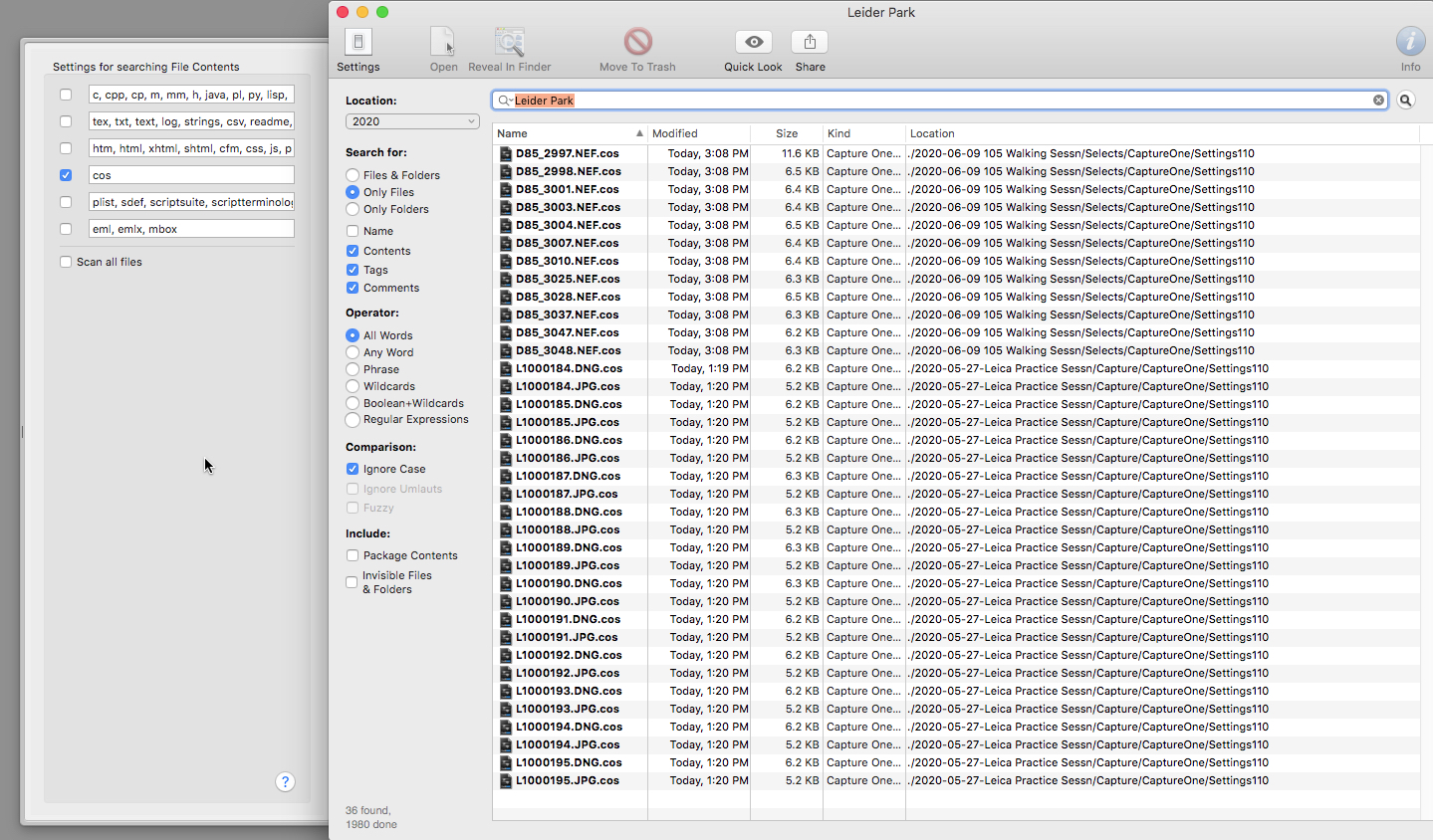
I don't know if you are still following this thread, but I just came across it while searching for a cross-session search solution, as I am new to C1. The thread got me to thinking, and so I did a little digging. The keywords are stored in xml in the .cos files for each image (and perhaps in the CO session db files, but that isn't relevant to searching for individual image files). As a proof of concept, I found that my goto editor (UltraEdit) could find and list files with a keyword. I couldn't get Mac finder to do the same, unfortunately. However a search on the web turned up a free search utility, EasyFind, by Devon Technologies. Setting to search for .cos files and pointing it to the top of my Sessions folder tree and searching for the keyword "Leider Park", it found all the images, so tagged. See attached screen shot. Perhaps this would be helpful to you.
Regards,
Dean
 0
0
Post is closed for comments.
Comments
10 comments