Unexpected keystone behaviour

I don't quite understand what is happening here.
With these Keystone adjustments (both vertical and horizontal):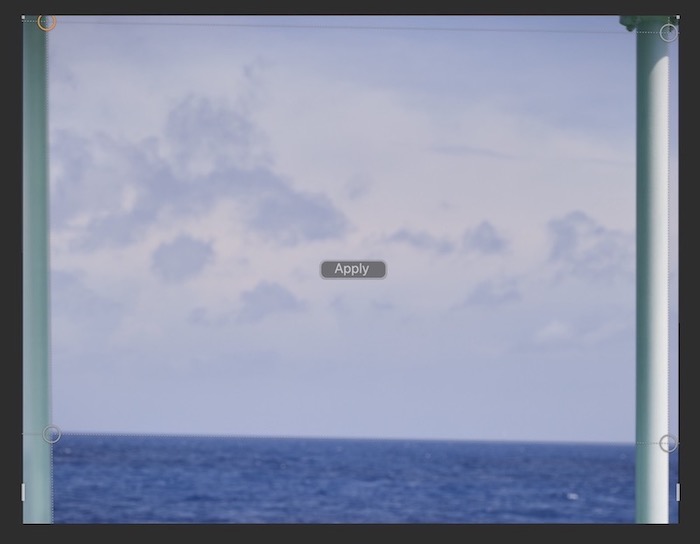
I get this result: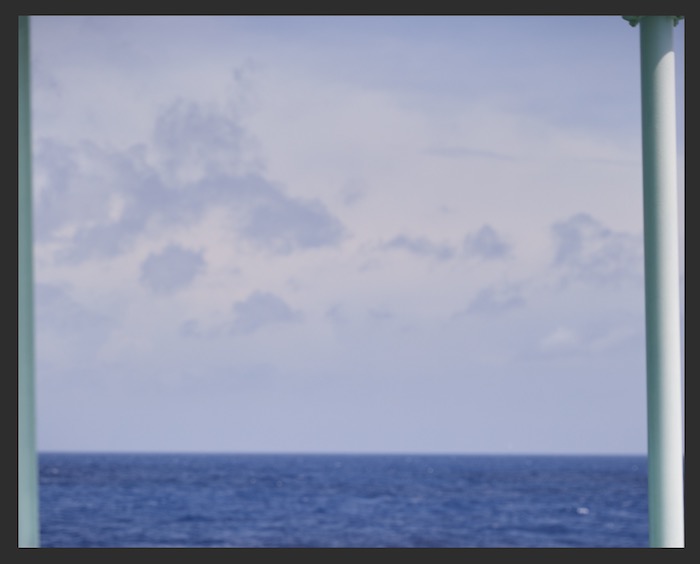
The horizon is nearly horizontal, but the lines that were supposed to be vertical aren't quite vertical.
0
-
One trouble would be the positioning of the top guide. How do you know where to put it with no corners to put the handles on?
I’d suggest a 2 stage approach.
(1) Get the horizon level using the straighten tool.
(2) Use the keystone tool in just the vertical mode.
Ian0 -

With that particular image it's difficult to find something on the left column that one might expect to be equally positioned, vertically and horizontally, with something on the right.
I would be tempted to suggest that using Grids and Guides might be useful (after rotation has been neutralised as Ian3 pointed out) to get multiple reference points for what is vertical and horizontal IN THE IMAGE CANVAS SPACE although maybe not for the content of the image.
Then maybe use the sliders on the Keystone tool to make things look right. Ignore the alignment tool in that example since what seems to be useful information for vertical alignment may not be so useful. For example it seems a little unusual that the left column is quite out of focus compared to the right column. That might suggest that they are at somewhat different distances from the lens, in which case even of the verticals should work out the same the horizontals perhaps should not but you have no obvious comparable points of reference for the horizontals once rotation correction (if appropriate) has dealt with the horizon.
Grant0 -
Thanks for your comments. This isn't actually the whole photo, only part of it. My question isn't so much about how to correct the photo, but rather what is going on with the corrections I have made – the vertical corrections should have resulted in vertical lines, but clearly they haven't. Is this a bug, or am I doing something wrong? 0 -
Can we see the whole image? That could make it easier to work out.
Ian0 -
Ian3 wrote:
Can we see the whole image? That could make it easier to work out.
Ian
Sure. Here it is.
https://i.imgur.com/vhGaucO.jpg0 -
Ah. Interesting challenge.
I would skip the sky/sea horizon as a reference point.
That said a non-horizontal horizon is likely to be extremely annoying so might require some PhotoShop type pixel pushing to make it parallel to the rear railings since they look like they are perpendicular to the metal upright columns.
At least that's my take on things.
I'll be interested to see what Ian3 thinks.
Grant0 -

I just tried adjusting horizontal keystone from your image and didn't have a problem. Did you try:
1. Select horizontal keystone
2. Set 2 targets on the horizon and the other 2 on the horizontal railing.
3. Crop as needed. You may want to fill the lower left corner, depending on how you crop.
In my result, the verticals and horizontals look fine to me.0 -
"Interesting challenge" sums it up. The trouble is as I said before that if you want to use the combined keystone tool in Capture One, you have no reference points to enable you to line up the guide at the top properly - should it be angled down or up a bit? (You'd need corners on a building or a window frame or something to do that against.) And as Grant (SFA) says the railing and the horizon can't both be horizontal.
Here is my best effort using Capture One - I had some guides showing and manually moved the horizontal and vertical sliders and the rotation angle slider until it looked about right with the horizon horizontal and the uprights vertical.
https://live.staticflickr.com/65535/49270334437_6cf64f9b01.jpg
And here is my best effort with Affinity Photo (with which I am not very skilled) using a Perspective live filter layer. (NB: I scarcely know what I am doing with that, really.)
https://live.staticflickr.com/65535/49270133721_965be069cc.jpg
Not much different?
I suspect that using something like Affinity Photo, or Photoshop is the better way to go with something like this. (If you know how to use it properly, which I am not sure I really do!)
Interesting challenge, though.
Ian0 -
Nature Isme wrote:
I just tried adjusting horizontal keystone from your image and didn't have a problem. Did you try:
1. Select horizontal keystone
2. Set 2 targets on the horizon and the other 2 on the horizontal railing.
3. Crop as needed. You may want to fill the lower left corner, depending on how you crop.
In my result, the verticals and horizontals look fine to me.
Does that leave the posts at left and right vertical?
Ian0 -
Thanks for your replies.
I'm still curious, though, why after aligning the vertical adjustment points with the posts left and right and applying the corrections, both posts are further from vertical than they were to begin with.
Here's the same photo with keystone corrections in Lightroom (using three lines/six adjustment points); it may be a bit distorted, but looks reasonable to me. I would have expected something similar to this with the adjustments I made in Capture One.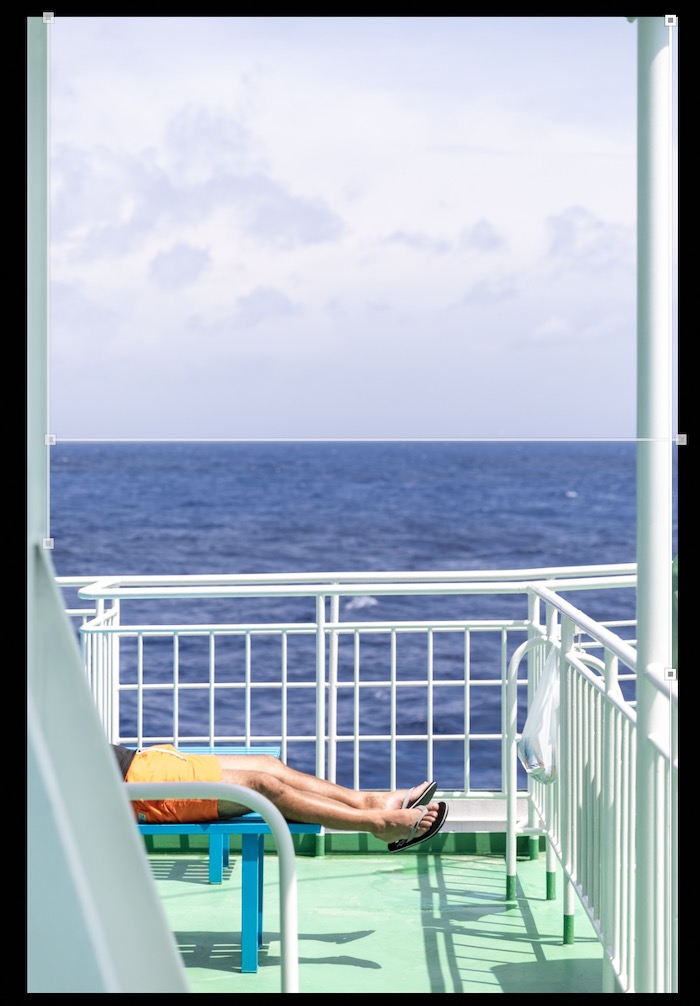 0
0 -
Nature Isme wrote:
I just tried adjusting horizontal keystone from your image and didn't have a problem. Did you try:
1. Select horizontal keystone
2. Set 2 targets on the horizon and the other 2 on the horizontal railing.
3. Crop as needed. You may want to fill the lower left corner, depending on how you crop.
In my result, the verticals and horizontals look fine to me.
The railing isn't quite horizontal so this will result in some distortion.
In any case, my question isn't so much about how to fix the horizontals/verticals in this photo, but rather about why after having applied the adjustments shown in the first image in my initial post, the posts left and right are further from vertical than they were before applying the corrections.0 -
thomaskyhn wrote:
Nature Isme wrote:
I just tried adjusting horizontal keystone from your image and didn't have a problem. Did you try:
1. Select horizontal keystone
2. Set 2 targets on the horizon and the other 2 on the horizontal railing.
3. Crop as needed. You may want to fill the lower left corner, depending on how you crop.
In my result, the verticals and horizontals look fine to me.
The railing isn't quite horizontal so this will result in some distortion.
In any case, my question isn't so much about how to fix the horizontals/verticals in this photo, but rather about why after having applied the adjustments shown in the first image in my initial post, the posts left and right are further from vertical than they were before applying the corrections.
Looks like it's because you are rotating using the horizon line at the bottom and something with much the same or perhaps exactly parallel line at the top. That will make the whole Image rotate if you set the horizontals before the verticals.
In reality the horizon line for sea and sky has no square angle relationship with the vertical metalwork. Indeed it's not even a fixed reference point since the entire ship will be moving relative to the horizon line.0 -
SFA wrote:
Looks like it's because you are rotating using the horizon line at the bottom and something with much the same or perhaps exactly parallel line at the top. That will make the whole Image rotate if you set the horizontals before the verticals.
In reality the horizon line for sea and sky has no square angle relationship with the vertical metalwork. Indeed it's not even a fixed reference point since the entire ship will be moving relative to the horizon line.
Yes, but as the adjustment points are aligned vertically with the posts left and right, you should expect the posts to be vertical after applying corrections, no matter how much distortion this would result in.0 -
Further examples of similar keystone issues in this thread:
[The Capture One forum has migrated to a new platform, as a result all links to Capture One related postsstopped working and have been removed]0

Post is closed for comments.
Comments
14 comments