Issue C1 20.0.2 and Open With plugin

installed last evening, version 20.0.2 brings a issue with the Open With plugin which cannot initialize and is declared disabled. This issue prohibits the use of the "Open with" and "Edit with" functions.
A reinstall did not change anything.
I send a request to the support currently without response (it was not the usual).
Win 10 Home 1909.
-

So we have 2 examples of the process crashing immediately after calling the localization dll and it's something to do with data string interpretation.
The crash appears to occur before or whilst attempting to start the service (which is then ext step report in the log file from my system.
A very quick review (all I have time for right now) suggest this routine to that point has not changed since the first records in the log file which go back to the final beta test release before the V20 release as far as I can recall.
Grant
0 -

Hi,
Decided to give 20.0.3 a go and save the log files. As others it failed again.
Plugin log file for working 20.0.0
Application started, version PluginHost 1.0 - Located at: C:\Program Files\Phase One\Capture One 20\P1.C1.PluginHostProcess.exe
Running on Microsoft Windows NT 6.2.9200.0
InitializationStarting
Log file initialized.
Parameters: C:\Program Files\Phase One\Capture One 20\Plugins\OpenWith BuiltInOpenWithPlugin com.phaseone.openwith
Discovering...
Discovering from path: C:\Program Files\Phase One\Capture One 20\Plugins\OpenWith with entry point: BuiltInOpenWithPlugin
Dlls discovered: C:\Program Files\Phase One\Capture One 20\Plugins\OpenWith\OpenWithPlugin.dll C:\Program Files\Phase One\Capture One 20\Plugins\OpenWith\P1.C1.Localization.dll
Discovery OK
Creating a new instance...
Starting service...
Adding host at: net.pipe://localhost/PhaseOne/Plugins/com.phaseone.openwith/P1.C1.Plugins.Common.Wcf.IPluginHostOpenWith
Adding host at: net.pipe://localhost/PhaseOne/Plugins/com.phaseone.openwith/P1.C1.Plugins.Common.Wcf.IPluginHostSettings
Service started...
Plugin initialization completedand for the failing 20.0.3
} | Application started, version PluginHost 1.0 - Located at: C:\Program Files\Phase One\Capture One 20\P1.C1.PluginHostProcess.exe
} | Running on Microsoft Windows NT 6.2.9200.0
} | InitializationStarting
} | Log file initialized.
} | Parameters: C:\Program Files\Phase One\Capture One 20\Plugins\OpenWith BuiltInOpenWithPlugin com.phaseone.openwith
} | Discovering...
} | Discovering from path: C:\Program Files\Phase One\Capture One 20\Plugins\OpenWith with entry point: BuiltInOpenWithPlugin
} | Dlls discovered: C:\Program Files\Phase One\Capture One 20\Plugins\OpenWith\OpenWithPlugin.dll C:\Program Files\Phase One\Capture One 20\Plugins\OpenWith\P1.C1.Localization.dll
} | Discovery OK
} | Creating a new instance...
} | Exception of Type : System.Reflection.TargetInvocationException
**| Message : Exception has been thrown by the target of an invocation.
} | Exception of Type : System.InvalidCastException
**| Message : Unable to cast object of type 'System.String[]' to type 'System.String'.
} | Plugin exiting---------------------------------
This appears to be the same failure that was logged (in Spanish) on a previous post that during the creating of a new instance of the service a change has been made to cause the
Unable to cast object of type 'System.String[]' to type 'System.String'.
failure.
Continuing investiagtion...!
1 -
@Mike Watson
The messages in your log are in english, so you seem to use the english version of C1. Right ?
Is your Windows in english or another language ?
0 -

I doubt that entries in a log file be localized. They are targeted at the developer or at the support personal.
0 -
} | Exception of Type : System.InvalidCastException
**| Message : Unable to cast object of type 'System.String[]' to type 'System.String'.There's nothing that anyone of us can do about this. This kind of message clearly denotes a programming error, in that case a confusion between a string (array of characters) and a string table (a table of arrays of characters). Something like confusing an apple with a crate of apples.
1 -
Epipactis:
Yes all english.
Samoreen:
Agreed, which is why I pulled it out.
0 -
I don't think it has anything to do with language, because it's in French, English and Spanish....
A code change was made for 20.0.2 and I think it has something to do with it: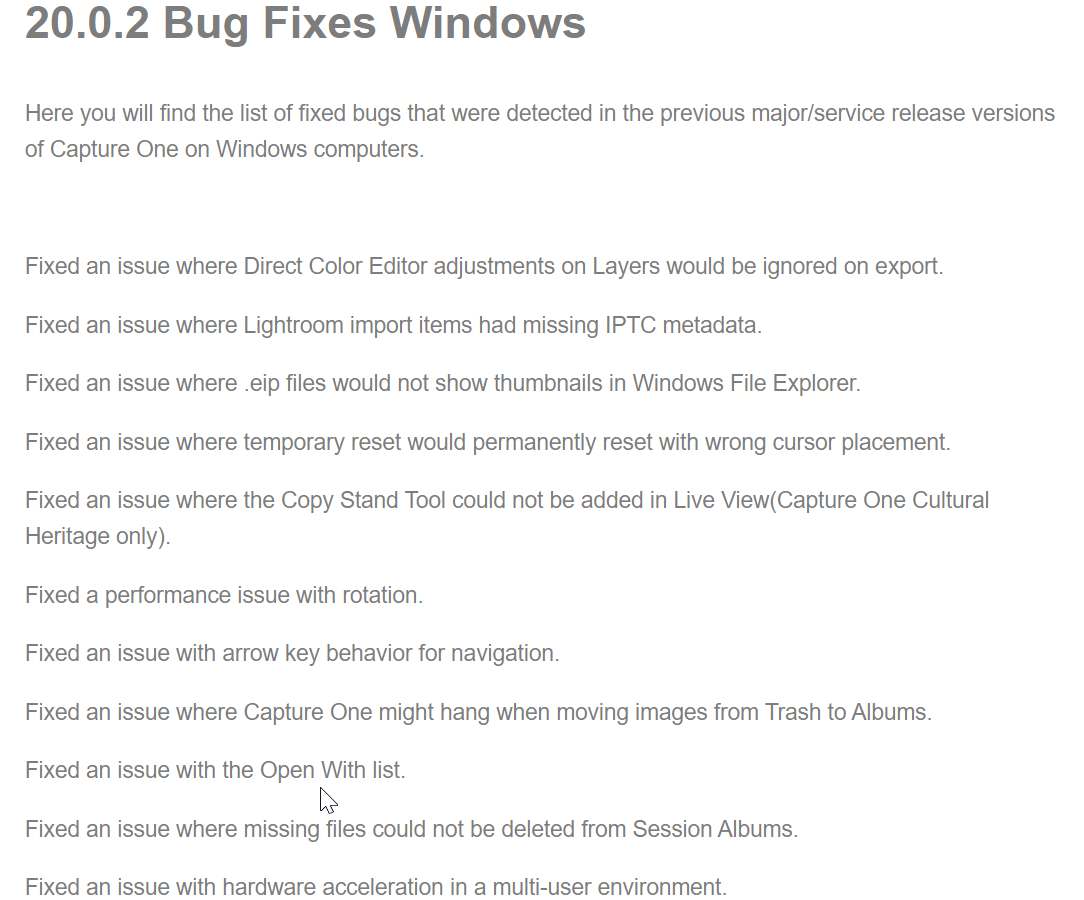 0
0 -
For what it's worth : my Windows 10 OS (1909) is EN as all software on my system. I switched C1 to FR just to check and the Openwith plugin continues to work.
0 -
@Samoreen
Please note the differences in the log files : you can see messages in english (Exception has been thrown... and Unable to cast...) or in spanish (Se produjo una excepción... and No se puede convertir...) or in french (Une exception a été levée... and Impossible d'effectuer un cast...).
@Mike & Samoreen
Thanks for your replies.
@pgrat
Congratulations, you discovered why it works with V20.0.0 and why it began to bug with V20.0.2.
I wonder why they made this "fix", I didn't see anyone complain on the forum about a problem with V20.0.0 and the OpenWith plugin.
Did anyone have a problem in V20.0.0 with OpenWith plugin ?
1 -
So, the log files are localized. My mistake.
> I didn't see anyone complain on the forum about a problem with V20.0.0 and the OpenWith plugin.
The Openwith plugin is a problem by itself. I have already explained why. It shouldn't even exist. I have never seen any application implementing the use of external programs this way.
0 -
The collection of software in the plugin list gives strange or even incoherent results, but there is always a way to work around it.
I guess someone at Phase One wanted to fix that and had to break something else...What I don't understand is why since January 27th when I reported this bug to the support, nothing has happened yet.
1 -
Hi,
I just discovered something rather strange with the OpenWith plugin.
In order to display localized strings, the main program uses C:\Program Files\Phase One\Capture One 20\P1.C1.Localization.dll in english and C:\Program Files\Phase One\Capture One 20\xx\P1.C1.Localization.resources.dll for other languages, xx being the language identifier.
I see that when the OpenWith plugin is loaded it also loads a copy of P1.C1.Localization.dll but this copy is located in C:\Program Files\Phase One\Capture One 20\Plugins\OpenWith\P1.C1.Localization.dll (EN) or C:\Program Files\Phase One\Capture One 20\Plugins\OpenWith\xx\P1.C1.Localization.resources.dll.Both versions of P1.C1.Localization.resources.dll for a given language are strictly identical binaries.
This doesn't make sense. Since the localization DLL is already loaded by the main process and since the plugin is also a DLL loaded by the main process, there's absolutely no need to load it again. This localization DLL can be accessed simultaneously by both the main program and the plugin DLL.
Moreover, this localization DLL contains all the translations needed by the main program while the plugin only needs to translate a few strings.
Duplicate copies of the same binaries, duplicate instances of the same DLL... There's something strange in this programming practice.
I don't know if this was working the same way in v12.
1 -
HI,
I just received an email from the support recommending that I don't have more than one version of Capture One on my system - which is never the case - and therefore uninstall 20.0.2 cleanly and install 20.0.3 instead.
So I did it again and the problem remains the same. I returned the plugin log and the copy of the release note of 20.0.2 above.
Wasted time for nothing.0 -
Hi,
Was the "plugin not initialized" problem fixed for anyone with version 2.0.4 ?
Thanks.1 -
Hi Patrick,
no change! The plugin remains inactive from 20.0.2 to 20.0.4 ... and I'm back to 20.0.0 !
I slowly come back to LR + Iridient N-transformer ... with a good dcp profile (not from Adobe), it works fine !I've just seen that my request has been considered resolved!
That's showing a bit of flippancy since the issue persists and no information has reached me from the development team!2 -
Same for me , back to 20.0.0
Submitted a query on Facebook wih the following response
"Thank you for your feedback. I can't comment about the technical aspects, but I have forwarded your feedback to our developers."
0 -
Seems to be fixed on 20.1 Hurrah and thanks!
0 -
Edit with plugin problem back with 13.1.1 !!
Switching back to 13.1.0 .............sigh!
0 -
Hi,
Yes, like many of us!
0 -

As i see this is a complaint is going on for nearly a year !
Dear developers i have the same problem too. Using latest Win10 with latest update from may 2020.
I switched back to 13.1 which is the one before 20.0.4And my plugins and "open with" functions working fine. Fyi.
Let us know if u give it a try to fix it in new version. Thanks in advance :D0 -

TOTALLY AGREE - PLEASE FIX THIS ... I am using the latest version of Cap1 and all the Topaz applications are the latest, but i can't use the plugins.
Taken from another thread i am following, i just entered this as it seems to have some good log information that basically points to Cap1 trying to access all the different applications from the same directory - regardless of where the applications are actually installed...:
At one point tonight, Edit With Topaz Denoise actually worked - and i noticed that when it did work, the Topaz application ICON was next to the plugin name - unlike the other Topaz application plugins - they were listed by no icon next to them.
Then tried grepping through the logs and came across this - basically the path to the Topaz applications is wrong ... except for the denoise application which worked.
Capture One is trying to access all the Topaz applications from the same directory of C:\Program Files\Topaz Labs LLC\Topaz DeNoise AI - regardless of where the application is actually installed.
Each Topaz application is actually installed under its own directory:
C:\Program Files\Topaz Labs LLC\Topaz {app name} AI\Topaz {app name} ai.exe
BUT Capture One is trying to access ALL the applications from the same parent directory of
C:\Program Files\Topaz Labs LLC\Topaz DeNoise AI\ - obviously theat is why only Denosie worked.I have no idea where to go from here - but Capture One is not working as it should - PLEASE HELP
[2020-07-01 18:09:29.912][000][ID:011, ]{PLUG } | path - System.IO.FileNotFoundException: C:\Program Files\Topaz Labs LLC\Topaz DeNoise AI\Topaz Mask AI.exe
**| at System.Drawing.Icon.ExtractAssociatedIcon(String filePath, Int32 index)
**| at BuiltInOpenWithPlugin.BuiltInOpenWithPlugin.GetAssociatedIconFromPath(String argPath)
[2020-07-01 18:09:29.912][000][ID:011, ]{PLUG } | path - System.IO.FileNotFoundException: C:\Program Files\Topaz Labs LLC\Topaz DeNoise AI\Topaz Sharpen AI.exe
**| at System.Drawing.Icon.ExtractAssociatedIcon(String filePath, Int32 index)
**| at BuiltInOpenWithPlugin.BuiltInOpenWithPlugin.GetAssociatedIconFromPath(String argPath)
[2020-07-01 18:09:29.912][000][ID:011, ]{PLUG } | path - System.IO.FileNotFoundException: C:\Program Files\Topaz Labs LLC\Topaz DeNoise AI\Topaz Studio 2.exe
**| at System.Drawing.Icon.ExtractAssociatedIcon(String filePath, Int32 index)
**| at BuiltInOpenWithPlugin.BuiltInOpenWithPlugin.GetAssociatedIconFromPath(String argPath)
[2020-07-01 18:09:44.091][179][ID:008, ]{PLUG } | GetTasks -> Id: Topaz Denoise AI.exe, DisplayName: Topaz DeNoise AI.exe, Image: ImageSkipped, G:\Exmoor-milkyway\Capture\ISO-50\A7R00645_20.tif
[2020-07-01 18:09:44.097][005][ID:008, ]{PLUG } | GetTasks Topaz DeNoise AI.exe Topaz Denoise AI.exe
[2020-07-01 18:09:44.142][044][ID:008, ]{PLUG } | StartOpenWithTask -> FileHandlingTask: Files: G:\Exmoor-milkyway\Capture\ISO-50\A7R00645_20.tif, Id: d7facd10-a772-4222-86d6-059d07ebf180, Action: Id: Topaz Denoise AI.exe, DisplayName: Topaz DeNoise AI.exe, Image: ImageSkipped, Settings: SettingsSkipped
[2020-07-01 18:09:44.150][007][ID:008, ]{PLUG } | StartOpenWithTask d7facd10-a772-4222-86d6-059d07ebf180 Topaz DeNoise AI.exe Topaz Denoise AI.exe
[2020-07-01 18:09:44.150][000][ID:008, ]{PLUG } | Trying to start application Topaz Denoise AI.exe
[2020-07-01 18:10:38.692][542][ID:016, ]{PLUG } | GetSettingsAsync
[2020-07-01 18:10:38.958][265][ID:017, ]{PLUG } | path - System.IO.FileNotFoundException: C:\Program Files\Topaz Labs LLC\Topaz DeNoise AI\Topaz Gigapixel AI.exe
**| at System.Drawing.Icon.ExtractAssociatedIcon(String filePath, Int32 index)
**| at BuiltInOpenWithPlugin.BuiltInOpenWithPlugin.GetAssociatedIconFromPath(String argPath)
[2020-07-01 18:10:38.958][000][ID:017, ]{PLUG } | path - System.IO.FileNotFoundException: C:\Program Files\Topaz Labs LLC\Topaz DeNoise AI\Topaz Mask AI.exe
**| at System.Drawing.Icon.ExtractAssociatedIcon(String filePath, Int32 index)
**| at BuiltInOpenWithPlugin.BuiltInOpenWithPlugin.GetAssociatedIconFromPath(String argPath)
[2020-07-01 18:10:38.958][000][ID:017, ]{PLUG } | path - System.IO.FileNotFoundException: C:\Program Files\Topaz Labs LLC\Topaz DeNoise AI\Topaz Sharpen AI.exe
**| at System.Drawing.Icon.ExtractAssociatedIcon(String filePath, Int32 index)
**| at BuiltInOpenWithPlugin.BuiltInOpenWithPlugin.GetAssociatedIconFromPath(String argPath)
[2020-07-01 18:10:38.958][000][ID:017, ]{PLUG } | path - System.IO.FileNotFoundException: C:\Program Files\Topaz Labs LLC\Topaz DeNoise AI\Topaz Studio 2.exe
**| at System.Drawing.Icon.ExtractAssociatedIcon(String filePath, Int32 index)
**| at BuiltInOpenWithPlugin.BuiltInOpenWithPlugin.GetAssociatedIconFromPath(String argPath)
[2020-07-01 18:10:50.004][046][ID:016, ]{PLUG } | GetOpenWithActions -> keys: .ARW, values: 1
[2020-07-01 18:10:50.273][268][ID:016, ]{PLUG } | path - System.IO.FileNotFoundException: C:\Program Files\Topaz Labs LLC\Topaz DeNoise AI\Topaz Gigapixel AI.exe
**| at System.Drawing.Icon.ExtractAssociatedIcon(String filePath, Int32 index)
**| at BuiltInOpenWithPlugin.BuiltInOpenWithPlugin.GetAssociatedIconFromPath(String argPath)
[2020-07-01 18:10:50.274][000][ID:016, ]{PLUG } | path - System.IO.FileNotFoundException: C:\Program Files\Topaz Labs LLC\Topaz DeNoise AI\Topaz Mask AI.exe0
Post is closed for comments.
Comments
81 comments