Output Recipe suggestions

When using Sessions I would like to have the option of tying Process Recipe, Output Naming, and Output Location together when I create a new custom Process Recipe. That way I will KNOW that these processed images will not only have the format, quality and so forth nailed down; but that anything I specifically want in Output Naming or in Output Location is done the same way every time.
My example would be to use a Process Recipe for making medium sized images and I define all the specific details in the Process Recipe box. Under Output Locations I would have a subfolder with the name “Medium Jpgs”. In the Output Naming section I would want the word “Medium” added to the file name after the Image Name token.
Right now Output Naming and Output Location are independent of Process Recipe and require that Output Location and Output Naming information to be hand entered each time. That’s both time consuming and error laden.
-
I can't see what you are asking for that can't be done already.
Ian
1 -
OK. How do I tie them together?
0 -
Please see the following screenshots.
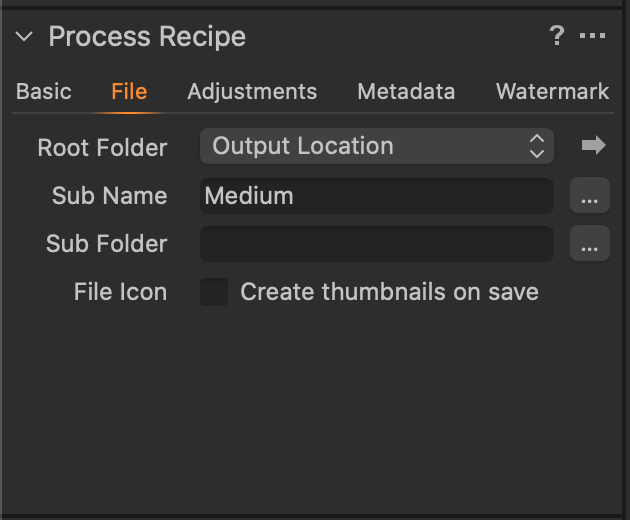
First, the file naming, where you'll see I've put Medium as the sub-name.
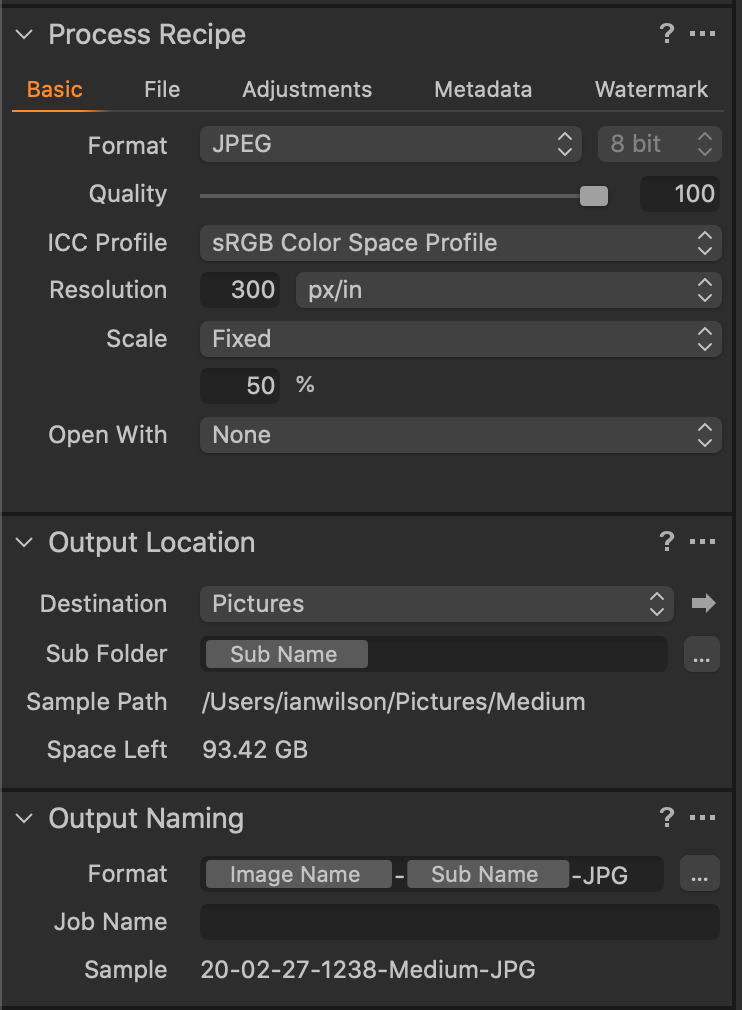
Then the rest of the recipe. I've changed the destination using Choose Folder to a different folder from the Output folder. defined as my Pictures folder with a subfolder named by the sub name (Medium in this case). Also the file naming appends the sub name token to the file name and the text -JPG. Does that cover it?
 0
0 -
Sorry, I see that the JPG text should have been added to the folder name no the file name!
Ian
0 -

Have you looked into all of the options for using Tokens for naming and for Output location subfolders?
Where does your output go? Always a fixed dedicated folder for a given recipe or somewhere relative to the output folder for the Session or Catalogue you are using?
So in the File Tab of the recipe -
Sub Name - Medium
Sub Folder - Medium Jpgs
Sub Name (from above) is an available token for the Output Name Format field.
When you process to output the files will go to wherever the Destination field is identifying. Hover over it to see where that is. The default would be the C1 provided "Output" folder for the Session or Catalogue BUT you can make it anywhere you like and still call it Output. Thus my previous question about "Where does your output go?".
The Subfolder field there (potentially named by token) is NOT THE SAME Sub Folder option as defined in the File Tab of the Process Recipe. So you can have
Output Folder > Output Sub Folder > File Tab defined Sub folder.
As you described above I think you would just need ...
Output Folder > File Tab defined Sub folder.
Of course if you always send all Medium Jpg to a single Folder called Medium Jpg then just make that the Root Folder in the Process Recipe but that is a little inflexible for some people who might end up with many hundreds of recipes - one or more for for each job they shoot.
I may have missed something. Please let me know if you think I have. Or my assumptions about the "Output Location" Destination field are not how you work with things.
Grant
AH! I see IanW has responded just after I started to prep a reply.
It may even be a similar answer!
1 -
I get what do now. I don't use the Output Naming or Output location dialog boxes at all. I just found File in the master Process Recipe dialog box. (Basic, File, Adjustments ...) THERE I can make those naming and output changes that will survive as specific to that Process Recipe. Now I'm asking myself what those independent Output Naming and Output Location boxes are for.
0 -
They pre-date the availability of the Tokens.
However there are other use cases where complete redirection of the output may be required and specific customer naming rules may need to be applied and locations are client related rather than internal storage locations.
1

Post is closed for comments.
Comments
7 comments