Can't find Affinity Photo from Capture One anymore

Hi,
So I switched to Capture One and eventually also to Affinity Photo from using Adobe Lightroom and Photoshop in the past. It's worked great up until today. I can't edit photos from Capture One in Affinity photo anymore. When right clicking and selecting "edit with" I just get the Browse file window. I bought Affinity Photo from Windows store so the program is inside the hidden WindowsApps folder. I have changed permissions to that folder but when ever I try to select the program file (photo.exe) in the "edit with" dialogue it just creates a new .tif file. It doesn't matter if I already have Affinity Photo open, and if I open the generated .tif file with AF it's not linked to the file in Capture One meaning that the edits I do in AF doesn't come through in Capture One.
In the past I could browse installed programs in the "edit with" dialogue but now I just have the file select dialogue.
I haven't had this issue in the past. I haven't installed any new versions of any of the apps. Any clues?
Thanks!
-
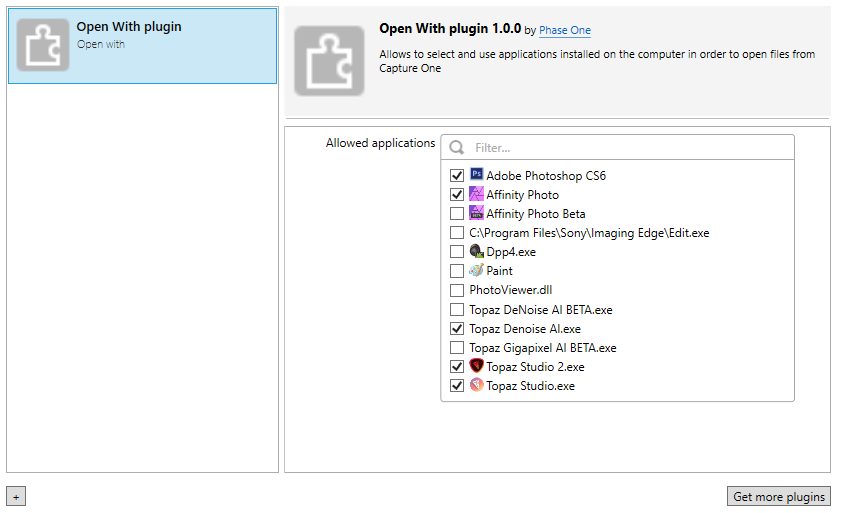
Have you looked at the plugins section of Preferences, and ensured that Affinity Photo is checked in the list of apps in the Open With plugin?
Ian
0 -
Hi Ian,
thank for the swift response! I've looked there and it's not even in that list. I don't think it was there before. I still had to choose "browse" but then I at least got to browse the installed programs.
0 -

If you buy from the Windows App store does it automatically update for you?
I ask because Serif have just released a new release of Affinity.
0 -
It does update automatically. I just tried uninstalling AF and downloading the non-Windows store trial version. That works great. I will contact Microsoft support tomorrow and see if I can get my serial number (or a refund) so I can just activate the trial version. Thanks for the help everyone!
0 -
Anders,
My guess is that all that has happened is that something like a shortcut that you previously used by browsing to to it when required (or you browsed to the .exe?) may have been replaced with a new shortcut (or the new .exe) and you need to find that.
Better might be so go into the Windows File Associations, make Affinity an associated program for the files types you might wish to pass from C1 from time to time, and then you should be able to "activate" it in the C1 Plug-in manager ready for selection without browsing. It should only take a minute or two to create the link in Windows.
My first post in this thread may help if you are not familiar with Windows File Associations.
I think there is a more detailed step by step post elsewhere but try this for now.
Grant
0 -

Hi Anders,
if you use C1 20.0.2 or 20.0.3 under Windows, the plugin "Open With" is buggy ! At launch, "Open With" is disabled but you can select "Edit with" or "Open With" and the symptom is yours.
Only 20.0.0 works fine.
You can see here :
https://support.captureone.com/hc/en-us/community/posts/360009392158/comments/360001674477
0 -

Strange, on Windows 10 both Open with & Edit with are available for me. But unless your associations are set in the OS they wont show in the list but you can just go to Preferences -> Plugins and select the ones you want to show in the list:
 0
0

Post is closed for comments.
Comments
7 comments