Can't see images in some folders

I bought version 20 last December and did not have this problem till today.
I am on vacation and created a new catalog which I will merge with my master catalog when I get home.
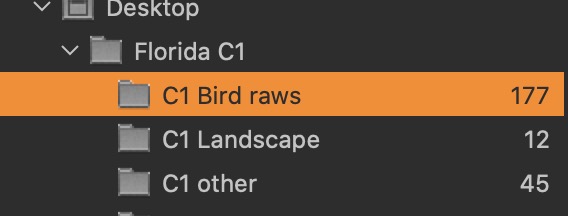
I created a folder called Florida C1. Inside it I created 3 subfolders - C1 Bird raws, C1 Landscape, and C1 other. From the screen shot you can se the number of images in each folder.
The problem is I just went to each of the 3 folders and when I click on C1 landscape - I can see the 12 images on the right side of my window. However, when I select C1 bird raws I don't see the images; rather see the message No results found for '0396.When I select C1 other, I don't see the images; rather I see the message No results in'0532'.
The images are on my harddrive. What did I do to mess things up or is there a problem with my catalog?
-
I forgot the screenshot
 0
0 -
I assume you have a filter set in the browsers' filter from an earlier search (0396). Capture One remebers your last filter for each folder or album, which explains why the Other folder it shows 0532. Tjis assumes you have serched for these strings before but do nit have the imagrs with these numbers in the respective folders (anymore?), as otherwise it would find them.
The filter us a small box in the browser somewhere on top.
regards
1 -
Thanks. I did a find coommand and those numbers appeared. I erased them and all is fine.
1

Post is closed for comments.
Comments
3 comments