Worst support ever

Hello Everyone
I just wanted to tell that phase one's support is one of the worst I ever encountered and I would not recommend buying C1 if you shoot with a Canon 5D mark I-IV.
C1's color rendering of Canon 5D raw files is useless. The preview and output look absolutely different (see below). Dark areas of night shots get a strong purple color cast, which is only visible in the output file or if you zoom in more than 50%. One can't make the proper color adjustment of any long exposed pictures that way!
To solve my problem I submitted a request and it took them 2 weeks to reply with a standard response to reinstall the software. As if I would not try that in those 2 weeks. They did absolutely not care about the problem or even tried to reproduce it on their side (they probably know about the problem anyway).
Another month passed and yet no response! I really can't believe that I'm the only Canon 5D user with that problem. I've downloaded sample pictures from the internet to check if my raw files are corrupt. They had the same problem :(.
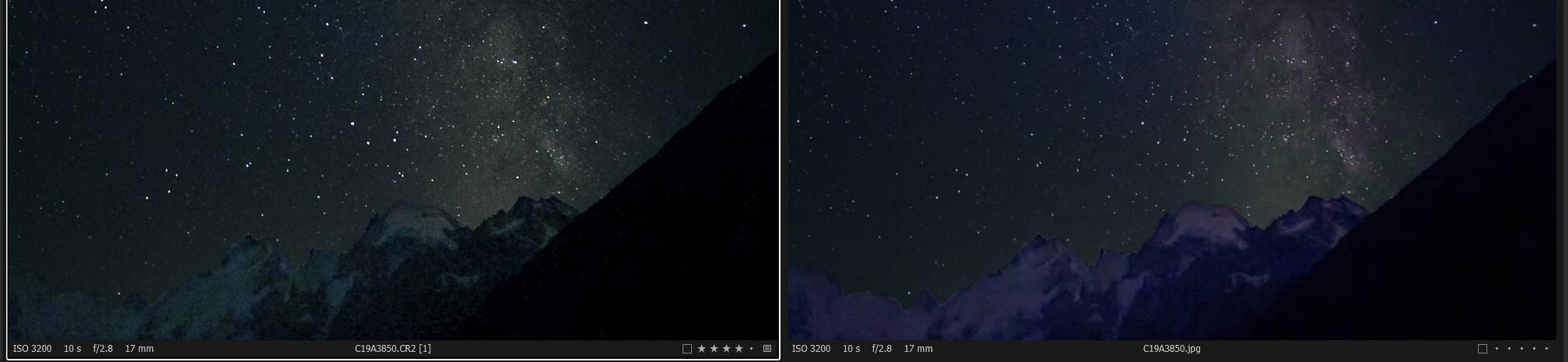
left preview window, right jpg output.
-

5D MK ? All models?
How did you process your output file?
I.E. Can you share your process recipe? Were you using the same Recipe for proofing?
Better still, if you could upload your original file and edits (EIP file?) to a file sharing platform I'm sure a few people would gladly take a look at the process and advise whether or not they can confirm the apparent problem.
Grant
0 -
Hi Grant
Thank you for your fast response!
As I can tell from my pictures, all models are affected. But III and IV the most. 1D x and EOS M3 pictures seams to be fine.
I used same process recipe export and for proofing. With QuickProof export, the jpg looks like the preview.
I simply turn up exposure and / or shaddows and the purple cast starts to appear. But only if zoom > 50%
You can see the effect with the sample picture from dpreview. It's not so obvious in this example but still noticeable. In the meantime, I try to find some online space for my pictures. (Mountain https://1drv.ms/u/s!AqavoCwY214qgQrwfypezxnnJq4Q?e=qGqrnZ )
https://www.dpreview.com/sample-galleries/9485291827/canon-eos-5d-mark-iv-sample-gallery/6591654188
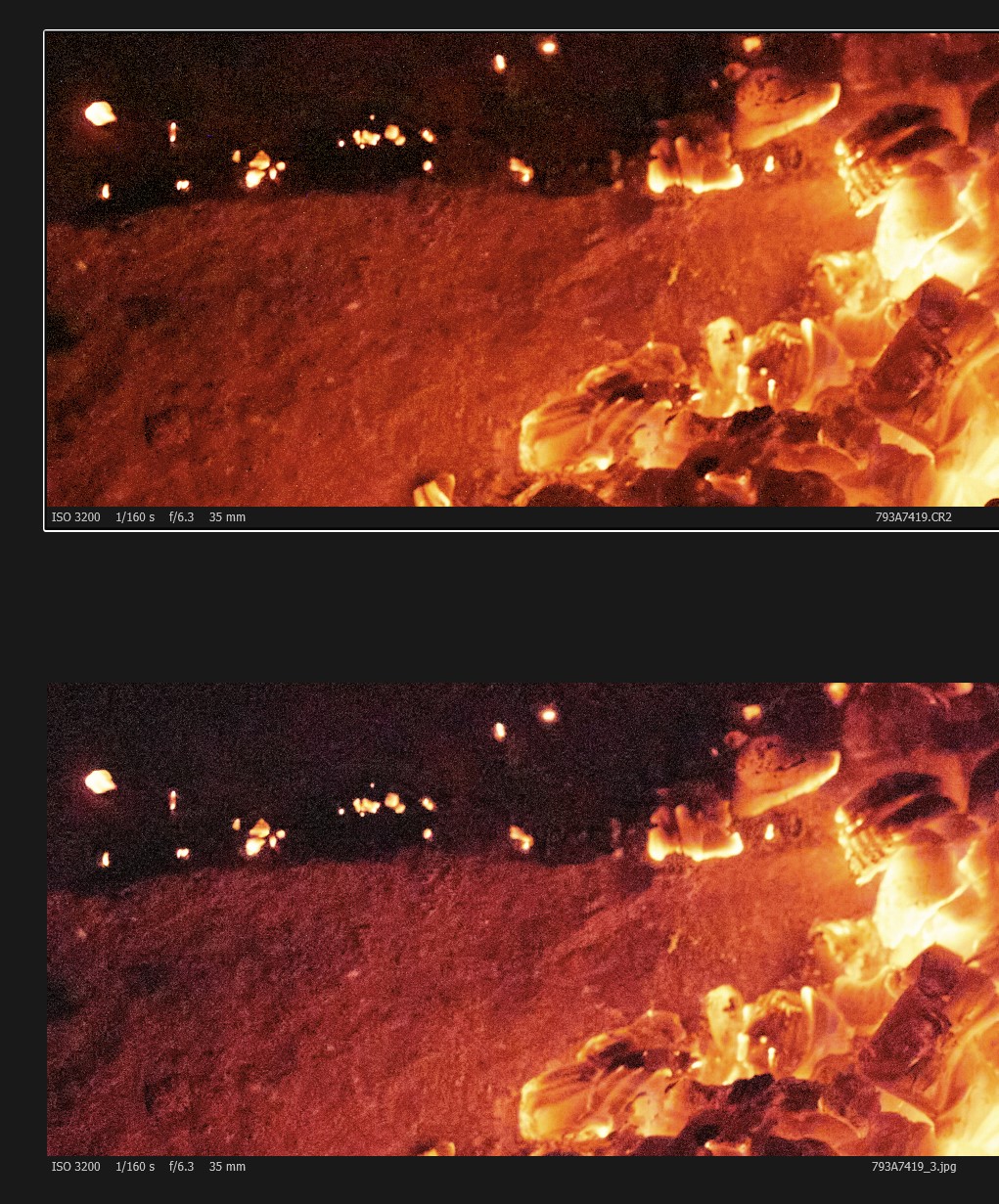
Another one of my pictures.
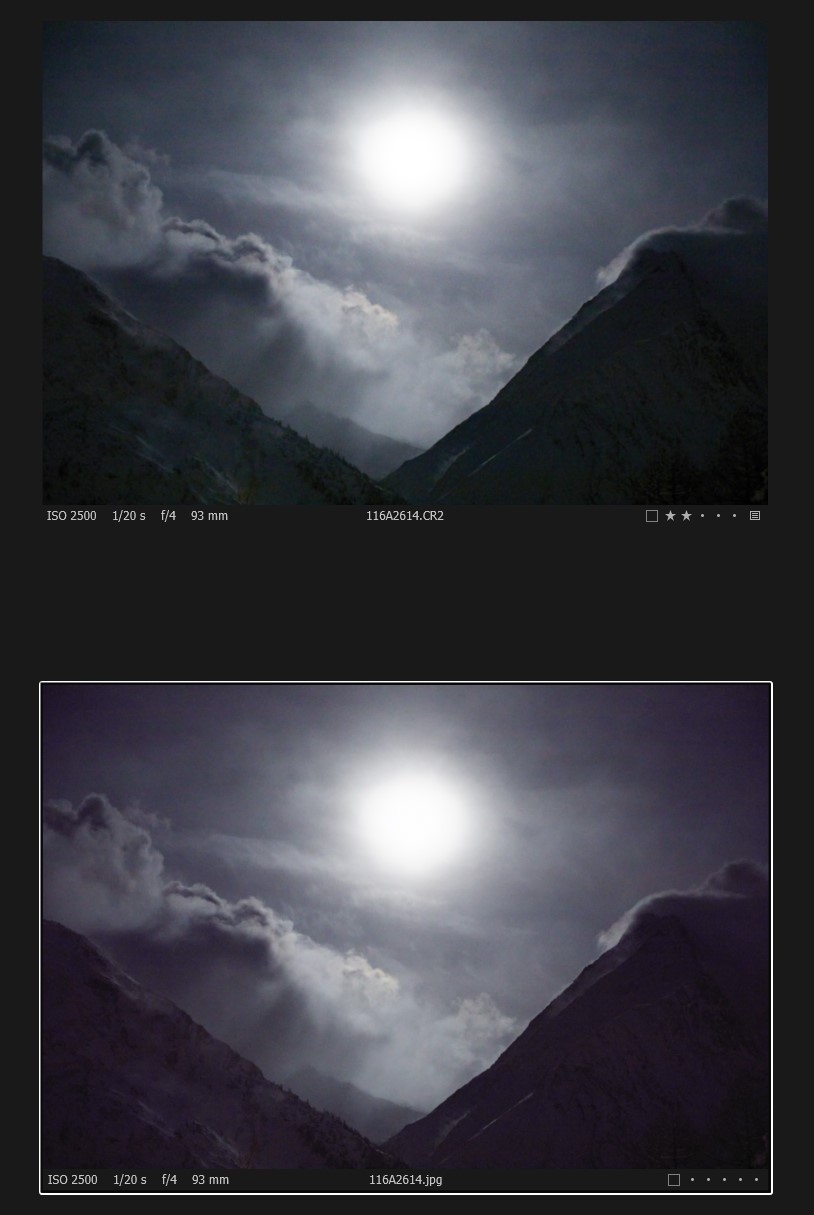 0
0 -

Does the error still occur with hardware acceleration disabled?
I get the colors of a 1DX MarkII displayed incorrectly in the depths and highlights when I use the HDR slider and have hardware acceleration enabled.
If I don't use the HDR slider, everything is fine or I disable GPU calculation. According to AMD, this is probably due to the new GPU architecture of my Radeon RX5700 (RDNA), which C1 may not yet support.Translated with www.DeepL.com/Translator (free version).
Robert
0 -

The output colors of my Canon 5D (mark I) In CO are very fine. The Canon 5D III colors are not so good and the Canon 5DS are ugly, too much reddish/orange. In the case of the 5DS I use DxO PhotoLab and perhaps the next upgrade of CO if the service is not better also for the rest.
Willy
0 -
@Robert
I tried your suggestion. Disabled HW acceleration has no effect on my computer.
@NN383
This sounds very bad. Had I known this earlier....
Phase one's advertising works well. How good the color rendering is and at the end it is worse than the competition. I even cross checked with open source sw darktable which has no such problem.I tried to get a refund from them, but they just ignore me.
0 -

A few questions:
Are you using LCC corrections?
Are you using the same engine version for all the images? ( Capture One 20)0 -
I downloaded your EIB mountain image. I basically see what you showed in the screenshots. With porocess recipe sRGB and proof profile -selected process recipe- with a sRGB monitor profile, calibrated.
A few observations:
- Below 50% zoom level, the purple cast is not visible, instead green and purple color swatches.
- The jpg looks the same as the preview if the preview is 50% zoom or higher
- I remember from a post in the forum, that below 50% zoom, the noise reduction is not applied to the preview
- Bumping up the color noise reduction helps somewhat
- I noticed that you underexposed by 3.45 stops, e.g. the dark mountain has a color readout RGB value of 1,1,1 or 1,1,2 if you choose the linear curve in base characteristics. Color shifts with exposure set to 3.45 I would somehow expect
- I also developed the cr2 with Affinity photo, a lot of green and prple color swatches too, not nice either
- In Affinity, I noticed the raw file is shown as " RGBA 32 (HDR)". Just an observation which I cannot judge the impact for C1
- When I chose the profile 5D -generic, the result is much much better!. Especially when the color noise slider is adjusted in addition. I actually like the result.
- Further tweaking with WB or color tools I did not do, but if that would be my image I am sure I could develop this highly underexposed image to a decent nice result
If I would have other raw converters which made me happy out of the box then I would go with these probably.
regards
PS. The image I looked at is the two mountains with the sun (or moon?), not the stars
0 -
I've downloaded the file and honestly I've had pretty much the same results with high ISO images from my Canon 5D in Lightroom, especially when underexposed.
I'm guessing this is less a fault with Capture One and more with some built-in noise reduction in their raw file stuff. Even if you turn down the noise reduction to 0 in C1 it still gets all mushy. That doesn't happen with any other image from any other camera manufacturer in my catalog, only Canon. And as I said, the result is very much the same in Lightroom.
Generally I'd say you should try to get a correct exposure to begin with. ISO2500 pushed by nearly 4 stops is really something where you could or should not realistically expect a usable outcome, especially for color photography.0 -
@BeO and C-M-B
Thank you for your detailed analysis, I really appreciate it. I uploaded the edited picture which triggered my frustration with C1.
https://1drv.ms/u/s!AqavoCwY214qgQuWK72tx8F7LpH7.
Bumping up color noise reduction indeed reduced the difference in color cast between zoom levels. The 5D generic did not help that much for me.
I did not use any LCC correction and used only C1 20 engine.I used Lightroom before switching to C1. Your right, the pink color cast is also present there. Canon 5D has its history with it. But the main and crucial difference is, it doesn't matter what zoom level I use. I can adjust the colors, WB whatever while see the whole picture and the preview stays consistent through all zoom levels and output. With C1 this is not possible. I edited the picture above with 0% zoom level and was shocked to see the output.
I do not complain about pink cast itself when I boost a underexposed picture but the inaccuracy of the preview in regard of zoom level and output. To me, this is not acceptable for a product in that price range when others can managed it.
0 -
I agree, all adjustments should be rendered no matter what the zoom level is. For images which are rather "normal" this might not make a difference and the performance gain is welcome, but for some images at any extreme end it can make a differnce, your example being one. As it might also be a difference depending on the monitor resolution, image resolution, how critical one looks at lower zoom levels etc. the automatic choice for a specific zoom level in the software seems a bit arbitrary..
So if we could choose in the preferences if all adjustments are rendered or not this would be most welcome.
regards
0 -
Yes, I think so too.
I assume the problem is that CaptureOne uses a lower res image to display the smaller magnifications and that automatically uses its own automatic "color noise reduction" during generation.
Maybe you should file a request for Support - I also think that there's often a difference between the lower res files and the high res files in color rendition when high ISO / high noise levels are present. Though to be honest it has never been that bad for me.0 -
Just for fun I reduced the preview size in preferences to the minimun 560px or so, and guess what, the viewer shows the purple cast already with zoom level 33% instead of 50%. My conclusion is that the adjustments, which are typically not seen at low zoom levels, NR in this case, are not applied the the preview file and also not applied on top of the preview file when the file is shown in the viewer (unless zoomed in).
And yes the performance is slower when the preview size is lower than what the Viewer size is.
It hasn't been an issue for me neither, but if you do a lot extreme images like astro I could image it would. I would vote for this feature request (setting in preferences) if someone opens it.
regards
0

Post is closed for comments.
Comments
12 comments