RAW Conversion Error

This suddenly started occurring today. I am a new user - been at it only about ten days. Until now, RAW files (.cr2 from an EOS 1DX MkII) have looked great. Today, they showed up all messed up, with lots of green patches. I have tried the following:
1) Going to another library that previously looked good. No longer looks good.
2) Removing C1 preferences and Application Support files (User Library) and rebooting. No help.
3) Changing profile in Lens Correction Tool and toggling Chromatic Aberration and Distortion Correction . This is bizarre. When I change something things briefly look normal, and then the green patches return (after about one second).
4) Converting to jpeg in Canon Digital Photo Professional (where the RAWs still look fine), and importing the jpeg into C1. Works fine.
5) Probably the most bizarre: if I process the file to jpeg in C1, the exported jpeg looks fine! [This is not even a workaround, because with a messed up preview, proper editing is not possible.]
6) Deleting the Cache folder from the Catalog file. Just regenerates wrong previews!
Any help will be greatly appreciated.
The center image below was imported as a jpeg (converted by DPP):
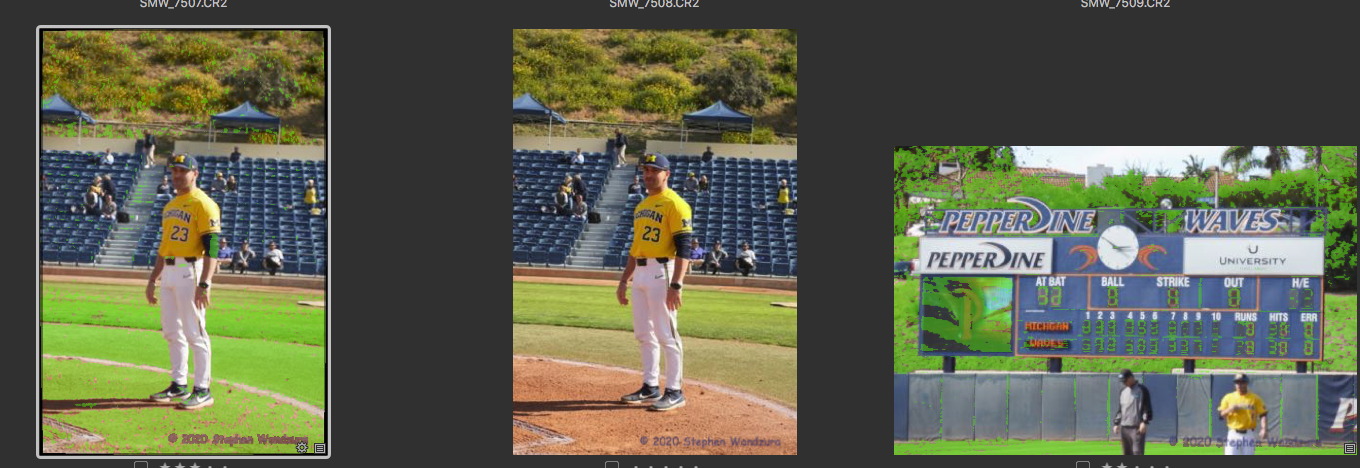
The scoreboard LEDs are all orange - no green.
-
Additional data: changing setting in Base Characteristics doesn't help, nor Exposure and/or Shadow Warning settings.
0 -
Wow!
Thank you, Walter.
I went to Focus preferences. I clicked on the Defaults button. Neither slider moved, nor the (green) color change.
However, the green stuff did disappear from the photos!
I don't understand why trashing the Preferences and Application Support files did not work - but I am happy to be back at editing photos!
0 -
I figured out how I went wrong.
I must have accidentally pressed Q (the keyboard shortcut for focus mask).
Thanks again for your quick help!
0 -

The focus tool is great idea but I have never found it to be useful. In the images shown it obscures eevrything that is in focus, and it typically doesn't indicate clearly what's in focus.
Olympus and Panasonic caneras (and I am sure a few other brands) have a feature that outlines sharply focussed edges, and this is much more useful.
1 -

I don't understand why trashing the Preferences and Application Support files did not work - but I am happy to be back at editing photos!
How did you trash the preferences?
0 -
Well to be honest, I didn't really trash them. I moved the file com.phaseone.captureone13.plist out of the Preferences folder and rebooted. Naturally when I reopened C1, it generated a new one.
0 -
Removing a plist doesn't always clear preferences. It been that way for several macOS versions, now.
Open a terminal. Enter the command
defaults delete com.phaseone.captureone13
That deletes the preferences. It also updates the plist file. The new contents will consist of not much more than generic plist boiler plate.
When you started Capture One after your reboot did it look and act the way it did the very first time you launched the program? It should have. If it didn't the preferences hadn't been fully removed.
1 -
Thanks for the info!
If I had actually put it in the trash and emptied, would that have worked??
I can't really tell about "look and feel". To some extent, I assume it was different, as I also removed all the C1 Application Support files.
Apple is evil. Killing Aperture is why I am here. I wish they would stop "improving" things.
😡
0 -
When you started Capture One did you get the Welcome to Capture One window which asks you to select your version? If not then you didn't actually delete your preferences.
0 -
Thank you.
I don't think so, but I am not sure.
As a newcomer, it's hard to remember all the bread crumbs.
I really appreciate your help, though.
0
Post is closed for comments.
Comments
10 comments