Automatic Sync Metadata entries between photos
Implemented
The ability to automatically sync metadata entries between selected photos when selected variants is active.
Now this works for color tag, rating and keywords. Why not for metadata?
-
Official comment

Hi Stimolo,
Thank you for feedback on Capture One - this is always welcomed and encouraged among our users and we appreciate the time you've taken to contribute towards the development of the software.
I have forwarded your comments and suggestions to our Product Management team as something to consider in a future release.
Whilst we cannot comment on future releases, we take all suggestions on board and hopefully your feedback contributes towards a future version of Capture One. -
With "sync" you mean copy and apply?
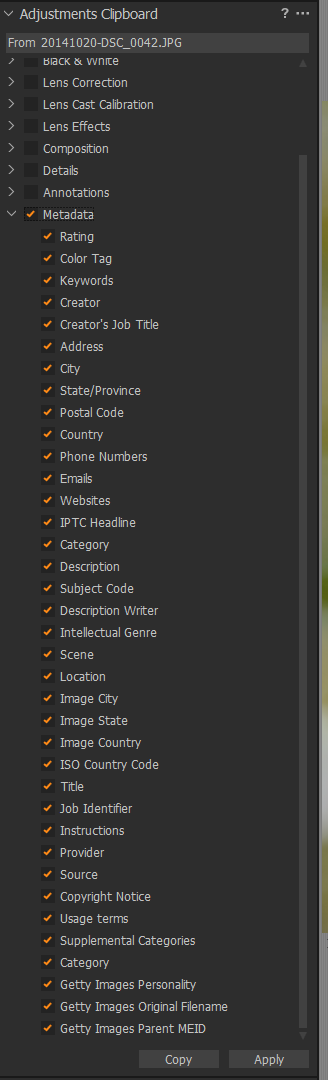
What metadata could be useful, shutter speed probably not. Here is a (probably non-exhaustive) list of metadata which can be copied:
 0
0 -
No, I know how to copy and apply metadata between images.
What I need is that, selecting 2 or more images with "selected variants" active, all changes I make to metadata entries must be reflected automatically to all selescted variants, without copy and apply action.
This now works for color tag, rating and keywords. If I select 2 or more variants and assign a keyword, a rating or a color tag, all selected photos are involved without the need to copy and apply.
0 -
Ah, understand. If you have the button All selected variants" or similar active, then a cahange to e.g. the IPTC location field should be automatically set for all selected variants. Make sense now.
1 -

This is a good one! It drives me nuts that I need to reapply my metadata to the TIF, even though the parent had it to start.
0 -

How are you creating the Tiff?
Export Variant or using a Process recipe both offer the option to make decision about the inclusion of exclusion of metadata.
0

Post is closed for comments.
Comments
6 comments