First time user

Hi folks. I've downloaded capture one express, and imported all my photos into catalogue called something like "catalogue_25032020" 1". The photos are in one folder on my PC. I could see all the images on C1, and there was a dialogue box saying creating previews (it was 33% through). Unfortunately it was taking so long my PC got shut down. When i turned my PC back on today I went to C1 hoping to complete the import process .... but no images. It asked me to create a catalogue (which I did with a new name "catalogue_new" or something). I'm hoping I just need to "point" C1 at the original catalogue and i will carry on where it left off ... but i cant see how to do that. Thanks everyone.
-
I believe the express version of C1 is restricted to one catalog. Try to find the catalog you have started with (catalogue_25032020"), search for all ".cocatalogdb" files on your system if you cannot find it.
A new catalog does not hold any of your images, browser cache or previews from another catalog, so you would not be able to start with a new catalog where you (or C1) have left the other catalog, so with a new catalog you would have to start from scratch.
If the system shut down irregularly, odd things might have happened, so starting from scratch might possibly be a good idea. If you want to do that, try to find the old catalog and delete it, together with the folders below (but always know where your original image files are and do not delete them; and I assume you have a backup).
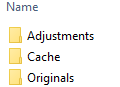
regards
0 -

How many photos were in this one folder?
Regards
0 -
Hi
I can see the old and new catalogue on my pc c:drive, but cant see how to "tell" C1 to forget the new one, and use the old one.
The original catalogue has 22k pics in, all of which appeared in C1 after import (only low res thumbnails though).
I chose to shutdown the pc half way through the previews were being created - my new PC has purple flashing lights and in the middle of the night my wife asked me to shut it down as it was lighting up the bedroom. It wasn't the time to try to turn just the purple lights off :) :) :)
0 -
I have no experience with the express version and this one catalog only restriction, but can't you just double click on the old catalog file?
purple lights are better than purple fringing I guess... :-)
0 -
Ha ha :) Did you mean click on the old catalogue from within C1 or from within windows file explorer?
0 -
Yes, from Windows explorer.Did it work?
0 -
Ok, problem solved ....
1. I double clicked the old catalogue, got a message saying "can't use multiple catalogues in C1 express, hold down alt when opening C1 to choose a catalogue"
2. double clicked c1 icon to open the programme, then held Alt whilst it did so
3. got a dialogue asking me to create or browse for a catalogue
4. it worked! boom, thanks :)
One question .... i found the activity icon (spinning wheel) and clicked on it ... it is creating 4000 previews. I have 22000 pics in the catalogue ... does that mean 18000 already have previews made?
0

Post is closed for comments.
Comments
7 comments