Previews Blurry

Hello! New user here, I am noticing that whenever I go to edit a picture it looks extremely blurry until I zoom in. Why is this? Its driving me crazy!
Hopefully someone knows how to fix it.
-
Myabe more information would be good. Which raw files do you have? Exported images look blurry too? (probably not). Can you paste a screenshot? Did you make adjustments? Which? Can you create a new variant without adjustments (F7), and see if it is blurry?
If you zoom in beyond the resolution of the preview file, which is configured in preferences, the preview file is not used but rather the raw is developed from scratch. So I think your title is well chosen. Check the preferences, preview size should be a bit higher than your monitor res. Select one image and regenerate the preview (F5 on Windows, or you find it in the menu) to test if blurriness disappears.
0 -
One initial import the "preview" can be blurry because it isn't yet a preview, just a scaled up version of the thumbnail. Capture One should quickly go on to generate the previews of its own accord, but sometimes it doesn't without being kick-started by choosing "regenerate previews". I don't know why.
Also on a Mac, new variant is F2 (and clone variant is F3). There is no default keyboard shortcut for regenerate previews, but you could set one up if you wanted. (Or just go to Image>Regenerate Previews in the menus.
Ian
0 -
hello, thank you all for replying. I tried everything you all said and nothing really changed. it seems that i can only get the full resolution when I zoom into the picture at 100%.
I attempted to regenerate previews and it still is just slightly softer than it should be. I can make a new variant and it is the same, my preview size is 3840. which i would assume is the right size, i am on a 2019 MBP. I know it has the retina display in it so i would assume its fine at that.
I am just so used to Lightroom where when you upload the picture into your catalog you can count on that picture more or less having all of the detail in the preview that you are editing.
Im sorry if my terminology isn't correct on anything.
0 -
If I remember right there was another user just recently who reported something similar with a Retina or hi res monitor, but not "extremely" blurry. C1 does not apply all adjustments at lower zoom levels, I know this for sure for noise reduction, maybe others. This might or might not explain a slight blurryness and maybe more noticeable on a hi res monitor, not sure though what you mean with extremely" blurry. A screenshot is easy to paste here...
0 -

my preview size is 3840. which i would assume is the right size, i am on a 2019 MBP.
Click on the Apple Menu -> About this Mac. Click on the Displays tab. That will tell you the resolution of your screen. Then click on the "Display Preferences" button. You want "Default for display" selected, not "Scaled".
0 -
@BeO maybe "extremely" blurry is not the right term. they are just a bit softer than the actual picture should be. I don't know why its happening.
I just posted two pictures. One zoomed in and one not zoomed in. The more i look at it i realize its really not a terrible difference but still it is noticeable to me. I would love to edit full quality pictures without having to zoom in every time i wanted to see details

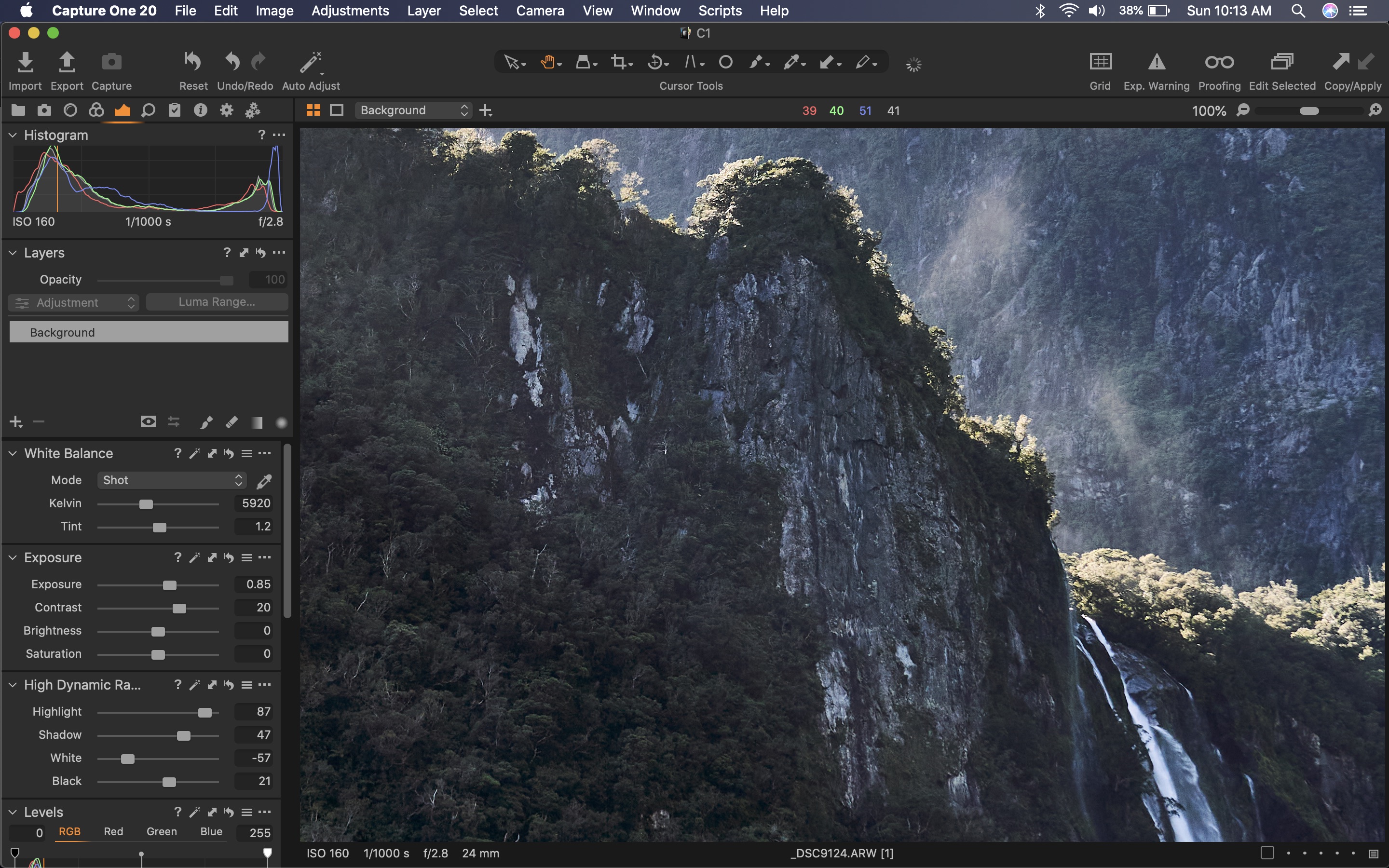 0
0 -
Are you on the very latest version of Capture One? There was a previous issue with soft previews, and there was an update that was supposed to address it. (But I don't remember which release it was.)
Ian
0 -
hey ian,
I am currently on capture one 20. It is the trial, maybe that has something to do with it? i couldn't imagine it would though? I am just looking to leave lightroom and I have heard amazing things about capture one while being a sony user.
0 -
I tested it in lightroom and when i open the same picture in lightroom it has a lot more detail and has no softness added to the preview.
I think it is capture one adding it.
0 -
The other thread I mentioned is this https://support.captureone.com/hc/en-us/community/posts/360009659098-Soft-Preview-on-second-monitor
though the hi res monitor was better than the lower res monitor, it seems to be similar.
Maybe you submit a request to C1.
The trial version is time limited but should not be different otherwise.
A solved preview issue, if this existed, can maybe found here, I have not heard of it though:
https://support.captureone.com/hc/en-us/categories/360000430178-Release-Notes
0 -
I have the same issue. For instance I can fine baby hairs in Lightroom but I’m C1 they get lost. I’ve been trying to figure this out for a while
0 -
I have the same problem. Blurry previews at "Fit" and 17%, but previews are sharp at 25%.
I'm using C1 20, Mac OS 14.10.6, display is a NEC 2490WUXi2 (1920 x 1200).
I have been fussing about with this for the past year or so and haven't really come up with a good solution. You can output numerous copies of your image as you work on it to check what it looks like using preview or PS. You can make an output recipe for your display and turn proofing on. On some other forums, people who have upgraded to a higher resolution display report that there is an improvement. I'm told that it is a scaling issue, but I haven't found an answer. It's just a C1 inconvenience that I seem to have to put up with if I want to use C1 as a raw converter.
0 -

Have a look at https://www.dpreview.com/forums/thread/4010043/64733140, the user suggest to change display scaling on windows to 100% and solved the issue - don't forget to regenerate preview.
0 -
I've had this issue since I first installed C1P a few years ago. It honestly has dramatically struck down my desire to even shoot photos at all because the process of processing is so arduous.
I changed the preview size to every single different option in the drop-down. Always regenerated previews before checking. No luck. Always blurry at "Fit" or 17% or whatever it is by default. These are tack-sharp images I'm looking at. Zooming in one step (by keyboard shortcut) usually got it up to usable sharpness for culling. Sometimes took two steps. This was on a 1366x768 monitor. About to install on a Macbook with 1440x900 display but I'm not optimistic because I've seen the complaint from others numerous times, told Capture One support myself, and there's never been an actual solution.
0 -
I have the same issue, all previews/thumbnails are blurry/pixelated. I submitted a request and email to C1 weeks ago with no response. I tried everything, Has anyone found a resolution to this as yet? This is so frustrating.
0 -

@Papa Swan
Same here. However, being a long time user of professional Sony hardware (10+ years), this is no surprise to me. And I don't have any hope that the issue will be fixed or even addressed. Sony user support and software quality is and always has been below average. Last time I really enjoyed Sony software was around 2005, when Acid Music and Sound Forge were still a thing :) However, these two did crash from time to time:) A sriking contrast to their hardware quality.
Scaling the Windows UI down to 100% made the blurriness less noticeable, but it is still there.
0 -
I have problem with blurry\stuck previews during tethered shooting for many years now. I'm testing ditching previews by setting it to 640px to reduce RAM usage.
0


Post is closed for comments.
Comments
17 comments