Image Counts in Filter Tool
Logged
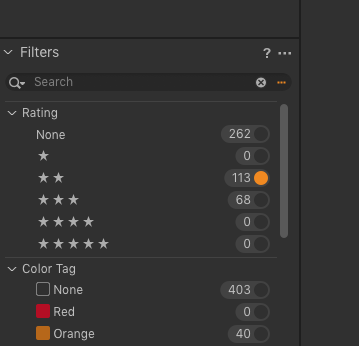
When using the filter tool, to the left of the radio button is a number that shows how many images satisfy the indicated criterion. This is very useful information. But equally (or sometimes more) useful would be the number of images that also match previously selected criteria. In the example below, there are 113 two star images, and 40 orange images. Next to the orange button, I would also like to see how many images there are that satisfy both criteria. This could be useful in finding a set of criteria that "sufficiently" narrow down the number of satisfactory images.
-
Thanks!
I apologize for my density, but could you detail the procedure a little more.
I tried what I thought you meant, but didn't get the results I expected.
0 -
I'm sorry, I didn't explain myself clearly.
I am aware of the <CMD> click function.
What I want is this - suppose there are two criteria; call them KW1 & KW2.
Suppose there are x1 photos satisfying KW1, x2 photos satisfying KW2, and x3 photos satisfying both.
Before I click on any button, the numbers next to them show x1 and x2.
If I click on x1, I want the option of having the number by the KW2 button to change to x3.
The number next to KW1 button should remain x1.
Alternatively, after selecting KY1, both x2 & x3 are visible.
0 -

Hi Stephen,
The Filters tool located in the Library tool tab would be perfect for searching images that satisfy several chosen criteria.
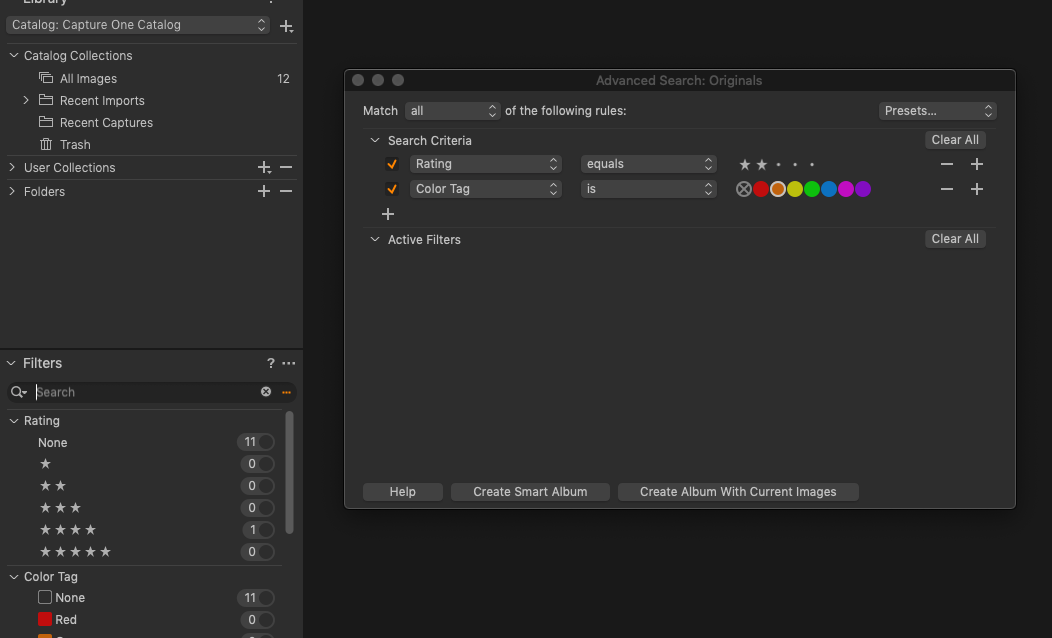
Following the example above, you can choose the Rating filter that equals 2 stars, then another criterion would be Color Tag that equals Orange. In the Match field, it is necessary to set "all" so this apply "AND" and selects the images that satisfy both criteria.
 1
1 -
Ah, yes - thank you Lily.
I now see that the numbers by the various filters only count images passing the Search Criteria.I might find this very useful - as a C1 novice, I am gradually developing a workflow strategy.I have a general question about Search and Filter.In many applications, these functions would be handled under the same “tool”.Philosophically, how would you characterized the distinction between or domains of the two?[Obviously, you have answered part of that - the numbers next to the various filters.]I seem to notice that in the Search Dialog one can edit the Criteria, but not the Filters; what is the reasoning behind this?0 -

Stephen,
Just to add to the mental stimulation ...
If you use Variants the individual variants have their own values that may be populated differently form variant to variant and may appear to report unexpected number in certain situations depending on whether the images with variants are in expended or stacked modes.
It's very complex attempting to explain that with made up examples. Just file the thought away for future reference at some point.
1
Post is closed for comments.
Comments
5 comments