RAW looks blotchy and noisy. Converted JPEG looks ok but still noisy

I just purchased CO 20 because I am a Fujifilm user and there is a lot of hype about CaptureOne as the best option available. I have been using a tool called FastStone for quite a long time for basic edits. Excellent tool and has most of the things you need. Clone/Heal tools is much better than capture one and easy to work. And most importantly, the JPEG converted using FastStone is much better than most of the tools out there.
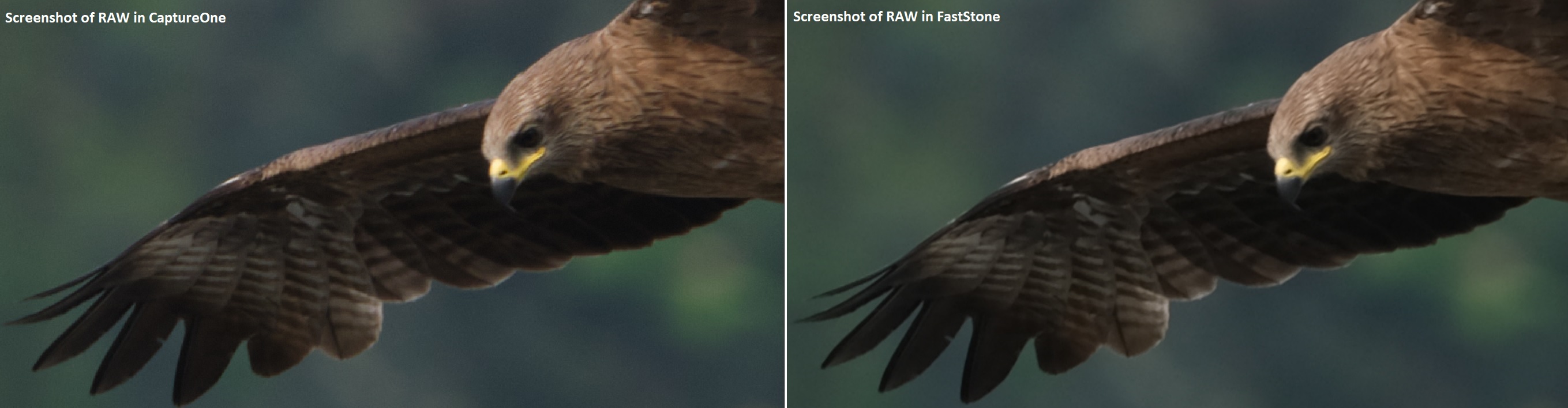
See here two side by side comparison (screenshots). CaptureOne on the left and FastStone on the right in both the images. Image is not that great...the bird was quite far and not in perfect focus also...but that is not the point.
The first one is a comparison of the converted JPEGs and the second one is RAW opened in CaptureOne and FastStone. See around the beak and the out of focus area.
Two issues I can see right away...on the screen, RAW looks very blotchy in CaptureOne. See how well defined it is in FastStone.
In the converted JPEG, though it does not look blotchy, the edges are not as defined in FastStone.
In both the images, see the out of focus area. CaptureOne looks so grainy/noisy.
Is there any setting to be done in CaptureOne to bring out the best by default. Did not see anything in calibration or preferences that affects this. Tried all options.
In both the images, no other adjustments have been done.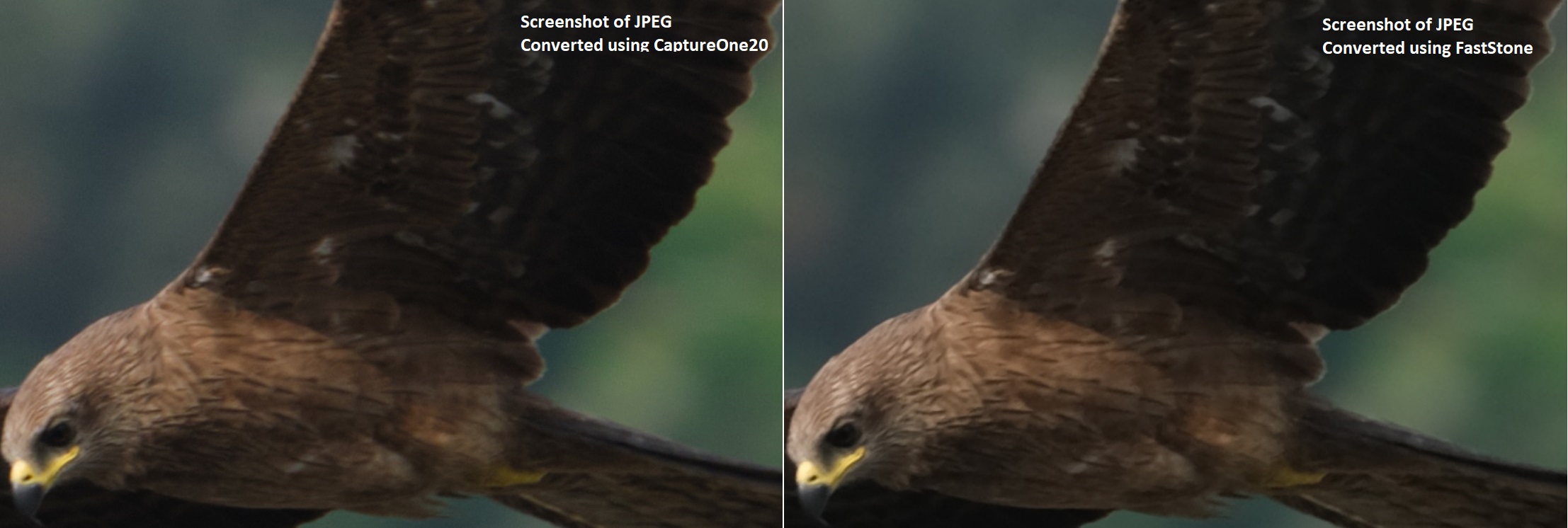
-
Please open both the images in a new tab so that you can zoom in...
0 -
Hard to see any difference, maybe at the side of the yellow beak, where FastStone is a bit smoother. Out of focus you mean the background, right (as everything is not in focus or moved), I can see smallish differences but not favor one or the other.
I have seen often in my images with a lot of cropping (as a result a small resolution where one might be close to pixel peeping) that other convertors might have an edge over C1, but such images when looked without or only with a slighlly crop slightly looked fundamentally better with C1.
To answer your question I think you have to experiment by yourself, also note that the final export often looks better / smoother than the preview. Candidates to start with are Noise reduction, clarity (structure), sharpening. And of course layer with masks, as the background usually would be treated differently than the subject.
regards
1 -
Thanks BeO for the quick reply. As you said, final output is much better than the preview. It is not pixelated which is very obvious near the beak. RAW when opened in FastStone is smooth as you observed. It is not just with this picture. The same issue is seen with all the images (100%). When saved as JPEG/PNG, it is ok. I am not a pixel peeper...but have been using FastStone for years for quick edits and absolutely no issues found so far...so using that as a benchmark and would have expected a much pricier tool to outperform a fully functional FREE tool. But of course, for fine editing and layer support we need something like PS or CO.
I tried NR/Sharpening/Clarity already...but could not get it to match fully because other parts of the image begin to lose quality/details...anyway I think I will have to keep trying and experiment as you said. I really miss DxO as they don't support FUJIFILM (so simple and in my opinion the most powerful..esp the Prime NR...unmatched by any other.
0 -
I notice diagonal lines (like the side of beak) look sometimes worse in preview as opposed to exported image.
Krishnakamur: "I tried NR/Sharpening/Clarity already...but could not get it to match fully because other parts of the image begin to lose quality/details"
That's where the layer masks / selective editing comes into the game.
When photographing birds I almost never have enough focal length so heavy crops and pixel peeping is well known by me :-)
regards
0 -

I appreciate BIF is hard to do but I don't think the image you have chosen is a particularly good example to use. Can you post an image that is actually sharp to begin with as this makes any evaluation difficult. You can't sharpen blurred detail unless you use something like Topaz sharpen, which is a whole new bag of tricks and I don't think even Topaz could help in this case.
Like BeO I can't see, nor would I expect to see, much difference between two blurred photos apart from general colour difference.
I use Faststone as my image viewer and although it can do raw conversions it is an automatic process i.e. you have no control over it and I think any further editing is on an 8 bit jpg. I suspect the raw converter it uses is one of the Open Source converters with DCRAW, very popular but now discontinued and probably replaced with LibRaw.
Certainly Fuji have partnered with Capture One so they think C1-20 is the best raw converter.
Starting with a sharp image will make it much easier to see the differences between raw converters and also the power of C1-20's editing. Applying sharpness, noise reduction and clarity to a blurred image can quickly degrade the image. C1-20's default sharpness and NR are usually considered good erring on the sharp side :-)
Everyone will try and help but a sharp image will allow people to provide reliable advice on how to proceed. As I said I have used Faststone since V2 I think which must be something like 15 years ago :-) Trust me when you understand how to use C1-20 you will never look back.:-)
Best regards
Ian
0 -
Really appreciate the help from members.
The reason I also took that no so perfect image was because that is when you would know the shortcomings of a tool or how best they perform. Otherwise it is hard to see and you would always be happy.
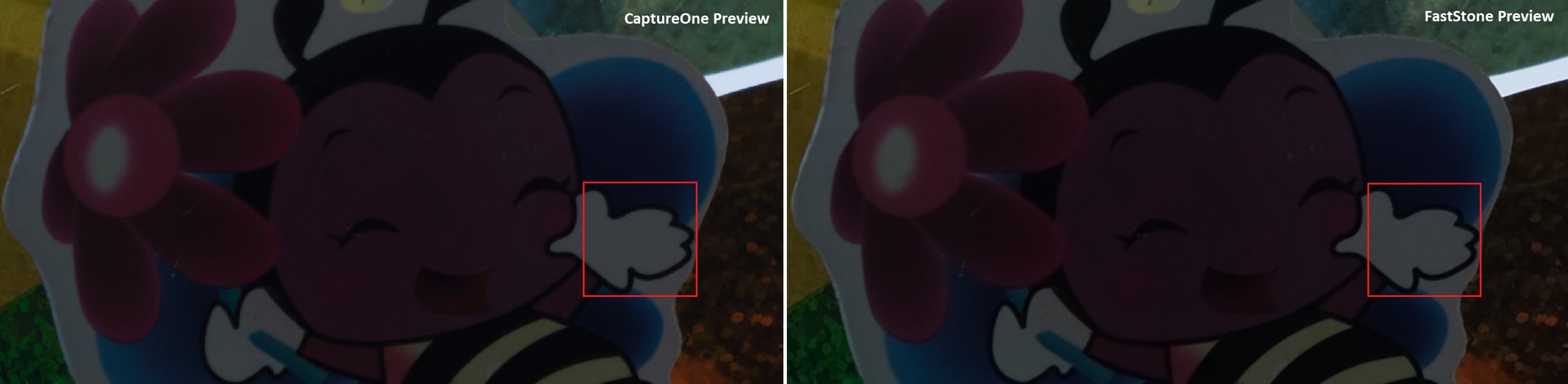
Another set of images. RAW is also attached. Again, not pixel peeping...just zoomed in all the way because that is when you see the issues/differences. See how the edges are not perfect at all in CaptureOne preview.
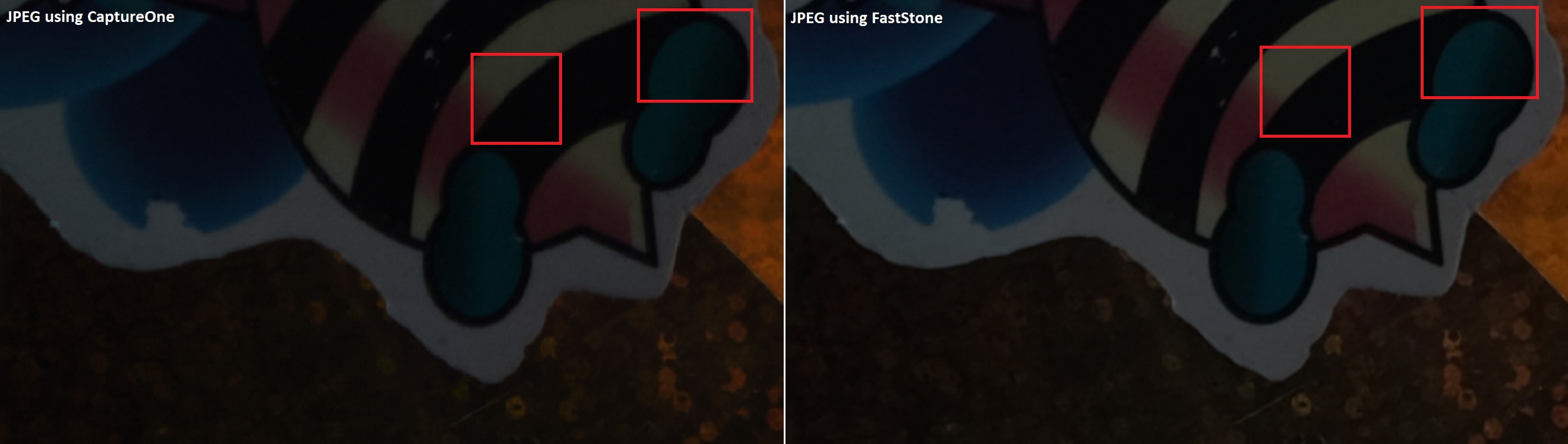
The difference can be seen in the saved JPEGs also...see the edges and the marked areas.
I believe, it is very important to have a good preview also, especially when zoomed in because that is what you see when you edit and make corrections. So a preview similar to FastStone is highly desirable. Equally important is the final output also.
I can share more images and this problem exists even in a photo that you would say is 100% usable in a comparison.
Preview Comparison
Converted JPEG Comparison
RAW https://drive.google.com/open?id=11_JfIPSEevS81PFMk7I6jzA1Oj4A89d4
0 -

I just upgraded to Capture One version 20 thinking it would help with the grainy raw files but it has not.
These files look sharp in LR but I have had success with my Fujifilm raw files 90% of the time. What has changed??
I'm attempting to process a very important wedding set of photos and this is unacceptable for me and my clients.0

Post is closed for comments.
Comments
7 comments