Filtering by DATE is off by one calendar day when using "Advanced Search"

Hello!
This is strange... I have an album with photos taken on, and imported on April 21 (metadata confirmed). I'm exploring how to better use filters, so I clicked on the DATE filter and selected the day. All photos in that album showed correctly. But when I clicked the "Advanced Search" ellipsis, the pop-up window lists the date as one day earlier, April 20! Also, when I clicked the month, the filter option correctly shows April, but the "Advanced Search" pop-up window shows 3/2020 instead of 4/2020. What is going on with the numbers being one off in the Advanced Search window? It's a problem when I actually tried to run a date search by typing in the date... wrong photos showing!
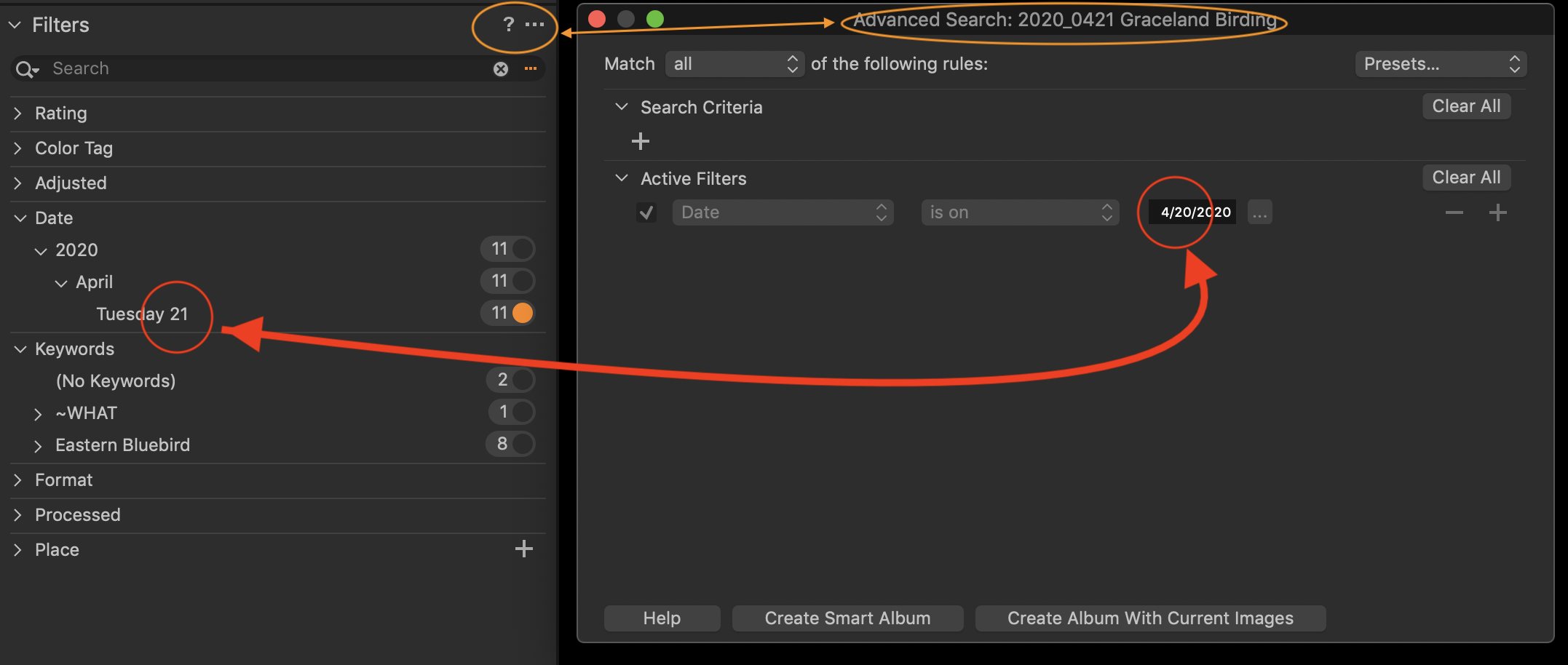
The "No Keywords" filter does not work for me either (as was mentioned by another person). All photos (keyworded and not) appear when "no keywords" is selected.
Any guidance would be appreciated.
Thank you,
Pam
-

I can confirm this report. It seems to be a bug and I have reported it to support.
1 -

I'm having the same issue. Thanks.
0 -
Support got back to me within 24 hours and said they have multiple reports of this problem but can't reproduce it. "We received similar feedback from other users and our R&D is aware of this, however we struggle to reproduce this on our side." They asked if it occurs on a newly created catalog and if it does to send them logs and various other files. It does and I did. We will see what happens.
0 -
Three months later, the bug persists. I am in California and doing the offset by a day also leaves off (iPhone) photos later in the day with 3:59 pm shot showing but the 9:45 pm shots being excluded.
Has somebody hardcoded a time zone? I recall that I ran into problems last year with Capture One while on an expedition in Madagascar so it seems like time has been a continuing struggle.
0
Post is closed for comments.
Comments
4 comments