C1 Pro Support -- what is going on??

Hi there,
my first post here and I wish that it never happened.
I have huge stability issues with C1 Pro 20.0.4 (13.0.4.8). Starting from being unable to import new folders into the library (C1 freezes) to shutting down the application (C1 hangs on "saving" dialog). Every time I have to finish by killing the process.
The worst thing is the support ticked that I opened in March is still unresolved and the support seems to postpone every action. Reinstalled the software, cleaned all senttings, without any improvement. I haven't heard back from the support for 2 weeks Retried my requests without any responses.
Right now I barely can use the software. Once in 10 times it seems to work correctly, but usually, when doing disk oprtations related to library (I think it is related to library), the software just hangs and becomes unresponsive.
The level of customer support is unacceptable. I hope your experience is different...
Regards,
Maciej
-
If you want some help from other users here, tell us a bit more about your system. What computer specs? What version of Windows? Have you tried running Capture One without hardware acceleration turned on? Is your catalog stored on an internal or external drive? Have you tried verifying the catalog? What happens if you create a new catalog? Is it OK with that?
As much info as possible, and maybe someone here will have some helpful things to say.
Ian
0 -
Sure thing.
When I go to my library, add a new folder to it, then C1 freezes. The only thing I can do it to kill a process. I have never had this issue before. It started to occur (if my memory serves well) after I upgraded C1 to 20.0.3. Now I am on 20.0.4 and the issue is still there.
Only occasionally I am able to add a folder (once per 5-6 times), but this requires to restart C1 (go to task manager, kill a process, start over again). The same thing when exiting C1. It likes to "freeze" on saving dialog (the orange thing rolls forever):

It is Windows 10 x64 1909. The library is on a local drive D (SSD), all raw files are on a network drive. My current library has ~150000 raw files. I verified the library and it is ok. I tried everything that was coming to my mind with and without hardware acceleration.
The C1 Pro became unusable at all :/
Thanks,
Maciej
0 -
I think that 150,000 raw files is quite a lot. Also how is the network drive connected - wifi, ethernet...? And have you tried testing with a newly created catalog? Is that OK?
If the new folder you are adding to the Library is on the local SSD, is there still a problem?
Ian
0 -
My network is a 1 gigabit ethernet. I store 90% of data on nas drive. No issues there. My transfer speeds aver over 100 MB/s both directions. The PC is a 14-core i9 with 128 GB RAM. It runs all other software blazingly fast without any issues.
PS. Same story when I add any folder stored locally.
Thanks,
Maciej
0 -
Some people have reported problems using Capture One with NAS. You could try searching the forum for any posts about that. And have you tried a new catalog?
Ian
0 -

Maciej,
Have you tried creating a new, small catalog to see what happens with that?
In Preferences > General tab there is a entry for Catalog Backup management and location of the backup file. How are those values set?
I think if you force a close of the system you run a risk of corrupting the catalog through incomplete handling of existing transactions in process and then the OS may also end up trying to manage abandoned temporary files. A very large memory capacity may not always help with that sort of situation.
I might also wonder about the version of WIn 10 that you were using when the problem started and whether it was one of the releases that were a little poorer than we should expect. However I have no direct experience of Win 10 as I decided to stay with Win 7 for as long as possible.
Is your NAS set up as just storage or is it a full RAID configuration?
0 -
Yes, I recreated the catalog. Same story. Then I ran a verification of the catalog. All was ok.
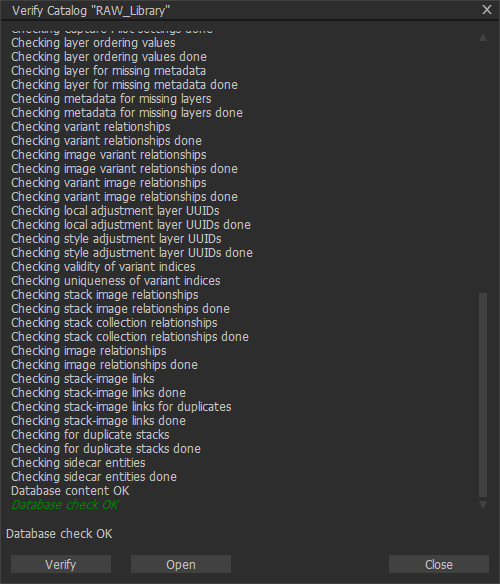 Everything worked fine in previous versions of C1, all works fine until today with LR and other software when files are anywhere, including on NAS. Besides I cannot imagine to store 10 terabytes on local drives without data protecion...I asked support for the setup foles for version 20.0.0. It worked without issues when I started using version 20. They have been silent for 2 weeks though. This is really bad.Thanks,Maciej0
 -
I don't understand why V20.0.0 works and later releases do not. (On the SAME catalog?)
In recent times the system (at least for Windows) seems to have been moving to individual User Configuration files for each release. I do not know if that is the same for Macs.
On that basis it would be possible for some some sort of error to creep into the User Config file and be carried forward automatically if not corrected. However if the error appeared at, say, V20.0.1 but V20.0.0 was previously used the config file for 20.0.0 might well be uncorrupted and so work as expected.
When I refer to Config file I am thinking of the application specific User Configuration definitions but there are some other files that can be saved, release by release, in the same way. However those I am aware of seem unlikely to produce the symptoms you have described - although anything is possible!
Have you already covered this possibility with the Support people?
0 -

Capture One is not even remotely optimized for network devices so trouble is to be expected - no matter how good your connection is.
0 -
It does not have to be optimized, I do not expect that. File API calls are translated by operating system. You do not write separate application code for files stored on network, ssd or hdd. It is transparent to the application. And my case is not related to performance, but to the stability / bug.
The problem is exactly the same on NVMe flash drives (Samsung 970 Pro and Samsung 970 Evo). C1 just freezes :(
0 -
What I meant was that it's not optimized for NAS - it seems to kind of drop the connection and then time out and freeze if it does not get a certain response from the NAS within a certain time window.
0 -
If that was freezing for a few seconds and then resuming -- you are right, that would be exactly a network issue and that is how any application would react. The thing is in my case C1 behaves exactly the same regardless of the location of RAW files. The only way to end the mysery is to kill the process and pray it does not happen next time (but 90% chances it does).
And I do not understand the support policy. 19th day of silence.
0 -
Well that's unusual then. For me it only happen when I use a catalog or session on a NAS drive or when I use a catalog/session that has its photos on a NAS drive.
If both the catalog/session and the files are on an internal drive or an external (USB) drive it does not freeze.
Are some (not all!) of the photos in your catalog on the NAS drive? Or are they all on local drives?
edit: yes, C1 support currently is pretty bad. And with currently I mean ever since they changed they system.
They should at least consider giving their users a discount for future upgrades as a compensation for those long waiting periods.0 -
Definitely some (most) RAW files are on NAS, but the catalog is on SSD drive. I cannot store ~10 TB of photos locally.
BTW, this setup of storing photos remotely (the best protection, decent performance on physical ethernet 1 GbE connection) and catalog on a local drive worked perfectly with older versions of C1 and it works all the time with LR or any other application. Moreover, it worked fine with version 20.0.0, but after the upgrade to newer release it started to fail.
Right now, after 20.0.3 or so, C1 is unusable. I had to return to LR and start paying monthly fees again. The phase one support is so bad that when I asked for a download link for 20.0.0 (to test it again) they have not responded either.
And to be fair, I started to use C1 with version 3, about 15 years ago and I recommended the software to many friends photographers. What happens at the moment is a total loss of trust and neglecting loyal customers. It is so hard and time comsuming process to build a good reputation but at the same time so easy to bury it.
0 -
At least I can help you with that:
https://www.captureone.com/en/download/archive
I assume Capture One wants to save all changes to the files you edited or even looked at when you close it so - that's why it's going to freeze.0 -
Thank you for that! I will be going back to 20.0.0 to verify it.
C1 doest not touch RAW files (at least in my case). I double checked that. Modification dates are exactly the same as when the files were coped from flash card.
0 -
I meant the preview and settings files (saved in the Cache and Settings folders)
0 -
Those folders are stored in the same directory as the library. In my case the library is on drive D:\C1. Within there Capture One created directories Adjustments, Cache and Originals. On network drive where the RAW files are saved, nothing gets created.
Tested version 20.0.0. It worked 3 times, froze on 4th...
UPDATE: Tested with a new catalog. The same story. Froze after adding first folder with pictures.
0 -
I created this thread when I was using 20.0.4.
So far I tested 20.0.0, 20.0.2, 20.0.3 and 20.0.4.
0 -
Not everyone is willing to do that (and users should not be and are not supposed to do so) but sometimes a look into the application.log file can reveal interesting details. Sometimes not.
0 -
Thanks BeO, I will dig into the log file and see if I find anything interesting.
Have a great day everyone and stay healthy!
0


Post is closed for comments.
Comments
21 comments