Dedicated button to filter for processed files in tool bar
Logged
I would love to have a Dedicated button to filter for processed files in tool bar, anyone else?
-
Official comment
Hi Peter,
In the Browser, there is a drop-down list which helps to sort the images.
You may enlarge the Browser a bit to see this list.
Select the Processed option on the list and you will see which images where processed as they will have a corresponding sign next to them.
Using the List View in the Browser is recommended in this case.
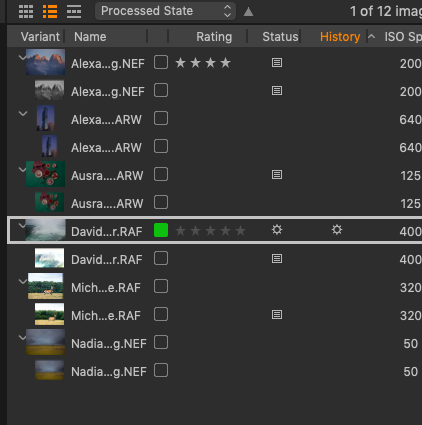
Alternatively, in the Filters tool, press on the ... in the Search field and select "Processed" and "is true" as a search criterion. It is possible to save this search preset from the drop-down menu in the top-right corner of the dialog box.
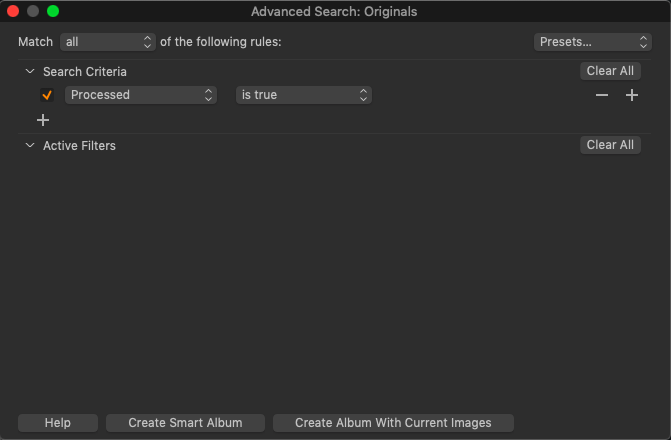
-

You may need to clarify whether you mean Processed as in "edited" or processed as in "Sent to output".
That's for a start.
If edited then at what point does "Edited" status appear? When a tool has been applied? Or when you feel you have finished with the image (or variant).
If Output processing ... is there ever a need to "unset" and "processed" indicator? Perhaps because you feel it needs to be redone?
There are filters available for both "Adjusted" (More than just the base edits applied) and "Processed" (Variant has been passed through the Output Process queue.) These filters are not made visible by default but you can make them visible or call them up on demand.
Click on the "?" in the Filters tool name line to go to the comprehensive User Guide page where how to do that is explained.
I have never felt a need for a dedicated button (or a Keyboard shortcut) for either of these features for my purposes. I'm not even sure they would be very useful to use outside of a current session or perhaps a live shoot of some sort. But that's not to say they would not work for you.
HTH.
Grant
0 -
Thx guys, I've used this method and it works great, I'm probably the only one in the world who constantly searches for processed files in big fashion shoots. Just thought it may be possible to customise the toolbar with the odd filter for speed. I'll just stop being lazy. many thx.
0 -
Peter,
I appreciate the humour in your last post - and you may well be right!
I'm not sure the toolbar needs to take primacy - but either way it may be useful to be a little circumspect about the ultimate accuracy of the "process" type related flags.
They offer good value BUT take care if your life relies upon them ... if you get my drift.
0 -
As this has popped up with recent activity ...
Peter,
It occurred to me that you could set up a saved preset for the filter. Not quite a button on the toolbar but a little bit closer.
Grant
0
Post is closed for comments.
Comments
5 comments