Small color spots become unsaturated during processing

Let's take sample raw file, for example, from dpreview site:
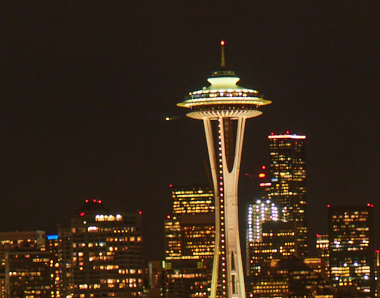
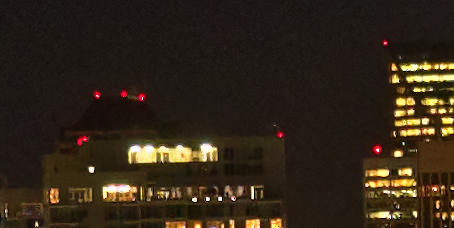
It's a night city photo. After loading to C1 and preview creation, this shot looks inside preview window with clearly visible small red signal lights on the skyscrapers roofs:
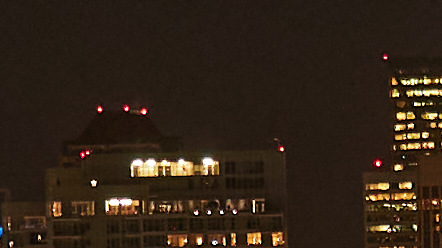
But in 100% view and after processing these ones became almost totally uncolored:
After processing reciepet:
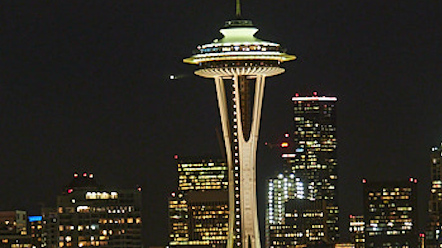
Is it normal behaviour?
-

Yes, quite normal depending on the image.
At full size the display is working with all available pixels in the image file.
At smaller resolutions - as in a screen preview, a lot of data has to be left out and the algorithm still needs to retain enough useful information to convey the dominant colours. Even is the relative number of pixels in a small area retains the same proportions of Red, Green and Blue as the original file has the dominance of some colours over others will be more apparent. However there is also the possibility that the proportion of different colours or the way they group together before the screen display and then one's eye become involved, will give a different colour perception to the person viewing.
0 -
Thank you, but it is sad. It means that C1 knows what color these lights have, but cannot use this knowledge to restore the color of the overexposed areas.
0 -
No, it mean that the sensor is unable to provide the information using the settings applied when the image was taken. Or that the effect is exactly right for the conditions.
It's not up to Capture One (or any other editor program) to make "corrections" unless explicitly instructed to do so.
That having ben said, have you tried reducing the exposure when looking at those spots as 100% size to see if there might be some colour detail that could be extracted and used?
0 -
May be, but it's hard to decide... "Olympus workspace" software do this work much better:
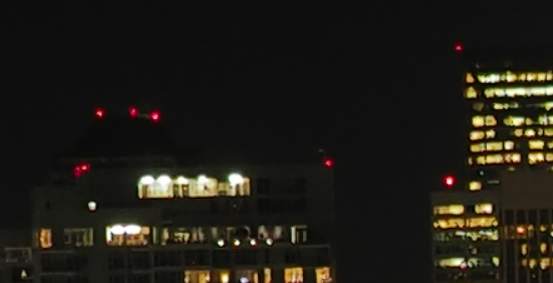
So, IMHO, this is a problem not only of sensor data, but also of the debayer algorithm or some postprocessing algorithms.
0 -
DxO PhotoLab 3.2.1 does a pretty good job too:
 0
0
Post is closed for comments.
Comments
5 comments