Colour Tags

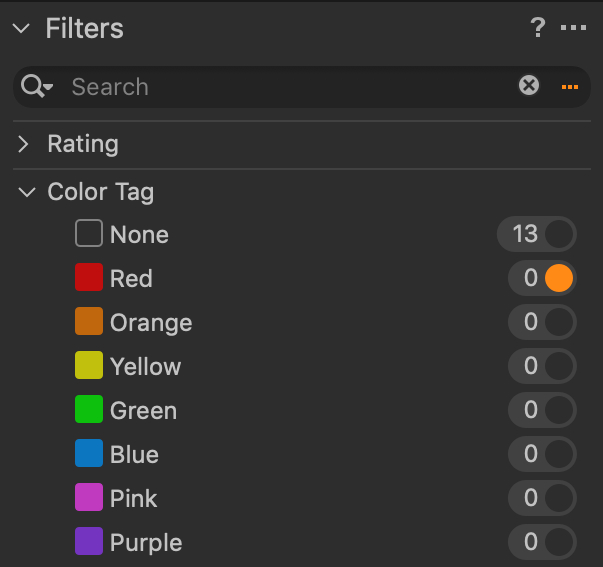
I have assigned a keyboard shortcut for the Red colour tag. When I have an image selected in the Browser, and the shortcut, all of the images in my Browser disappear. The Browser says, "No results found for the current filter(s)". However, I have no filters switched on, and I am in the Capture session folder. When I press the shortcut again, they reappear.
Why is CaptureOne doing this? I have tried using different shortcut combinations, but it still happens.
-

If you go to the Library Tab and then select the Filters Panel and select the Colour Tag section and click the circle to the right of the red colour tag so it shows 'orange', then the browser will be 'filtered' so it only shows images using the red colour tag. By default the browser is showing images with a 'None' tag, i.e. no start or colur rating.
 0
0 -

Sounds like you have set the shortcut to "filter by color tag > red" rather than "set color tag > red"
1 -
Thank you both! You're correct, I was making my shortcut in the incorrect command. I was using Filters>Toggle Color Tag Filters>Red, instead I should have been using Adjustments>Color Tag>Red
0
Post is closed for comments.
Comments
3 comments