Assign shortcuts to customized workspaces
Implemented
It is very nice to be able to customize workspaces (although none enters full screen automatically, even when defined so in the customized workspace).
It would be even nicer to have the possibility to switch from one customized workspace to another by just hitting keys.
I haven't found the possibility in the "Customize keyboard".
Wouldn't the "Fxx" keyx be something for that ?
-
There is an icon which can be configured in the tool bar on top, it saves one click to open the list of workspaces.
I fully support the idea to be able to customize keys for specific workspaces.
And if this gets implemented, why not allow custom keys to create (and remove / toggle) floating tools with the same new version. For floating tools there is not even an icon for the customizable tool bar.
0 -
Thanks for the tip one the icon .
Worse is that ... I had installed it, and never paid attention !
But here, I wish we could program for example F1 until F16, and that, if the workspace was a full-screen with floating tools, C1P would simply do that: reisntall a full-screen with floating tools layout.
0 -
Hi Claude,
Thank you for your post.
Indeed, it is possible to switch between the workspaces from the main menu (WIndow ->Workspaces->[workspace]) or by adding the Workspace icon in the toolbar.
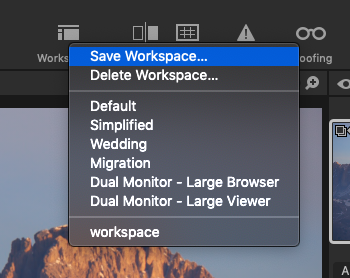
For now, there is no option to switch between the workspaces using the keyboard shortcuts or assign shortcuts to certain workspaces.
We have a couple of similar requests already, so I will add your comments on this matter and forward them to the Product Management team.
Best regards,
Lily
0 -

On macOS you can use system to set shortcuts to anything in a menu. It is a good workaround.
https://shootmachine.co/2017/08/28/how-to-shortcut-almost-anything-in-capture-one-pro-mac/
0 -
I am abroad now, but will certainly try that when coming home.
If it works, it would be pure gold ! Thanks for the tip !
0

Post is closed for comments.
Comments
5 comments