seeing cursor instead of brush, and after right click Capture One stops working

I've just reinstalled C20 Pro in hope that the issue will solve it self but it didn't. Instead of the brush size I can only see cursor, which does work fine when i need it to paint (only thing is i can't see the brush) and everytime I right click to set the brush preferences, Capture One stops working.
I am new to CaptureOne (so far was working on AdobePhotoshop) so finding the whole experience very frustrating.
-
Problem still isn't fixed. Haven't found online anything helpful and unfortunately can't fix it my self.
Will CaptureOne customer service get in touch with me and help me out or shall I just stick with the AdobePhotoshop instead?
0 -

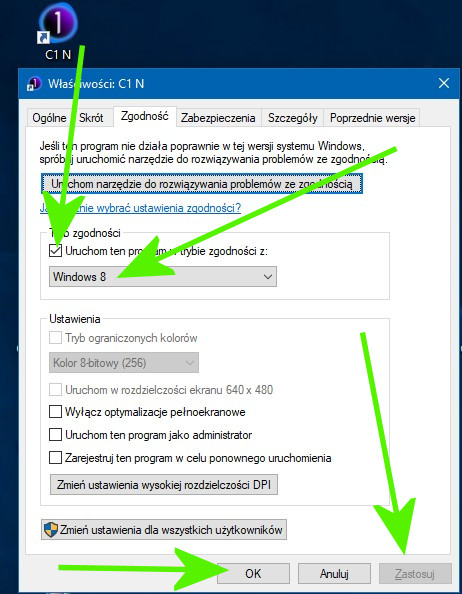
And I try to run the program according to Windows 8.
 0
0 -

Following. Having the same issue with the spot removal brush. Bringing up the controls for the tool either in the tool tab or floating crashes the program. Have had a ticket with tech support Since June 4 and it takes them 4 days or so to respond. So far I've tried removing/re-installing, they recommended removing my EOS utility, removed my Loupedeck, updated graphics card drivers, switched from "Studio" to "Game" drivers (NVidia RTX GFX card), disabling GPU Acceleration and smaller sessions/catalogs. None of which has worked.
The weirdest part is it works fine on my laptop?If I may ask, what types of files are you editing? Mine are .CR3 (Canon EOS 1DX3)
0 -
Since I know you had the same issue, i got another answer from tech support only 7 days later:
"Hello,
Thank you for bringing this bug to our attention, we appreciate the time you’ve taken to contribute towards the development and maintenance of Capture One.
I would consider this a bug and have already filed a report with all the details for the R&D team.
I will place your ticket on-hold and will get back to you should we need any more information on this bug report.
Unfortunately, we cannot comment when this bug will be fixed, but rest assured that it has been reported and will be looked into.
We also cannot guarantee that this will be in the next service release, but we will do our best to roll out a fix as soon as possible"
So it looks like we are out of luck for the time being
Disappointing to say the least0 -

I've the same problem with C1 20 (13.1.1.31)
I've tried to reinstall, to update drivers, to disable hw acceleration - no use of these at all.I reactivated C1 12 in order to be able to work. In fact, the program is unusable and it's not a fair answer that at a later time it'll be fixed. We paid for a program promised to be usable, but this is not the one. :-(
Michael Woeller, did you get any further information from the support team?
0 -
Zoltan, I got nowhere with support after they said "It's a bug, we will work on it"
It's weird, since my laptop is fine, but underpowered for such editing. I only use that machine for on-location importing and preset application to a session. Trying to remove dust with it is a chore at the best of times.I am actually considering a fresh install of windows, since I have not done so in the time I have owned this machine (3 years). While I doubt this will fix this specific issue, I think it will contribute to overall stability of the program. I'll let you know, but to be honest, I feel I should not have to take such drastic action to fix a "Professional" level product
0 -
So, who wants to be the guinea pig to see if this falls under "Other Minor Bug Fixes"
https://support.captureone.com/hc/en-us/articles/360012039717-Capture-One-20-13-1-2-release-notes
It's not listed on the major fixes0 -
I've just tried it and I can see and adjust the brush.
No crash for right click. I didn't do anything else yet, just tried this.0 -
Zoltan, thanks for the info. I upgraded right after I saw your comment and finished the event I had been processing. Thankfully it did the trick. Seems like some stability issues have been addressed as well
0 -

Been dealing with the same disappearing brush outline issue for months and has progressively gotten worse. Finally saw this and updated today. It's definitely still an issue but not AS bad. If I zoom in or out a bit it usually comes back. Hopefully it doesn't get progressively worse again. Super frustrating as this is such a basic thing. I can't edit in this app if I can't see the brush. WTF
0 -

Hello Support,
I experience the same issue, however on version 21 and now on version 22. On both my mac mini and macbook pro. I have since re-built my mac mini and the issue persists.
Are you able to comment on a solution?
Regards - Paul
0
Post is closed for comments.
Comments
11 comments