Auto-creating user collections on import

Hi,
Sorry of this is a total noob question, but I'm trying to migrate to C1 from Aperture, and haven't been able to find a specific answer to this;
In Aperture, when I imported images (from my camera or from disk), Aperture automatically created a new project for each shooting session - so I go away for a week, shoot every day, when I get home and import my images, I have 7 dated projects in my library, with the images from each day in each.
How do I do that in Capture One?
When I try to import images from multiple days, they all end up all in the one import session in Recent Imports. I'm not going to manually create albums / projects for each day and then do the import one day at a time etc. Surely there's a way or setting to automate it?
Thanks,
-

Hi,
yes, there is a very versatile way how to split the imported images. Here are some references where the possibilities are explained.
As a starter: "Importing and organizing your photos" https://learn.captureone.com/tutorials/creating-a-catalog/
My suggestion would be that you watch the webinar covering either
"Organize your catalogue" https://www.youtube.com/watch?v=MWmT0kfLudU or
"Organizing with sessions" https://www.youtube.com/watch?v=rkqbc_4S2GU
depending how you plan to organize your images. (As you come from Aperture, I suppose that you plan to use a catalogue)
You'll find on the CO Learning Hub https://learn.captureone.com/ or on YouTube https://www.youtube.com/channel/UCJgJWICGMzzvXk2wIgqxVEQ/videos loads of helpful Webinars/Videos
0 -

Hi Ralf,
Thanks for the response. I've looked through those, but I'm not finding an answer to the problem (that I can understand) - I'm using a Catalogue, I have years of images in Aperture with an established storage structure - every day's shooting for every camera automatically gets its own project, even if I only do a single import from the camera once a week, month, etc.
Example attached:
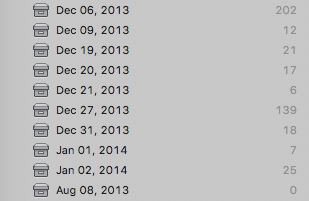
Given that's the way C1 brings my Aperture library in, I want to be able to maintain that for new imports once I've migrated across. I don't want to have to manually do that, doing one day at a time for the import, I want import process to do it for me.
It's possibly my Aperture perspective, but it seems so self-evident to me that the import process should have a function to split images into (arbitrary time chunk) / day-based events in User Collections, given that's the structure it honours when importing the Aperture libraries themselves.
I'm trying the import options to the Catalogue, and all I seem to be able to do, is import to Recent Imports, which brings everything from multiple days to a single flat import session, for the time the import was done (not really of any use to me - I care about when the photos were taken, not when they arrived int he DAM), or create an album manually, then import to that album, again putting all the images within the one flat album, again of no use to me.
If it's not available as an Import option, is there a scripting option that can take an import session, and then make User Collections for each day, based on EXIF, and move the images to those collection?
Cheers,
0 -
Hi Matt,
Thanks for your clarification. I think that I now better understand your problem.
I never used Aperture but I seem to remember that Aperture stored the images inside of the catalog. Although this would also be possible with CO, the recommended way is to import the images into a folder-structure.
The CO catalog would then contain references to the locations of the images and the created previews. Beside of the smaller size of the catalog, another advantage is that the images could be stored on an external device, which is only connected when needed: you can still browse the catalog and review the images, add keywords, make some adjustments (as long as the original sized image is not needed).
For storing in a folder structure, you would select the base folder (destination) upon import and by using "tags" for automatically creating subfolder(s) sorting the images accordingly during the import. (e.g. in your case using the image date information [EXIF-Metadata] tags).After the import you will be able to browse the folder structure on the "Library" register. (This is also the way which David Grover demonstrates in the webinars)
I think that being able to browse and select those sub-folders would be close to your User Collections in Aperture.
Hth,
Ralf
Edit: I never tried to store images inside a catalog. Mainly because of concerns that
- a catalog would grow very quickly (but limitation would be the available space on the drive.
- what happens with the images if the catalog gets corrupted? The images inside of a catalog could be restored only from a backup. The images stored in a separate folder-structure would remain intact.
- with the pictures in a folder-structure, it would even be possible to access the images directly if needed, e.g. for testing some other raw converter
0 -
Hi Ralf,
My images in Aperture are all stored as referenced images - they're all on disk in Year / Month / Day folders.
I know I can browse the physical directory structure of images in C1 once I've imported them into the C1 library, but I think what I'm looking for, is for user collections to be created automatically, which correspond to that, as a part of the import process.
To put it in context, the import process for Aperture is:
- Stick card in card reader (Aperture auto-switches to import mode with the card selected as source).
- Hit Import in Aperture
- Choose the physical location that is the root level for file storage that you want files copied to (in my case a folder for a particular camera's images).
- Hit OK
After that, no more interaction is required - the files are copied from the card to the drive (and folders created for year / month / day if they don't exist already), and a Project for each day for which there are images, is created in the Library (Catalogue) for said images.
Is the process you're describing for using tags something that will work automatically? ie - is it something I set up once, and then it will do its process every time I import? If you know which webinar video it's demonstrated in (and timecode if possible) it would be a real help, because I'm not having much lick finding it myself.
Cheers,
0 -
Hi Matt,
what I referred to as "tags" are actually called "tokens" by CO.
in the webinar https://www.youtube.com/watch?v=MWmT0kfLudU David explains the usage starting around 15:30 and around 35:40 he shows how to use several tokens to create during the import.
To achieve the structure, as you do with Aperture you would use following structure for the subfolders:
- Choose your physical root level folder for the images as destination
- Create the following as Subfolder (by clicking "..." on the right side of the field)
<image date (yy)>/<image date (mm)>/<image date> (dd)>
- the tokens have different formats (which can be chosen via the little down-triangle)
- the "/" between the tokens means that it is describing a folder structure and create subfolders when needed
- Hint: when you are satisfied with the created structure, save it as a user preset..
Hth,
0 -
Hi Ralf,
Ahh ok, yeah I had already figured the tokens - it's exactly the same as the system Aperture uses for the physical importing of files to your chosen location from source (memory card etc) to your referenced library.
Unfortunately, what that doesn't do (and what Aperture does) is create User Collections as a part of the process - and that's the problem, because User Collections is the part that's populated when you import an Aperture library.
Cheers,
0 -
Hi Matt,
I'm not sure that those "user collection" would be needed in CO.
The catalog offers a way to browse the different folders to which images where imported (even if the actual location is offline, marked by a triangle).
Additionally, there is the possibility to use a filter (e.g. for a specific date [if needed could be combined with other options])
Regards,
0 -
Hi Ralf,
Well that's the thing - C1 is already bringing in my existing workflow as User Collections, my entire 40k image library is organised like that, and stays organised like that once it's brought into C1, so realistically I'm going to want to continue using it like that.
The difference boils down to the user collections are showing me a flat list of all my shoot days, which I can then group into multiday events etc, whereas the disk browsing is showing me a hierarchical structure.
It looks like there's a couple of options - I can have someone develop me an applescript to take each import session and make user collections of it, which I'd have to run on each import manually. Or I could just continue to do my photo importing in Aperture, and then export each import session as an Aperture Library, and import that into C1.
I'll put a feature suggestion in, hopefully it'll make its way somewhere.
Cheers,
0
Post is closed for comments.
Comments
8 comments