Multiple issues with C1 13.1 / deleting multiple images in capture one 13.1- Mac

With my last update of C1 (13.1), it seems that there is a big problem and also there are a few small problems, big problem is; I cannot select all or even select multiple images when I want to delete them, each time only one image is getting deleted. Then very quickly I have ran out of space in my laptop and unable to import new images to C1 anymore. Has anyone encountered similar issues? How can I fix this?
Also, I noted with any exporting image, the capture one screen moves tiny bit down , and away form top of my screen and with second export it will comes down a bit more.
My previous custom tab immediately disappeared after updating to 13.1, so I had to make a new one.
Always when I open C1, it tells me to do the free update and when I act on it, tells me there is no new update available!
-

Hi Omid,I can't really understand what is your problem, but :
1) Did you "select all variants" tool enabled ? Three little pages should be enlightened in orange (see below)
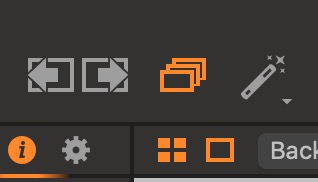
2) When you delete an image from the catalogue, it is not suppressed from your master disk (where you store images), but goes to the catalogue trash. If you want to delete it from the catalogue, you should empty the catalogue trash.
What do you mean by custom tab ? If you mean your workspace, it hasn't disappeared, but is saved in your preference lists, in user -> (hidden) library -> application support -> Capture One -> workspaces
0 -
Thanks a lot dear Robert, problem solved!
"select all variants" tool was disappeared after this update and I did not noticed, I could not transfer images to the catalogue trash, now all is fine:)
by custom Tab I meant Q column tools. That's not an issue anymore.
Thanks again
0
Post is closed for comments.
Comments
2 comments