Sharpening won't hold

I'm using Cature One 4.8.3 tethered to a Canon 5D Mark II. In the Process Recipe I have the Disable Sharpening button UNchecked. The sharpening will not hold. When I go from another window, for instance the Capture window, back to the Details window I can see the sharpening for a split second and then it goes away. I can see the sharpness change slightly when I move the sliders. I can set the Amount to 500 and Radius to 2.45 and the image still doesn't look sharp enough. When the image is processed into Photoshop I have to apply a ton of sharpening... like 500% with a Radius of 2. I have thrown a way the preferences. What's going on? Please help.
0
-

David,
View the image and sharpening at 100% in the Viewer. If you are just looking at the viewer in "Fit" when you go from one image to the next you are not seeing the sharpening disappear but rather the preview load. It appears sharper for a moment but really that is just pixelation seen from a distance. You'll see the direct effects of sharpening at 100% as appose to view.0 -
[quote="Drew Altdoerffer" wrote:
David,
View the image and sharpening at 100% in the Viewer. If you are just looking at the viewer in "Fit" when you go from one image to the next you are not seeing the sharpening disappear but rather the preview load. It appears sharper for a moment but really that is just pixelation seen from a distance. You'll see the direct effects of sharpening at 100% as appose to view.
I am viewing it at 100%. I can't add enough sharpening to make the image look sharp. Even if I max out the settings the resulting image, in Photoshop, is not sharp enough. There is barely a difference between maxed out sharpness and Capture Ones' canned sharpening setting. I can get OK sharpness in Pshop, but sometimes I get too much noise. Should I uninstall and reinstall the software? How do I do that?0 -

David,
Slightly OT but are you absolutely convinced that your camera is focusing accurately? My own experience is if an image is focussed, you don't need to push the sharpening setting. In fact after much time testing some 14 L lenses on my 1Ds MKIII and 5D, I have found very high error rate on Canon's AF. I have now minimised this error rate but the 5D needs to go back to Canon still. On the other hand, with my P1 645 and P30+ back, I have found the auto-focus error to be consistent so I can judge if the AF is accurate without looking at the computer screen or LCD.
In any case, when I have accurate focus, I can shoot wide open on any of my lenses and get tack sharp images with just 110, 0.8, 1 set. Add Clarity = 20.
Hope this helps.0 -
Henry,
I thought about that too. I started doing some focus tests and it does look like my autofocus focuses forward a bit.
So if it's a mechanical focus issue does that mean it's an issue with the camera or the lens? Does it only affect autofocus?
What does it mean if I focus manually and still get this softness issue?
Does anyone miss 8x10 cameras with swings and tilts and a giant ground glass you can put a loupe on?
Dave0 -
[quote="David Kosmin" wrote:
Henry,
I thought about that too. I started doing some focus tests and it does look like my autofocus focuses forward a bit.
So if it's a mechanical focus issue does that mean it's an issue with the camera or the lens? Does it only affect autofocus?
What does it mean if I focus manually and still get this softness issue?
Does anyone miss 8x10 cameras with swings and tilts and a giant ground glass you can put a loupe on?
Dave
Dave,
With DSLRs the focus screens are not designed to help manual focus so you will find it really hard to be sure if indeed you have correct focus. Furthermore, unlike film, digital is very unforgiving for misfocus because now we can see the image at 100% and when I use Variants to compare in C1 Pro, I can watch how focus is getting sharper or softer as I adjust the micro-adjustment on the body. Most times, there's nothing wrong with the lens. just inaccuracy of AF or even MF on the body.
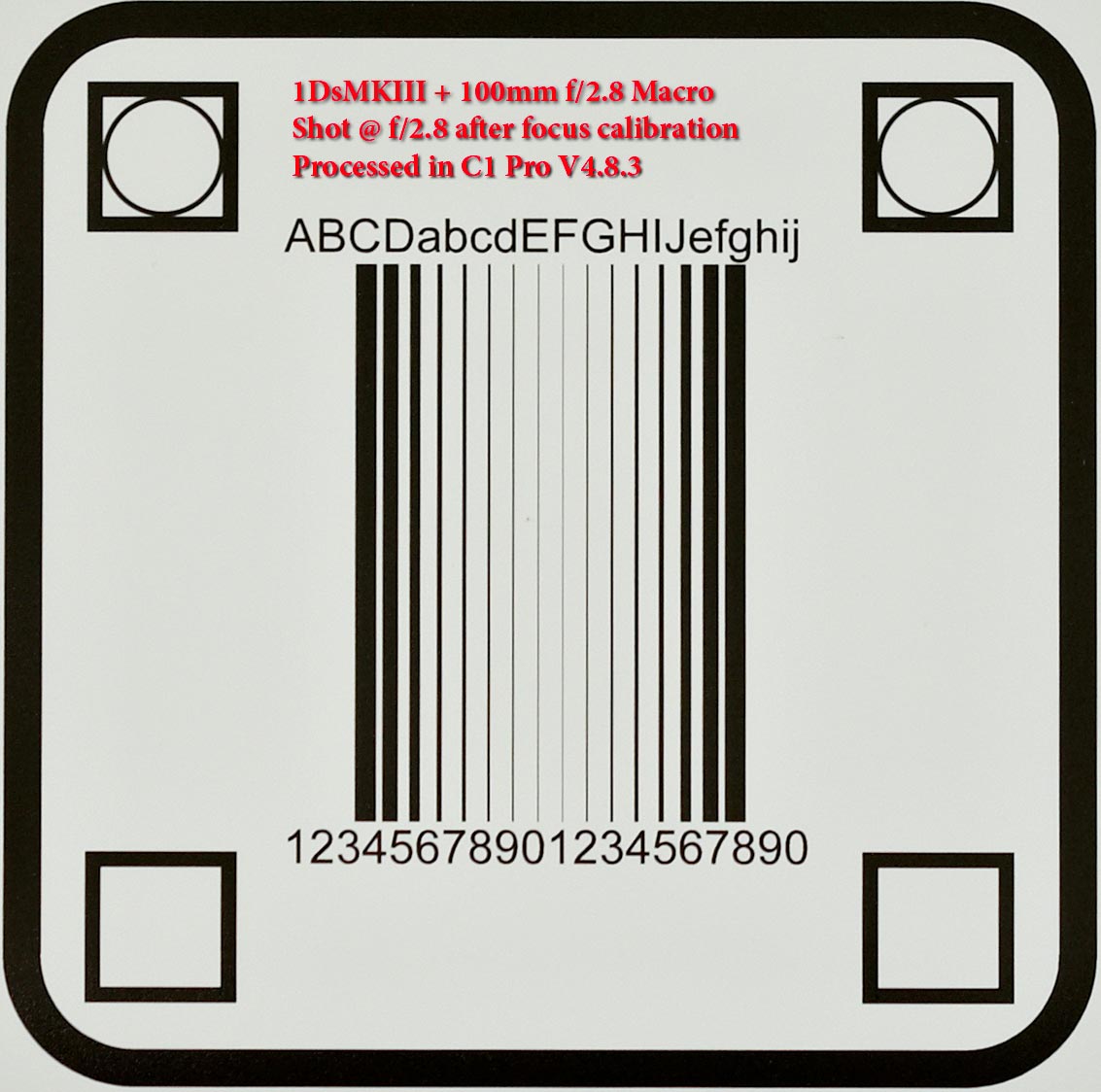
Try one lens, tether it to C1 Pro, switch to manual focus, wide open and shoot a target. Next twitch the focus barrel a tad say clockwise and take another shot. See if this has gotten sharper or softer. If it is sharper, twitch even more and shoot again. you will reach a point where focus is spot on and sharpness will jump out at you. That will say to you that there's nothing wrong with the software nor the lens. Just the body. give it a try.
example of a focussed 1Ds MKIII + 100mm f/2.8 @ f/2.8
http://forum.getdpi.com/gallery/files/1 ... target.jpg0 -

I am having that same issue. I think it has to do with the amount of noise reduction.
Try reducing the amount of noise reduction.0 -

[quote="Henry1" wrote:
[quote="David Kosmin" wrote:
Henry,
I thought about that too. I started doing some focus tests and it does look like my autofocus focuses forward a bit.
So if it's a mechanical focus issue does that mean it's an issue with the camera or the lens? Does it only affect autofocus?
What does it mean if I focus manually and still get this softness issue?
Does anyone miss 8x10 cameras with swings and tilts and a giant ground glass you can put a loupe on?
Dave
Dave,
With DSLRs the focus screens are not designed to help manual focus so you will find it really hard to be sure if indeed you have correct focus. Furthermore, unlike film, digital is very unforgiving for misfocus because now we can see the image at 100% and when I use Variants to compare in C1 Pro, I can watch how focus is getting sharper or softer as I adjust the micro-adjustment on the body. Most times, there's nothing wrong with the lens. just inaccuracy of AF or even MF on the body.
Try one lens, tether it to C1 Pro, switch to manual focus, wide open and shoot a target. Next twitch the focus barrel a tad say clockwise and take another shot. See if this has gotten sharper or softer. If it is sharper, twitch even more and shoot again. you will reach a point where focus is spot on and sharpness will jump out at you. That will say to you that there's nothing wrong with the software nor the lens. Just the body. give it a try.
example of a focussed 1Ds MKIII + 100mm f/2.8 @ f/2.8
http://forum.getdpi.com/gallery/files/1 ... target.jpg
You know I would believe that is the case but I am getting horrible results too where as with 3.7.8 I could process the sharpest images with a setting of 130 in the amount and 2 threshold. I believe it is the software because I have not change anything with my lighting or camera settings. The only thing that has changed is the software.
Jay0
Post is closed for comments.
Comments
7 comments