Sytles and Presets panel is blocking my photo

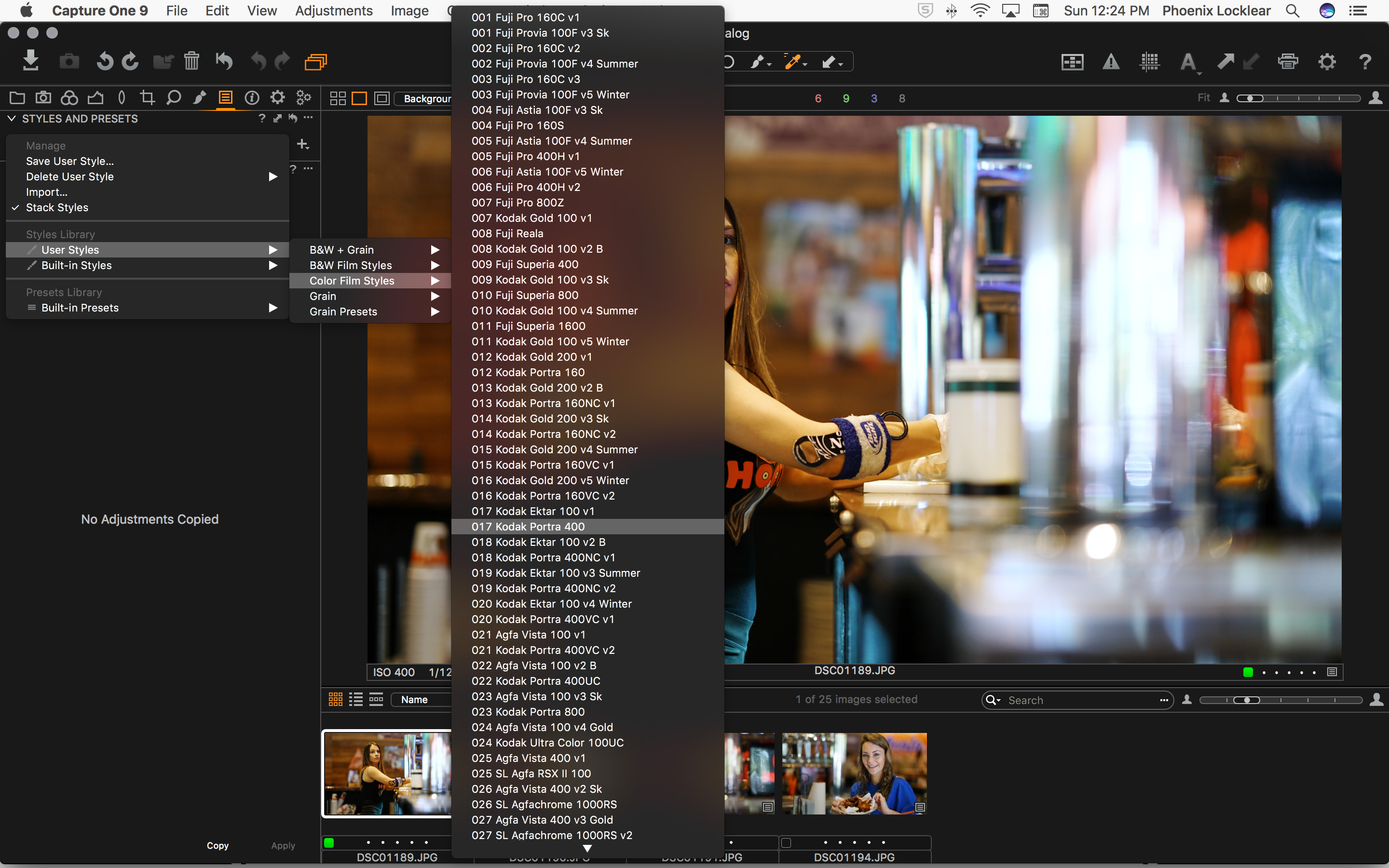
When choosing a style, the options appear in a fly out panel. The problem is it covers my photo and more than likely my subject, which defeats the purpose. See below for example. In that example, I reduced the folders and it still isn't enough to fix it.
My solution for a cleaner and polished experience (yes the aggravation is there because of it): Since there is plenty of unused real estate on the left under the styles selection (where it says No Adjustments Copied), it should be there as selectable options while maintaining the instant preview.
Great software so this is my feedback to make it better. Thank you.
My solution for a cleaner and polished experience (yes the aggravation is there because of it): Since there is plenty of unused real estate on the left under the styles selection (where it says No Adjustments Copied), it should be there as selectable options while maintaining the instant preview.
Great software so this is my feedback to make it better. Thank you.
0
-

Interesting.
Using Windows here.
What I see is that C1 will place the list right for the first level and left for the second level - basically what you are suggsting.
HOWEVER ....
the ability to place left seems to be governed by the widest name of the Preset/Style in the list to be displayed. If the length of the name exceeds the space available to make a suitably presented column in the width available to the left of the first pop-out C1 will go to the right. If the names are short enough it will go left.
The Basic width you have set currently for display of the tools column also influences the decision.
Is Mac the same?
Grant0 -

Some people have suggested this as a work-around: viewtopic.php?f=61&t=24203 0 -
That workaround didn't work for me. When putting it on the right, the fly out then appears leftward. lol
I shouldn't have to use a "workaround" nor resize my app to compensate (which makes the canvas smaller and defeats the purpose). The fly out panels are counter productive. Just remove the fly out panels and place the styles stacked under each other as selectable items. There is plenty of space under the Adjustments pane. Even if there wasn't, you can just scroll through a list without using fly out panels.
I don't mean to sound harsh but it is very frustrating. Thank you for listening.0 -
I think you will find that people with a lot of styles that they like to group into related sets might have different ideas.
The Styles and Presets tool as a Floating tool seems like a reasonable option - especially if you have 2 screens or a very large 4k or 5k screen.
Not so good perhaps if working in something smaller - as I do - but that is hardly the C1 development team's fault.
Grant0
Post is closed for comments.
Comments
4 comments