The action cannot be applied to any of the selected items.

-
It's possible that the files are too small. There is a minimum size of 512 px (shortest edge, I think) below which Capture One will not apply any edits to the file. That includes applying keywords, which I agree is an inconvenience. (Though if you use Capture One to create a small JPG, for instance to put on a website) it can apply to it the keywords that are already applied to the source file.)
Ian0 -

I know this is an old thread but I am getting this when trying to bring in any JPG, DNG, PNG, MOV files, and it is getting very frustrating, and also so unhelpful, it gives you an error message, but does not give you the reason for it, i'm presently using 2023 and getting to a point where if I cannot edit, keyword and apply even the most basic of edits, then why do we use the software? Sorry this is not helpful to your problems but more of me just having a frustrated rant, all I can say is that the more that they do to push the software forward, the more it lacks behind the competition. I just wish they would tell you why you cannot apply keyword, after all, even if the software does not edit the file, I may still need to search for it later for a project.
James
0 -
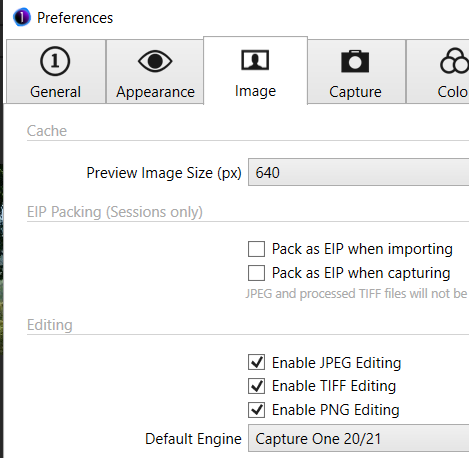
For JPG and PNG it might well be that it is not enabled in the preferences, try to set it like this:
 0
0


Post is closed for comments.
Comments
3 comments