Can't "Copy Mask From"

-

[quote="sdanzig" wrote:
Where did I go wrong?
I suspect the answer to that is that you didn't know about the webinar that was run on Wednesday and Thursday last week and covered adjustments and layers in some detail with full examples.
Highly recommended - it should be available for viewing on line soon.
Grant0 -
I was the one in that webinar (the earlier session) who actually asked how to duplicate layers, and he pointed me to the Copy Mask From feature. But now I'm trying to use it, and I'm not sure what I'm missing. 0 -
Hmm.
Maybe webinars are somewhat limited without the ability to replay and "revise"?
So, if you have created layer one and added a mask and now have added layer 2 and want to copy the mask Capture One knows about Layer 1 and that a mask is defined (or maybe it is assumed that a mask is defined even if there is not (obvious) mask.
So you can tell C1 to copy the mask from Layer 1 and apply it to Layer 2.
If you are not seeing anything change what may have happened?
One option is that you have the mask set to NOT display. So no pink area and no obvious change of appearance in the image if the changes applied are not intensive enough to be obvious.
A second option is that there is a mask on layer one but for some reason it is not very visible.
Forgetting what it is you are trying to achieve with the edit, for now and for testing purposes I would suggest you make sure that you have the mask set to "Always Display" and make sure you have a mask painted at 100% Opacity, and full hardness.
Experiment with your mask and changes until you feel comfortable with how it all works.
Then create a second layer, use the Copy Mask facility, copy from layer 1. Apply some changes and see what happens. You should, in that process, be able to see the mask deployed.
Of you don't see anything useful on screen then I think it would be helpful to take some screen shots all the way through your process and make them available for people to review so they are familiar with exactly what you are doing.
Alternatively create a Support Case with Phase Support and see what they say.
I'm sure this would be easy sitting next to each other or sharing an on-line conversation but it's more difficult to make any sense of things without knowing exactly what is going on.
HTH.
Grant0 -
I'm not sure it'd be so easy, but maybe I'm missing something obvious. Here's what I see:
https://dl.dropboxusercontent.com/u/28419853/Copy%20Mask%20From.png
You see I have multiple layers, right? Those adjustment layers are the only concept Capture One has for "layers", right? And there are no layer names I'm forgetting to set, right? The names are what I see in that list, no?
Could something this basic not be working for me? I must be missing something. Where is this "Layer 1" that I'm supposedly able to copy from?
It's not a matter of the mask being on, opacity and hardness. Thanks for the detailed reply though. It sounds like you really care about me 😊0 -
Ah ha!
This is now somewhat easier ...
You are not seeing what I would expect you to see.
The previously missing information is that your named layers are not appearing in the list of possible sources from which you could copy the mask(s). Instead you are seeing only "Layer 1". You should be seeing the 4 layers listed named as you have named them.
I have no idea why you are not seeing the 4 renamed layer bit only "Layer 1" from somewhere else.
The problem is not really about nothing happening when you try to copy the mask from another layer within the variant you are editing, rather that you are being offered a copy from a layer that either does not exist or does exist but not related to the current image.
Can you recall exactly what you did to get to that point?
I would suggest that you try something similar on a different image preferably in a different catalog or session to see what happens.
If you see the same sort of thing as per your screen shot you should report it to Phase in a Support Case and work with them to investigate it.
If you see something different - the layers listed as you have created and named them - then you might start to wonder whether the original catalog/session has some internal database problems.
However please remember I am having to work with some guesswork here in the absence of knowing exactly what has gone before in your edit session and there may be some other factors involved.
HTH.
Grant0 -

Sdanzig
The screenshot you're showing clearly demonstrates the problem. Instead of "Layer1" the "Copy Mask From" list should contain the names of your adjustment layers, "test later" grayed out since that will be the "Copy To" layer - hence no paste option, and the three others selectable as "Copy Mask From" Layers.
That's the behaviour I'm seeing on my Windows machine, I'd certainly expect it to be the same on a Mac. Looks like a bug.
Best of luck.
Cheers,
Mogens0 -

As Mogens pointed out, you should see the layers listed in the menu Copy Mask From. 'Layer 1' is not a layer you have (you have renamed them, well done!).
I suggest you do a repair of your session/catalog. You can also create both a new variant and a clone variant of your image to see whether this helps. If so, you delete the old variant you are having problems with.0 -
Just to let you guys know, I created the clone, and noticed the Copy Mask From was working correctly on it. But then I noticed the other variants were fine too. I think it was just a matter of restarting Capture One. 0 -
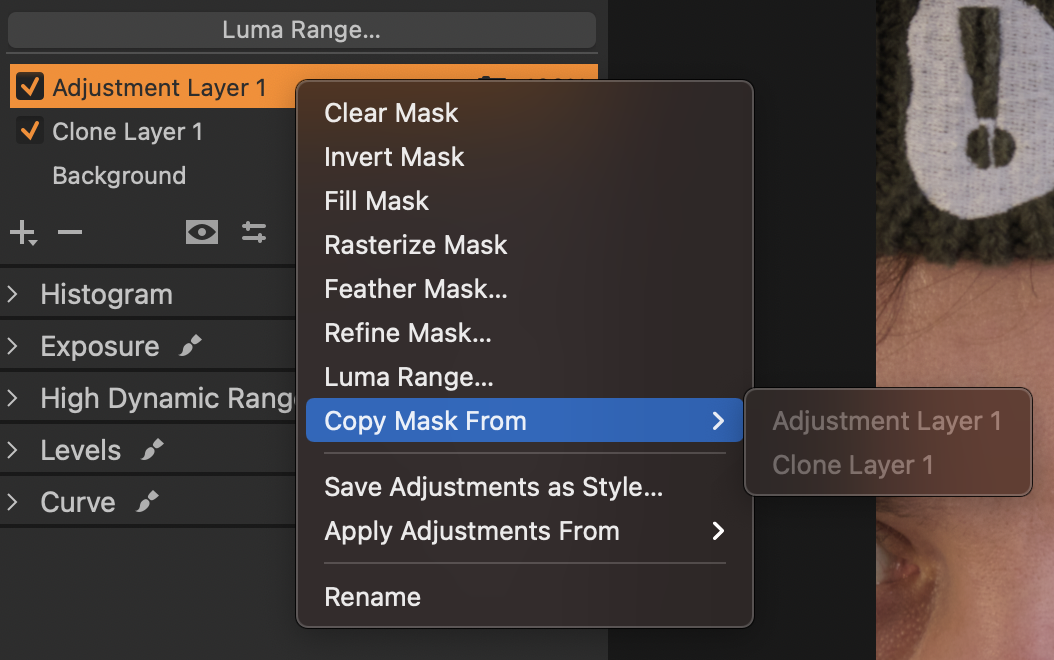
I have the same issue. I have a mask in one clone layer, and I am trying to copy that mask into another layer, as per tutorial, but the option to copy mask is greyed out.
I created a ticked, but no response for a day now, which I consider to be a terrible customer experience.
 0
0 -
So, I got this in a response to my tech support ticket:
"A more important change from previous versions is the fact that you cannot copy masks between Heal or Clone layers (or copy these to an Adjustment Layer). In version 21, you can only copy masks between Adjustment Layers. You can, however, copy Heal and Clone layers to other images for reuse. Just note that the images need to have the same dimensions."
What is bananas is that it took them 6 days to figure it out (it's their product), and it's not even listed in their release summary.
0
Post is closed for comments.
Comments
10 comments