colour problem

Hi all
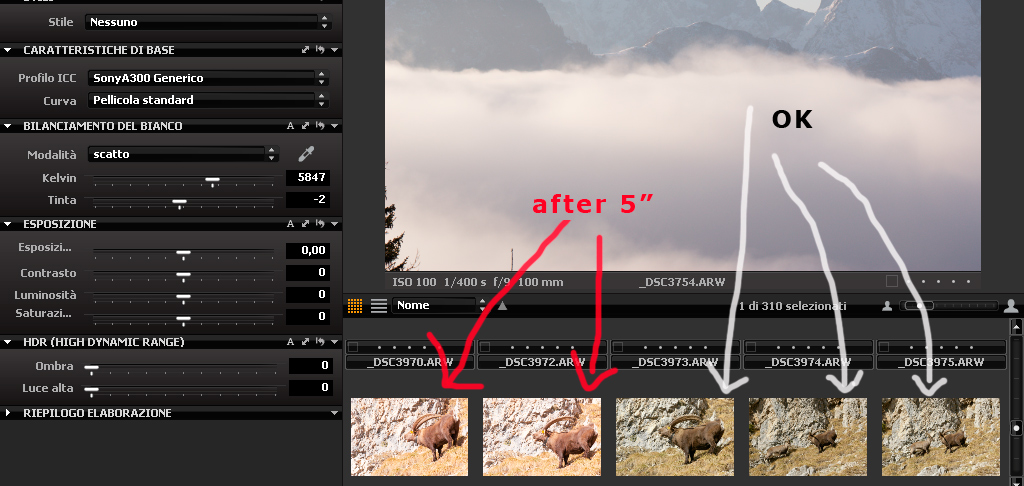
I've got a problem with C1: when I open a RAW image there is a definite colour cast. click here
While when I open the same image, for exemple with FastStone or with Ps, doesn't have this problem...click here
(I use adobe rgb 1998 profile)
Any ideas please?
Thanx
I've got a problem with C1: when I open a RAW image there is a definite colour cast. click here

While when I open the same image, for exemple with FastStone or with Ps, doesn't have this problem...click here

(I use adobe rgb 1998 profile)
Any ideas please?
Thanx
0
-

[quote="rebel04" wrote:
...
Any ideas please?
A bit more information about CO version, camera, camera profile, Windows, monitor profile would help to get a picture.0 -
CO version= C1 V.5 30 day free treal
camera= sony alpha 300
camera profile= adobe rgb 1998
Windows= XP sp3
until yesterday morning C1 works OK, now I have this problem!!0 -
Does CO5 not select the Sony A300 camera profile by default? I would not select the AdobeRGB as camera profile because it is not meant to be used as such. It is a color space profile for your output (TIFF/JPEG) file.
Are you working with ARW files (not sure whether the A300 can create DNG files as well), which should be the correct option?0 -
yes sorry, I use sony A300 as camera profile in C1 (adobe rgb98 is the colour profile that I use in the camera)
I use arw files with the correct option0 -
when I open a folder the images are OK, but after 4-5 seconds they assume a strange colour
http://digilander.libero.it/Nordavind17 ... lamaC1.jpg0 -

Your C1 image looks overexposed. I notice this behavior in my camera as well and compensate for it with exposure tool, for normal pictures -0.25 to -0.75. Than use HDR shadows to bring out shadow details.
As for colors it could be a problem with display profile. I have color calibration device, but once I installed a fresh copy of Windows and didn't calibrate or set any display profile my pictures started to look better. So I kept it this way - no color profile whatsoever.
In any case, I find that C1 produces images with more colorful shadows and pale highlights.0 -
my C1 has a problem ☹️
...for example this image http://www.mediafire.com/file/zxunzmymntd/_DSC3995.ARW
with my C1= http://digilander.libero.it/Nordavind1709/magenta.jpg
😕0 -
Hi, I downloaded your ARW image and had the same problem (CO 5.0.1 on Mac by the way). I suggest you to open a support case with Phase One and upload an raw image file. 0 -

I'm having a similar problem with version 5.0.1 and D300:
http://img685.imageshack.us/img685/9219/38573481.jpg
http://img33.imageshack.us/img33/6915/51170347.jpg
http://img36.imageshack.us/img36/8393/83180033.jpg
I've read that this problem WITH SONY cameras has been fixed in v5.1.1
Does this bug was effectively fixed?
And what about D300?0 -
I tried with Fuji S3 RAW and the image is ok, without the problem.
Then, I tried with D300's RAW in 14bits and the image is ok too! 😄0 -

Xiru,
Some of the images above simply look like Noise Reduction settings.0 -
Yes, the problem is with Noise Reduction, thanks.
But see the image below.
http://img14.imageshack.us/img14/2402/colornoisec1.jpg
The images I posted earlyer has samples of Bibble4 conversion using Color Noise Reduction on 100 (max), and there is no problem. With many others softwares, including RawTherapee that is free, I can use high values in COLOR noise reduction. Unfortunately, it seem that it's not possible with C1 =/0 -

That definitely appears to be too much color noise reduction, especially the first image and the last. The most notable artifact is reduced red and a red haze around red colors.
I found the color noise reduction defaults for higher iso images (for Canon 30D, but maybe for other cameras) to be too aggressive and result in this haze.0 -
[quote="Xiru" wrote:
With many others softwares, including RawTherapee that is free, I can use high values in COLOR noise reduction. Unfortunately, it seem that it's not possible with C1 =/
Xiru,
It's clear from the images above that you don't need further color noise reduction after the "50" value, if even that much. It's unclear why these other software you mentioned are seen as advantageous when, with Capture One, the conflict is resolved without needing to go to higher values. ❓0 -
I've used excessively high color and/or luminance noise reduction for special effect - for example a neat effect for night shots with lots of colorful lights. Not something to overuse, but fun anyway. 0 -
[quote="Drew " wrote:
[quote="Xiru" wrote:
With many others softwares, including RawTherapee that is free, I can use high values in COLOR noise reduction. Unfortunately, it seem that it's not possible with C1 =/
Xiru,
It's clear from the images above that you don't need further color noise reduction after the "50" value, if even that much. It's unclear why these other software you mentioned are seen as advantageous when, with Capture One, the conflict is resolved without needing to go to higher values. ❓
Well, in THIS pic its not necessary a lot of color NR. It's ISO 400.
But what about an image in ISO 3200? I really don't matter if there is luminance noise in 3200, I used to see much more in films. But chroma noise is terrible. I'm really LOVING Capture One, but an -at least- average color noise reduction is essential. C1 doesn't give me this, unfortunately.
Yes, I don't nedd it in ISO 400. But I need in ISO200 with long exposures, and ISO 1600/3200.
Every professional (or advenced amateur) uses these configurations sometimes/frequently.
Well... my answer to you could be just this image:
(and I'm not using NoiseNinja with Bibble. Only the standar noise reduction)
http://img7.imageshack.us/img7/6903/colornoisec1b.jpg
As you can see, with "50", ther's still a lot of chroma. With 100 finally there isn't chroma, but my texture ans blacks details were destroyed =(0 -
And yet with the example above, showing Bibble at 100, there is still Color Noise ☹️ 0 -

Perceived exposure is very different too - if the Cap One image was as light as the Bibble one, the "advantage" of the Bibble file would be significantly reduced.
I must admit that I'm confused about Xiru's problem here: in my experience, especially with my Canon 7D, Cap One is literally in another league as far as its NR is concerned compared with Bibble - with or without Noise Ninja (and I have a "registered Noise Ninja" Bibble set-up).
I have no problems using 1600, 3200 ISO from my 7D or my 40D and (with a bit of work) 6400 ISO from my 7D in Cap One - it's just far and away better in noise management terms than Bibble or anything else.
As a bird photographer I can't afford to throw away detail with the noise, and Cap One is by far the best compromise I've found so far.0

Post is closed for comments.
Comments
18 comments