Missing documentation regarding icc color profiles

Hello,
There is one thing that I am unable to figure out and would like to have documented.. When using the "edit in" function to send the photo to Photoshop you can select icc profile to use. Depending on the selection in this box you will get various deviation in HUE values on color values in the picture.
If selecting "embedded camera profile" there will be close to no deviation when comparing C1 and PS. If using ProPhoto profile the deviation can be significant (more than 10 degrees). AdobeRGB is somewhere in the middle...
By using the embeded camera profile would have been the obvious choise then..? No, because PS does not understand this profile (I have a Sony A7r4 camera) for various functions e.g. Camera RAW.
Could you please document a workflow that would give consistent color values when comparing PS Hues to C1 Hues. Alternatively. could you document how the effect of different color profiles affect the hue values when embedding them in the file transferred to PS. From what I can see on my screens the visual colors are the same, so no change there.
Personally, I am most interested in the effect from AdobeRGB and ProPhoto RGB. It would also be good to understand if there are similar effects on the saturation also even though for me that is not so important. Hue is key!
Thanks
Best regards,
John Ivar Evensen
-

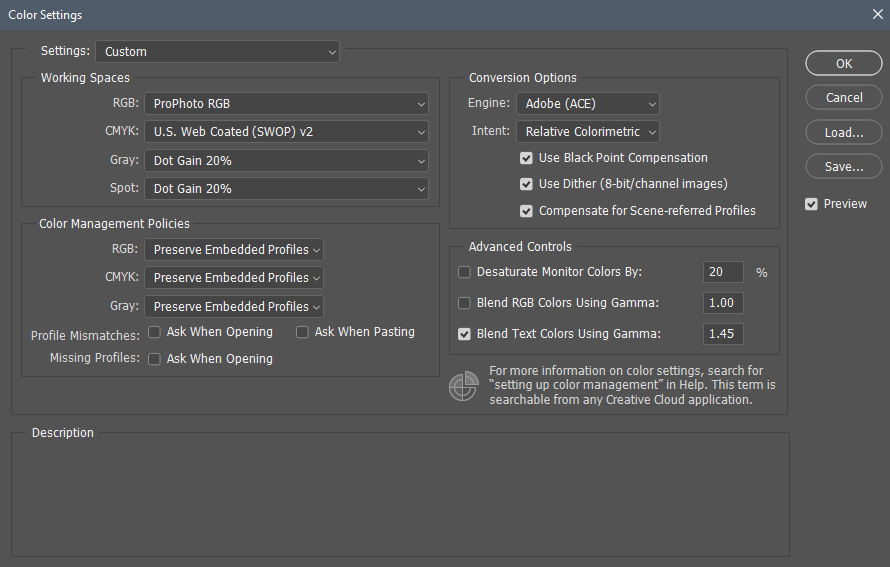
for a start go to PS -> Edit -> "Color Settings" and post a screenshot of how you configured your PS to deal with color profiles embedded into files when you open them
0 -
"... No, because PS does not understand this profile (I have a Sony A7r4 camera) for various functions e.g. Camera RAW...." - you are grossly confused... what C1 embeds is a data in a standard icc/icm container (that guides conversion from RGB data into a coordinates in standard PCS like cieLAB or cieXYZ) that PS can use then to convert (from RGB coordinates in the source file to coordinates in PCS and then from PCS) into whatever colorspace you configured it to use ... whether or not your copy of ACR has a DCP profile for your camera model is irrelevant here (even if you configured your system to open files like .tiff in ACR when you invoke PS)
0 -
Hi Dee jjjaaa
Your response is appreciated, and I might be confused because I do not know the inner workings of either PS or C1. However, one thing is for sure, you do not understand my problem description and is therefore not answering my question.
I often use ACR within PS to do a bit of tweaking. I know that the camera profile is irrelevant if using ACR within PS to edit a layer. The problem is that when the camera profile is embedded in the PSD file that is being opened in PS makes ACR not work at all..
Posting my settings in PS is not relevant either (but shown anyway), as there should be a documented way to achieve consistent color readings between these two products. This is a job for C1 staff, which makes me think that this is not the right forum for this problem.
Thank you for your effort in assisting me :)
Best regards,
John Ivar
0
Post is closed for comments.
Comments
3 comments