Crop tool displays wrong dimensions

No matter what the size or shape of the crop tool, it displays the size as 32.0 x 40.0. This is very frustrating because the dimension display is a quick way to check if a crop has sufficient resolution to be viable.
-

Andrew,
Assuming you are using a "Pro" version of of C1 rather than an Express version (about which I do not know enough to comment) the size information displayed is connected to an active "Output Recipe" and its definition.
I'm guessing you have something selected that defines a fixed size by a defined ratio (5x4?) in either inches or cms and that one of the number is coloured orange and the other will more often than not be red. Unless you happen to create a crop that is 5x4 (or 4x5) .
As for viability, if you want ot see an instant analysis of how the combined process settings and crop will turn out in terms of size or limitations just open the Process Summary tool and monitor the values. Anything in RED will be a warning that there may be something to check based on the definition of the current recipe and the cropped (or uncropped) area of pixels in use.
HTH.
0 -

Andrew,
Just as SFA has explained, with a visual aid:
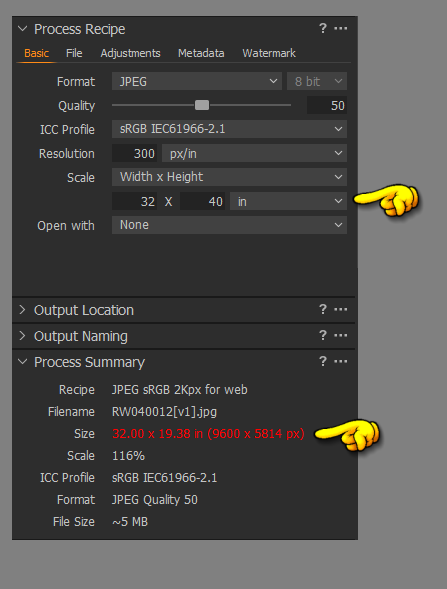
You most likely have the output width and height fixed to 32x40 inches as shown above.
Change the Scale to Fixed and set the value to 100%
Your Trim tool will then display the true dimensions.
I just discovered this last week, if you right click in the Trim window and you are in 'Fixed' mode you can then change the units that the trim window is showing: in, mm, cm and px.
Rob
0 -

SFA Rob Wiejak Thank you so much! Is this information documented anywhere? What's the point of giving the option to manually enter the size dimensions, but without any effect?
0 -

That's because you could have photos with different aspect ratios that you'd want to export and print to the same paper format or you want them all to have the same width/height for a website etc.
0
Post is closed for comments.
Comments
4 comments