Capture One pro 20. Keyword Libraries.

Capture One Pro 20 13.1.1.24
The keyword library seminar video (which uses an earlier version of capture one) shows how to create a new empty keyword library inside a catalog, and then enter a prepared text file to it, to create an individual keyword library.
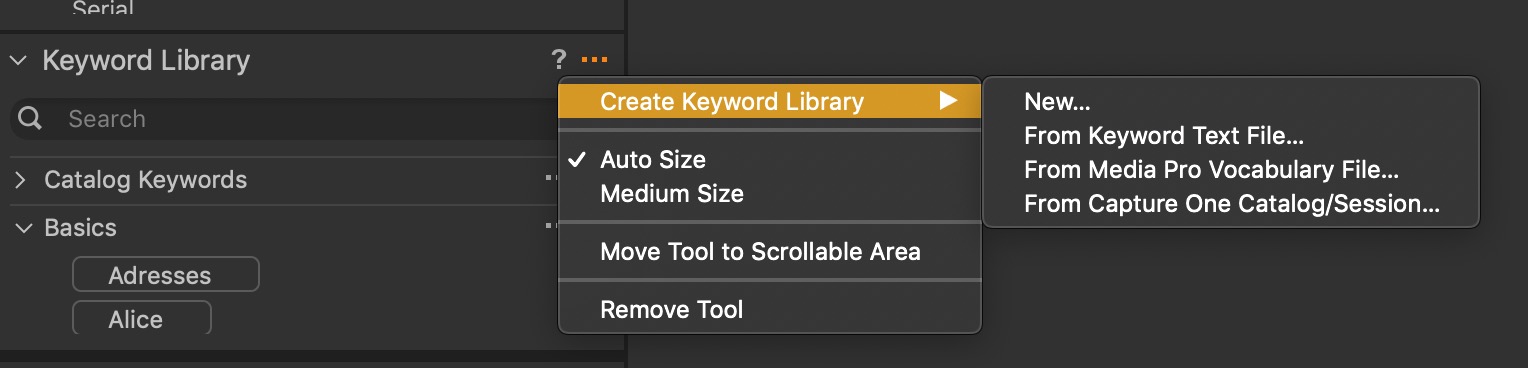
The latest version of capture one pro 20 does not have the option to create a NEW library, just the options to import an existing one. When a library is imported, capture one does not request a name for this library it just adds the new part to the existing library. On outputting the raw file, there is an option to select the keyword library to use with the output. So how are separate keyword libraries created? The help says that more than one keyword library can exist together.
-

Hi Robert,
On my version, the option "create a new library" exists. It is the latest (13.1.1.24).
 0
0 -
HI, thanks for your reply. What you show, is just how I would expect it to be. But the top option does not appear on my computer.I just get the other three options.
What computer/OS are you using?
I am using an imac with the latest OS: Catalina 10.15.6, and it was updated today.
0 -
Hi, update.
I now see my problem / solution.
I am actioning the three dots (...) next to "session keywords", instead of the three dots next to "keyword library",
My mistake, thanks for your help,
Robert
0 -
I am using an imac with the latest OS: Catalina 10.15.6, and it was updated today.
Me too, and I see the same ... menu options that Robert Farhi sees.
When the Capture One user interface starts acting funny for me I go through a set of steps that often resolves the issue:
- Window -> Workspace -> Save workspace to make sure my workspace changes aren't lost
- Quit Capture One
- Open a terminal window and use the command "defaults delete com.phaseone.captureone13"
- Re-launch Capture One
- Restore my workspace
0
Post is closed for comments.
Comments
4 comments